极客教程
极客教程jQuery UI spinner步骤选项
jQuery UI由GUI小部件、视觉效果和使用jQuery、CSS和HTML实现的主题组成,jQuery UI对于构建网页的UI界面非常有用。jQuery UI旋转器帮助我们使用上下箭头来增加和减少一个输入元素的值。在这篇文章中,我们将看到如何在jQuery UI滑块中使用步骤选项。step选项是用来指示jQuery UI spinner中的步骤数。默认情况下,该值为1。
语法:
$( ".selector" ).spinner(
   { step : number | 'string'}
);
参数:该选项接受上面提到的和下面描述的两个参数。
- number。这个参数的步长大小。
- string:该参数将根据numberFormat和culture选项进行解析,否则将退回到本地的parseFloat()方法。
CDN链接:首先,添加jQuery UI脚本的CDN链接,为你的任务所需。
<link href = “https://code.jquery.com/ui/1.10.4/themes/ui-lightness/jquery-ui.css” rel = “stylesheet”>
<script src = “https://code.jquery.com/jquery-1.10.2.js”></script>
<script src = “https://code.jquery.com/ui/1.10.4/jquery-ui.js”></script>
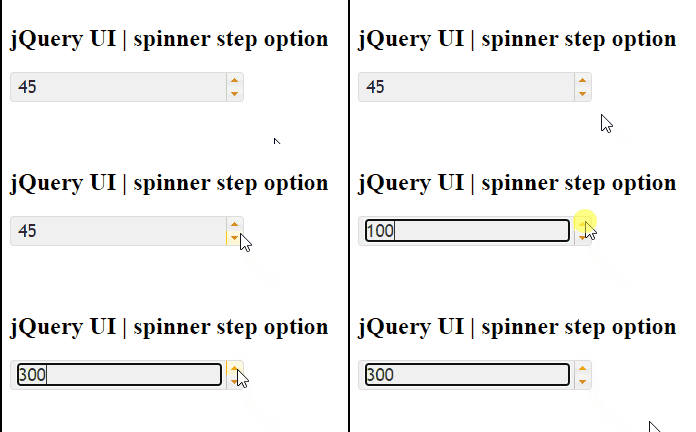
例子1:在这个例子中,我们每一步都将旋转器的值增加50。
<!DOCTYPE html>
<html lang = "en">
   <head>
      <meta charset = "utf-8">
      <link href =
"https://code.jquery.com/ui/1.10.4/themes/ui-lightness/jquery-ui.css"
            rel = "stylesheet" />
      <script src =
"https://code.jquery.com/jquery-1.10.2.js">
     </script>
      <script src =
"https://code.jquery.com/ui/1.10.4/jquery-ui.js">
     </script>

      <script>
         (function() {
            ( "#gfg" ).spinner(
               {step: 50}
            );
         });
      </script>
   </head>

   <body>
      <h1>GeeksforGeeks</h1>
      <h2>jQuery UI | spinner step option</h2>
      <div id = "geeks">
         <input type = "text" id = "gfg" value = "45" />
      </div>
   </body>
</html>
输出: