 极客教程
极客教程如何使用jQuery获得被点击的分部的背景颜色
在这篇文章中,我们将学习如何使用jQuery获得被点击的分部的背景颜色。
方法:首先使用一个共同的选择器选择页面上的所有分部,然后使用click()方法应用一个点击绑定来触发颜色检测。然后,通过使用this作为选择器,就可以找出当前被点击的部门。
jQuery中的css()方法是用来获取和设置它所使用的元素的计算样式。它接受两个参数,第一个参数定义了我们需要获取或设置的样式,第二个参数定义了它必须设置的值。我们可以使用这个方法来获取当前的颜色,通过传递参数 “background-color “来获取当前的背景颜色。然后,这可以作为RGB值的文本显示或分配给另一个元素。
语法:
$(".box").click(function () {

    // Get background color of element
    let current_color =
        $(this).css("background-color");

    // Show the color text on the same box
    $(".current-color-text").text(
        current_color
    );

    $(".box").html('');
    $(this).html('<b class="current-color-text">'+current_color+'</b>');

    });
下面的例子说明了上述方法。
示例:
<html>
<head>
<script src="https://code.jquery.com/jquery-3.3.1.min.js">
</script>
<style>
    .container {
    display: flex;
    }

    .box {
    height: 125px;
    width: 125px;
    margin-right: 16px;
    }

    .yellowgreen-bg {
    background-color: yellowgreen;
    }

    .orangered-bg {
    background-color: orangered;
    }

    .slateblue-bg {
    background-color: slateblue;
    }

    .gold-bg {
    background-color: gold;
    }

    .current-color {
    height: 75px;
    width: 75px;
    }
</style>
</head>

<body>
<h1 style="color: green">
    GeeksforGeeks
</h1>
<b>How to get the background color of a
    clicked division using jQuery?</b>

<p>
    Click on any division to get its
    background color
</p>


<div class="container">

    <!-- Define the division's with
    background color -->
    <div class="box yellowgreen-bg"></div>
    <div class="box orangered-bg"></div>
    <div class="box slateblue-bg"></div>
    <div class="box gold-bg"></div>
</div>


<script>
    (".box").click(function () {

    // Get background color of element
    let current_color =
        (this).css("background-color");

    // Show the color text on the same box
    (".current-color-text").text(
        current_color
    );

    (".box").html('');
    $(this).html('<b class="current-color-text">'+current_color+'</b>');

    });
</script>
</body>
</html>
输出:
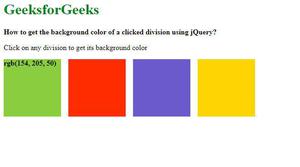
点击后,颜色显示在同一个盒子上。