 极客教程
极客教程如何使用jQuery创建一个斑马条纹的表格效果
给出一个有表格的HTML文档,任务是用jQuery在表格上创建一个斑马纹的表格效果。
方法:要实现斑马纹表的效果,请使用以下代码片段。
$(function() {
    $("table tr:nth-child(odd)").addClass("zebrastripe");
});
在上述函数中,zebrastripe是使用的类名,奇数表示奇数的行将有彩色条纹。
要改变偶数行的条纹,只需使用:
$(function() {
    $("table tr:nth-child(even)").addClass("zebrastripe");
})
在下面演示的上述方法中,jQuery-3.5.1.js包含源代码。
例子:下面是上述方法的演示。
<html>

<head>
    <title>jQuery Zebra Stripes Demonstration</title>

    <script type="text/javascript" src=
        "https://code.jquery.com/jquery-3.5.1.js">
    </script>

    <script type="text/javascript">
        (function() {
            ("table tr:nth-child(odd)")
                .addClass("zebrastripe");
        });
    </script>

    <style type="text/css">
        body,
        td {
            font-size: 10pt;
            text-align: center;
        }

        h1 {
            color: green;
        }

        table {
            background-color: black;
            border: 1px black solid;
            border-collapse: collapse;
        }

        th {
            font-size: 15px;
            padding: 5px 8px;
            border: 1px outset silver;
            background-color: rgb(197, 69, 69);
            color: white;
        }

        tr {
            border: 1px outset silver;
            padding: 5px 8px;
            background-color: white;
            margin: 1px;
        }

        tr.zebrastripe {
            background-color: green;
        }

        td {
            border: 0.5px outset silver;
            border-collapse: collapse;
            padding: 5px 8px;
        }

        .center {
            margin-left: auto;
            margin-right: auto;
        }
    </style>
</head>

<body>
    <h1>
        GeeksforGeeks
    </h1>
    <table class="center">
        <tr>
            <th>ID</th>
            <th>Course</th>
            <th>Price</th>
        </tr>
        <tr>
            <td>1</td>
            <td>Fork CPP</td>
            <td>Free</td>
        </tr>
        <tr>
            <td>2</td>
            <td>DSA</td>
            <td>2499</td>
        </tr>
        <tr>
            <td>3</td>
            <td>Fork Java</td>
            <td>Free</td>
        </tr>
        <tr>
            <td>5</td>
            <td>Linux</td>
            <td>599</td>
        </tr>
        <tr>
            <td>6</td>
            <td>Fork Python</td>
            <td>Free</td>
        </tr>
    </table>
</body>

</html>
输出:
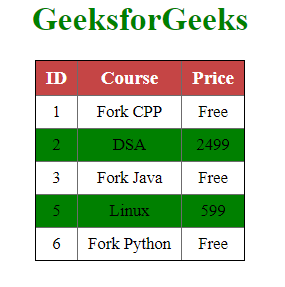
上述示范的产出