极客教程
极客教程如何将HTML渲染成一个图像
HTML代码可以通过不同的方式转换为图片,如html2canvas JavaScript库,有时也可以通过CSS转换,这对希望分享代码图片但不能分享确切代码的用户来说是非常有帮助和有用的。用户将从网页上生成一个图片,并可以选择将HTML页面的某一部分转换为图片。
例子1:这是一个相对简单的实现,它使用CSS将代码转换为图像。下面的代码不涉及任何方式的JavaScript。
<!DOCTYPE html>
<html>

<head>
    <title>HTML Code to Image</title>

    <style>
        .image {
            text-align: center;
            padding: 20px;
            color: white;
            font-size: 90px;
            width: 800px;
            height: 400px;
            font-family: 'Times New Roman';
            background-image: linear-gradient(
                140deg, #3a9c50 0%, #006b18 100%);
        }
    </style>
</head>

<body>
    <div class="image">
        <h4>GEEKS FOR GEEKS</h4>
    </div>
</body>

</html>
输出:

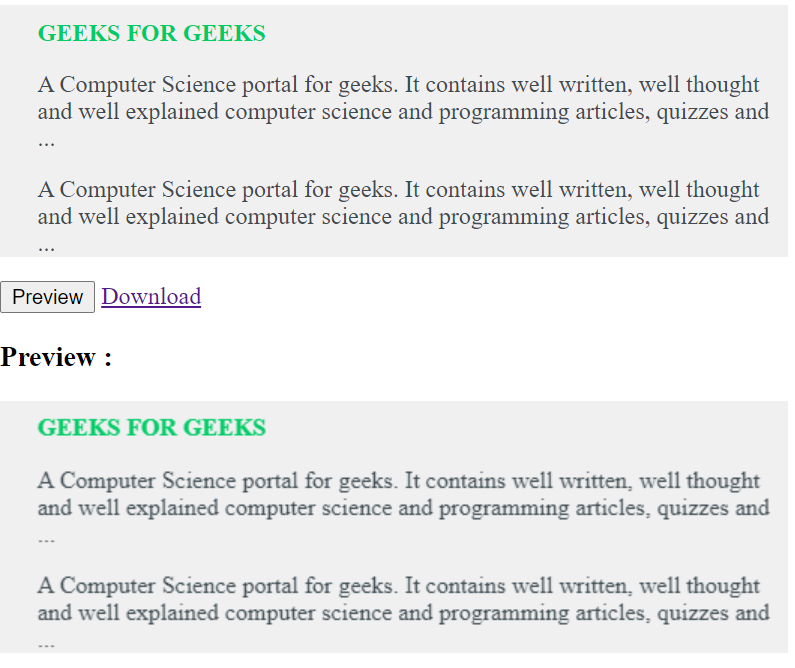
示例2:该示例实现了将HTML代码转换为图片,其中预览按钮显示了转换后的照片。通过使用html2canvas JavaScript库,给出了下载选项以将其保存在本地计算机上。
<!DOCTYPE html>
<html>

<head>
    <script src=
"https://ajax.googleapis.com/ajax/libs/jquery/1.11.2/jquery.min.js">
    </script>

    <script src=
"https://files.codepedia.info/files/uploads/iScripts/html2canvas.js">
    </script>

    <title>
        How to render HTML to an image?
    </title>
</head>

<body>
    <div id="html-content-holder"
        style="background-color: #F0F0F1;color:
                #00cc65; width: 500px;
                padding-left: 25px;
                padding-top: 10px;">

        <strong>GEEKS FOR GEEKS</strong>

        <p style="color: #3e4b51;">
            A Computer Science portal for geeks.
            It contains well written, well thought
            and well explained computer science
            and programming articles, quizzes and ...
        </p>

        <p style="color: #3e4b51;">
            A Computer Science portal for geeks.
            It contains well written, well thought
            and well explained computer science and
            programming articles, quizzes and ...
        </p>
    </div>

    <input id="btn-Preview-Image"
        type="button" value="Preview" />

    <a id="btn-Convert-Html2Image" href="#">
        Download
    </a>

    <br />

    <h3>Preview :</h3>
    <div id="previewImage"></div>

    <script>
        (document).ready(function () {

            // Global variable
            var element =("#html-content-holder");
            var getCanvas; // Global variable

            ("#btn-Preview-Image").on('click', function () {
                html2canvas(element, {
                    onrendered: function (canvas) {
                        ("#previewImage").append(canvas);
                        getCanvas = canvas;
                    }
                });
            });

            ("#btn-Convert-Html2Image").
                        on('click', function () {
                var imgageData = getCanvas.toDataURL("image/png");

                // Now browser starts downloading it
                // instead of just showing it
                var newData = imgageData.replace(
                    /^data:image\/png/,
                    "data:application/octet-stream");

                ("#btn-Convert-Html2Image")
                    .attr("download", "gfg.png")
                    .attr("href", newData);
            });
        });
    </script>
</body>

</html>
输出: