 极客教程
极客教程JavaScript 如何从另一个文件访问变量
在JavaScript中,可以使用<script>标签或者 import 或 export 语句从另一个文件中访问变量。<script>标签主要用于在HTML文件中访问JavaScript文件中的变量。这对于客户端脚本和服务器端脚本都适用。而 import 或 export 语句不能用于客户端脚本。而 import 或 export 语句在服务器端脚本中的 Node.js 上运行。
方法1
首先创建“module1.js”文件,并定义一个带有属性“name”,“age”,“dept”和“score”的Student对象。“module1.js” JavaScript文件使用HTML文件中“head”部分的<script>标签的src属性进行导入。由于导入了JavaScript文件,所以可以在HTML文件中访问其内容。
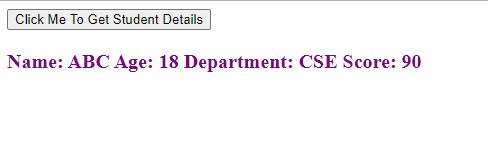
我们创建一个按钮,当按钮被点击时,触发JavaScript函数。通过 f() 函数访问Student对象属性,并将所有Student对象属性连接到一个字符串变量中。将该字符串放置在具有’text’ id的<p>标签内,使用document.getElementById()和innerHTML属性进行操作HTML DOM。这是一个客户端程序的示例。
代码实现:
variable_access.html
<!DOCTYPE html>
<html>
<head>
    <script type="text/javascript"
        src="module1.js">
    </script>
</head>

<body>
    <button onclick="f()">
        Click Me To Get Student Details
    </button>

    <div>
        <p id="text" style="color:purple;
            font-weight:bold;font-size:20px;">
        </p>
    </div>

    <script type="text/javascript">
        function f() {
            var name = Student.name;
            var age = Student.age;
            var dept = Student.dept;
            var score = Student.score;

            var str = "Name:" + name + "\nAge: "
                + age + "\nDepartment:" + dept
                + "\nScore: " + score;

            document.getElementById(
                'text').innerHTML = str;
        }
    </script>
</body>
</html>
module1.js 这个文件被用于上述的 HTML 代码。
var Student =
{
    name : "ABC",
    age : 18,
    dept : "CSE",
    score : 90
};
输出:
方法2
在这种方法中,我们创建一个名为“ module1.js ”的 JavaScript 文件,并定义了一个拥有属性“name”、“age”、“dept”和“score”的 Student 对象。通过使用 module.exports 导出 Student 对象。在另一个 JavaScript 模块文件“ module2.js ”中,我们使用 import 语句在文件的开头导入“ module1.js ”。在“ module2.js ”文件中定义了 Hostel和 Hostel_Allocation对象,并在 Hostel_Allocation对象中访问了 Student 对象。
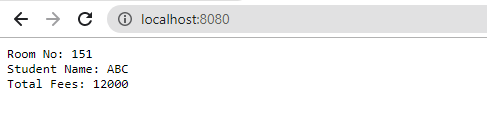
创建并托管了一个端口号为8080的 HTTP 服务器。将Hostel_Allocation的属性连接成一个字符串。每当 web 应用程序运行时,该字符串会被打印在应用程序的首页上。这是一个服务器端脚本的示例。
代码实现:
module1.js
var Student = {
    name : "ABC",
    age : 18,
    dept : "CSE",
    score : 90
};
module.exports = {Student};
module2.js
var http = require('http');
const {Student} = require('./module1.js');

var Hostel = {
    student_count: 500,
    no_of_rooms: 250,
    hostel_fees: 12000
}

var Hostel_Allocation = {
    room_no : 151,
    student_name: Student.name,
    student_age: Student.age,
    student_dept: Student.dept,
    total_fees: 12000
}

var str = "Room No: " + Hostel_Allocation.room_no
         + "\nStudent Name: "
         + Hostel_Allocation.student_name
         + "\nTotal Fees: "
         + Hostel_Allocation.total_fees;

http.createServer(function (req, res) {
    res.write(str);
    res.end();
}).listen(8080);
输出:
启动服务器
node module2.js
在浏览器中运行应用程序
localhost:8080
JavaScript以网页开发而闻名,但也用于各种非浏览器环境。您可以通过跟随这个JavaScript教程和JavaScript示例,全面学习JavaScript。