极客教程
极客教程使用纯JavaScript的API创建报价生成器Web应用程序
在本教程中,我们将创建一个Web应用程序,使用API获取励志和鼓舞人心的名言。
应用要求:
- Bootstrap 4 CDN
- API : https://type.fit/api/quotes
- JavaScript
- HTML
步骤: 按照以下步骤创建报价生成器。
- 第1步 获取: 我们使用JavaScript的内置fetch函数从API获取数据。该函数返回一个promise。我们将使用JavaScript的innerHTML函数在网页上填充来自API的数据
script.js
fetch(url).then(function (response) {
       return response.json();
}).then(function (data) {
    return response.json();
});
- 第2步 上一个和下一个按钮: 我们在一个变量中递增和递减由我们设置的值,以在不同的报价之间切换。
script.js
let nextthought = document.getElementById("nextthought");
nextthought.addEventListener("click", function () {
  let countnum = document.getElementById("countnum");

  countnum.value = ++a;

  displaythought(countnum.value, data);
});

let previousthought = document.getElementById("previousthought");
previousthought.addEventListener("click", function () {
  let countnum = document.getElementById("countnum");

  if (countnum.value < 0) {
    let thought = document.getElementById("thought");
    thought.innerHTML = `<b><i>你在第一条名言上</i></b>`;
  } else {
    a = --countnum.value;

    displaythought(a, data);
  }
});
- 第3步 搜索按钮: 对于搜索按钮,我们接受用户输入的值,以在API提供的数据集中搜索特定的数字,然后在我们的网页上显示它。
script.js
let searchbtn=document.getElementById('searchbtn');
searchbtn.addEventListener('click',function(){
       let countnum=document.getElementById('countnum');
       let inputsearch=document.getElementById('inputsearch');
       a=inputsearch.value;
       countnum.value=inputsearch.value;
       displaythought(a,data);
})
现在,我们将创建HTML结构并将所有以上js部分组合起来执行获取和操作API数据。
index.html
<!DOCTYPE html>
<html lang="en">
  <head>
    <!-- Required meta tags -->
    <meta charset="utf-8" />
    <meta
      name="viewport"
      content="width=device-width,
               initial-scale=1,
            shrink-to-fit=no"/>

    <!-- Bootstrap CSS -->
    <link
      rel="stylesheet"
      href=
"https://cdn.jsdelivr.net/npm/bootstrap@4.5.3/dist/css/bootstrap.min.css"
      integrity=
"sha384-TX8t27EcRE3e/ihU7zmQxVncDAy5uIKz4rEkgIXeMed4M0jlfIDPvg6uqKI2xXr2"
      crossorigin="anonymous"/>
    <link href=
"https://fonts.googleapis.com/css2?family=Chelsea+Market&display=swap"
      rel="stylesheet"/>

    <title>My Quotes</title>
    <style>
      body {
        font-family: "Chelsea Market", cursive;
      }
    </style>
  </head>

  <body style="background-color: black; color: white">
    <div class="container">
      <div class="jumbotron text-center bg-dark mt-4">
        <h1 class="display-4">My Quotes</h1>
        <p class="lead">Motivational, Inspirational and more !</p>

        <hr class="my-4" />
        <div id="thought"></div>
        <div class="row">
          <div class="col-lg-10">
            <input
              type="number"
              min="0"
              class="form-control"
              id="inputsearch"
              placeholder="numbers (1/1642)"
              onkeypress="return event.charCode >=
                       48 && event.charCode <= 57"/>
          </div>

          <button
            type="button"
            class="btn btn-outline-success col-lg-2"
            id="searchbtn">
            Search
          </button>
        </div>
        <div class="container mt-3">
          <button
            class="btn btn-outline-danger btn-lg"
            role="button"
            id="previousthought">
            Previous
          </button>
          <span>----</span>
          <input id="countnum" type="hidden" />
          <button
            class="btn btn-outline-primary btn-lg"
            role="button"
            id="nextthought">
            Next==>
          </button>
        </div>
      </div>
    </div>

    <!-- Optional JavaScript; choose one of the two! -->

    <!-- Option 1: jQuery and Bootstrap Bundle (includes Popper) -->
    <script src=
"https://code.jquery.com/jquery-3.5.1.slim.min.js"
            integrity=
"sha384-DfXdz2htPH0lsSSs5nCTpuj/zy4C+OGpamoFVy38MVBnE+IbbVYUew+OrCXaRkfj"
            crossorigin="anonymous">
    </script>
    <script src=
"https://cdn.jsdelivr.net/npm/bootstrap@4.5.3/dist/js/bootstrap.bundle.min.js"
            integrity=
"sha384-ho+j7jyWK8fNQe+A12Hb8AhRq26LrZ/JpcUGGOn+Y7RsweNrtN/tE3MoK7ZeZDyx"
            crossorigin="anonymous">
    </script>
    <script src="script.js"></script>
  </body>
</html>
script.js
let url = "https://type.fit/api/quotes";
fetch(url)
  .then(function (response) {
    return response.json();
  })
  .then(function (data) {
    let a = 0;

    let searchbtn = document.getElementById("searchbtn");
    searchbtn.addEventListener("click", function () {
      let countnum = document.getElementById("countnum");
      let inputsearch = document.getElementById("inputsearch");
      a = inputsearch.value;
      countnum.value = inputsearch.value;
      displaythought(a, data);
    });

    let nextthought = document.getElementById("nextthought");
    nextthought.addEventListener("click", function () {
      let countnum = document.getElementById("countnum");

      countnum.value = ++a;

      displaythought(countnum.value, data);
    });

    let previousthought = document.getElementById("previousthought");
    previousthought.addEventListener("click", function () {
      let countnum = document.getElementById("countnum");

      if (countnum.value < 0) {
        let thought = document.getElementById("thought");
        thought.innerHTML = `<b><i>You are at first quote</i></b>`;
      } else {
        a = --countnum.value;

        displaythought(a, data);
      }
    });

    displaythought(0, data);
  });

function displaythought(index, data) {
  let thought = document.getElementById("thought");

  if (data[index].author == null) {
    data[index].author = "unknown";
  }

  let htmlthought = `<div class="alert alert-outline-primary">
            {data[index].text}<br>
            <span style="color:#00ffc5;">
                {data[index].author}
            </span>
        </div>`;
  thought.innerHTML = htmlthought;
}
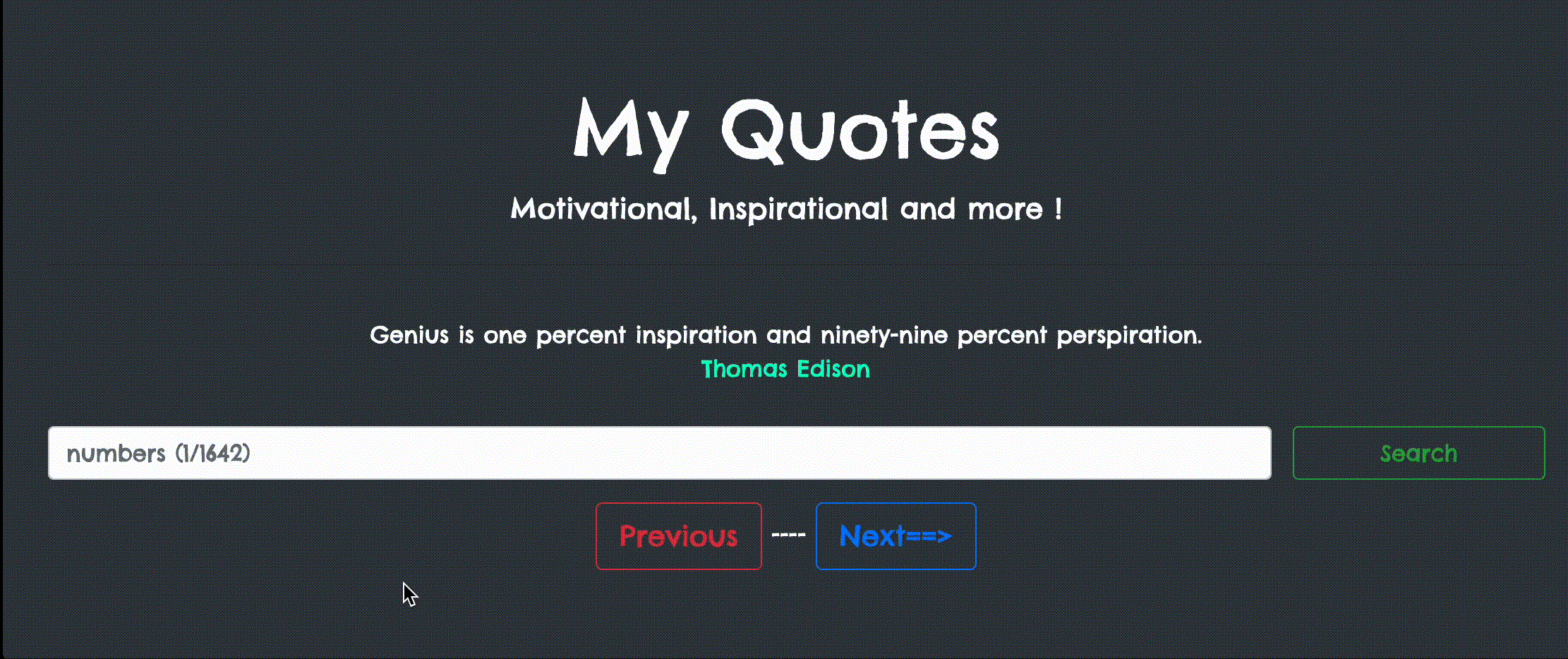
输出: