极客教程
极客教程JavaScript 设计一个带有Neumorphism效果 / Soft UI的计算器
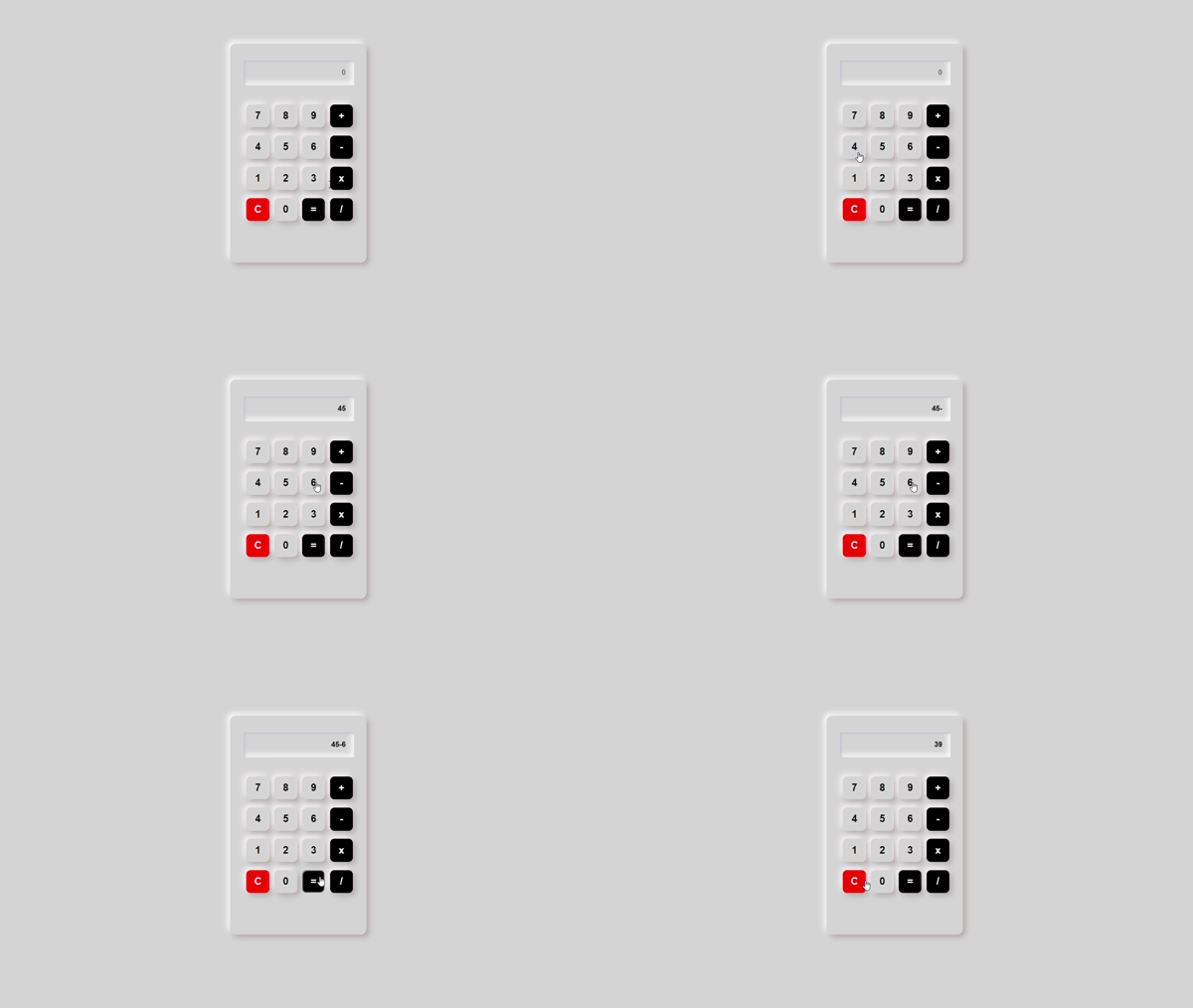
在本文中,我们将学习如何使用HTML、CSS和JavaScript创建一个带有Neumorphism效果的工作计算器。可以使用这个计算器进行基本的数学运算,如加法、减法、乘法和除法。
方法:Neumorphism 是一种当代的装饰网页元素并在任何网页上创建3D效果的方法。可以使用HTML和CSS来创建这种动画效果。可以使用CSS的box-shadow属性来实现Neumorphism效果,它用于在元素的一侧给予一个暗色和亮色的阴影。背景看起来好像与中性用户界面元素相关联,好像它们是从中伸出来或嵌入其中的。有些人将其称为“软UI”,因为它们使用柔和的阴影来创建这种幻觉,其样式几乎是三维的。
HTML代码: 在本节中,我们将创建Neumorphism计算器的布局。
HTML
<!-- Filename: index.html -->
<!DOCTYPE html>
<html lang="en">
<head>
    <meta charset="UTF-8">
    <meta http-equiv="X-UA-Compatible"
          content="IE=edge">
    <meta name="viewport"
          content="width=device-width, initial-scale=1.0">
    <title>Neumorphism Calculator</title>
    <link rel="stylesheet" href="style.css">
</head>

<body>
    <div class="container">
        <div class="cal-box">
            <form name="calculator">
                <input type="text" id="display" placeholder="0" readonly>
                <br>
                <input class="button"
                        type="button"
                        value="7"
                        onclick="calculator.display.value +='7'">
                <input class="button"
                       type="button"
                       value="8"
                       onclick="calculator.display.value +='8'">
                <input class="button"
                       type="button"
                       value="9"
                       onclick="calculator.display.value +='9'">
                <input class="button mathbutton"
                       type="button"
                       value="+" onclick="calculator.display.value +='+'">
                <br>
                <input class="button"
                       type="button"
                       value="4"
                       onclick="calculator.display.value +='4'">
                <input class="button"
                       type="button"
                       value="5"
                       onclick="calculator.display.value +='5'">
                <input class="button"
                       type="button"
                       value="6"
                       onclick="calculator.display.value +='6'">
                <input class="button mathbutton"
                       type="button"
                       value="-"
                       onclick="calculator.display.value +='-'">
                <br>
                <input class="button"
                       type="button"
                       value="1"
                       onclick="calculator.display.value +='1'">
                <input class="button"
                       type="button"
                       value="2"
                       onclick="calculator.display.value +='2'">
                <input class="button"
                       type="button"
                       value="3"
                       onclick="calculator.display.value +='3'">
                <input class="button mathbutton"
                       type="button"
                       value="x" onclick="calculator.display.value +='*'">
                <br>
                <input class="button clearButton"
                       type="button"
                       value="C"
                       onclick="calculator.display.value =''">
                <input class="button"
                       type="button"
                       value="0"
                       onclick="calculator.display.value +='0'">
                <input class="button mathbutton"
                       type="button"
                       value="="
                       onclick="calculator.display.value =eval(calculator.display.value)">

                <!-- eval() evaluates arithmetic expressions in display box -->
                <input class="button mathbutton"
                       type="button" value="/"
                       onclick="calculator.display.value +='/'">
            </form>
        </div>
    </div>
</body>
</html>
CSS代码: 在这个部分,我们将使用一些CSS属性来设计Neumorphism计算器。
CSS
/* filename: style.css */
body {
    background-color: rgb(214, 214, 214);
}

.container {
    width: 250px;
    height: 400px;
    margin: 80px auto;
    border-radius: 10px;
    background-color: rgb(214, 214, 214);

    /* box-shadow is used to achieve Neumorphism
    by using a light shadow and a dark shadow*/
    box-shadow: 5px 5px 10px #b6a9a9,
        -5px -5px 10px #ffffff;
}

.cal-box {
    width: 200px;
    margin: 20px auto;
}

#display {
    border: none;
    outline: none;
    color: black;
    text-align: right;
    font-weight: 600;
    padding: 15px;
    margin: 30px 0 20px 0;
    background: transparent;

    /* Inset shadow gives the appearance that
      the element is being pressed into it.*/
    box-shadow: inset 2px 2px 5px #babecc,
        inset -5px -5px 10px #ffffff;
}

.button {
    margin: 15px 0 0 5px;
    width: 42px;
    height: 42px;
    border: none;
    outline: none;
    font-size: 18px;
    font-weight: bold;
    cursor: pointer;
    border-radius: 8px;
    background-color: rgb(214, 214, 214);

    /* box-shadow is used to achieve Neumorphism
    by using a light shadow and a dark shadow */
    box-shadow: 5px 5px 10px #b6acac,
        -5px -5px 10px #faf4f4;
    display: inline-block;
}

.button:active {

    /* When the button is pressed, the inset
    shadow provides the impression that the
    element is being pressed into it */
    box-shadow: inset 1px 1px 2px #babecc,
        inset -1px -1px 2px #fff;
}

.clearButton {
    color: white;
    background-color: red;
}

.mathbutton {
    color: white;
    background-color: black;
}
输出结果: