极客教程
极客教程JavaScript 如何对集合进行排序
JavaScript的集合类似于容器。它只是将多个元素组合成一个单元的项目。集合通过存储、访问、修改和通信来存储聚合信息。
我们通过构造函数在JavaScript中创建集合。在早期版本的JavaScript中,构造函数被表达为函数,并以相同的方式使用。在集合中有数组、集合和映射。让我们在本文中学习如何对它们进行排序。
我们使用 JavaScript sort() 方法对集合进行排序。这个方法在原地对数组进行排序。
语法:
Array.prototype.sort()
对数组进行排序
示例1: 当数组的元素为数字时对其进行排序:
HTML
<!DOCTYPE html>
<html>

<head>
    <title>Javascript sorting collections</title>
</head>

<body>
    <script>
        // Sorting an array in ascending order
        let array = [10, 2, 5, 12, 7];
        array = array.sort(function (a, b) {
            return a - b;
        });
        console.log("sorted array : " + array);
    </script>
</body>

</html>
输出:

示例2: 对由字符串组成的数组进行排序:
HTML
<!DOCTYPE html>
<html>

<head>
    <title>Javascript sorting collections</title>
</head>

<body>
    <script>
        // Sorting an array of strings
        let array = ["c", "b", "a"];
        array = array.sort();
        console.log("sorted array : " + array);

    </script>
</body>

</html>
输出:

排序一个映射表
当:
- 映射表具有键和值的成对对象。
- 映射表的工作原理类似于字典。
- 我们需要将映射表转换为数组进行排序。
示例1: 根据值进行排序:
HTML
<!DOCTYPE html>
<html>

<head>
    <title>Javascript sorting collections</title>
</head>

<body>
    <script>

        // Creating a map and sorting it according to values.
        let newMap = new Map();
        newMap.set("a", 50);
        newMap.set("c", 40);
        newMap.set("b", 30);
        newMap.set("d", 10);
        newMap = Array.from(newMap).sort((a, b) => a[1] - b[1]);
        console.log(newMap);
    </script>
</body>

</html>
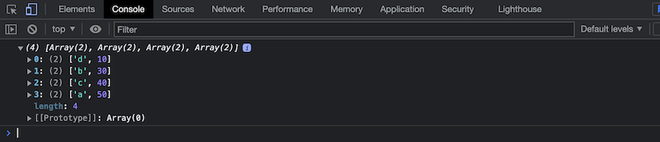
输出:
示例2: 根据键进行排序:
HTML
<!DOCTYPE html>
<html>

<head>
    <title>Javascript sorting collections</title>
</head>

<body>
    <script>
        // Sorting map by keys
        let newMap = new Map();
        newMap.set("a", 50);
        newMap.set("c", 40);
        newMap.set("b", 30);
        newMap.set("d", 10);
        newMap = Array.from(newMap.entries()).sort();
        console.log(newMap);
    </script>
</body>

</html>
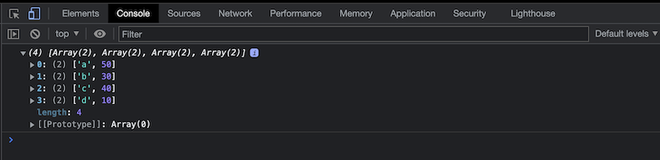
输出:
排序集合
在以下情况下对集合进行排序:
- 使用new关键字创建一个新的集合。
- 集合包含重复的值,这些值在代码运行后被移除。
- 我们需要将创建的集合转换为数组以便对其进行排序。
示例1: 对包含数字的集合进行排序:
HTML
<!DOCTYPE html>
<html>

<head>
    <title>Javascript sorting collections</title>
</head>

<body>
    <script>
        // Converting a set into an array and sorting it.
        new_set = Array.from(new Set([9, 9, 2, 4, 5, 11]))
          .sort(function (a, b) {
            return a - b;
        });
        console.log(new_set);
    </script>
</body>

</html>
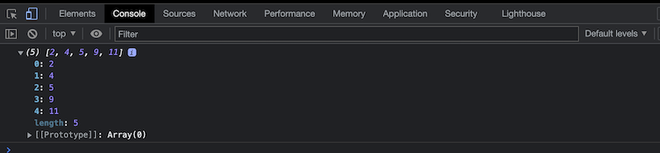
输出:
示例2: 对一组字符串排序:
HTML
<!DOCTYPE html>
<html>

<head>
    <title>Javascript sorting collections</title>
</head>

<body>
    <script>
        new_set = Array.from(new Set(["rachel", "sam", "daniel"]))
          .sort();
        console.log(new_set);
    </script>
</body>

</html>
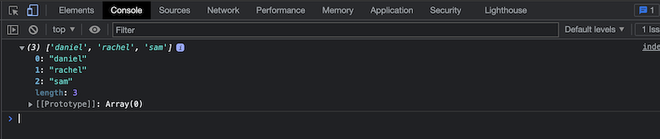
输出: