极客教程
极客教程JavaScript 如何将文件的所有导出内容作为对象导入Node.js
import 关键字用于在JavaScript中使用从其他模块导出的元素。将文件的所有导出内容作为对象导入的语法如下所示。
语法:
import * as objName from "abc-module"
...
let element1 = objName.value1
这里,
objName 是在从模块中导入所有内容时,你给对象初始化时的任意名称。
首先在我们的package.json文件中,添加以下属性:
"type" : "module"
当你有“type: module”属性时,你的源代码可以使用import语法,否则会导致错误,并且只支持“require”语法。
你的package.json文件应该类似于这样:
{
   "name": "gfg-modules",
   "version": "1.0.0",
   "description": "",
   "main": "index.js",
   "type": "module",
   "scripts": {
     "test": "echo \"Error: no test specified\" && exit 1"
   },
   "author": "GFG",
   "license": "ISC"
}
项目结构:
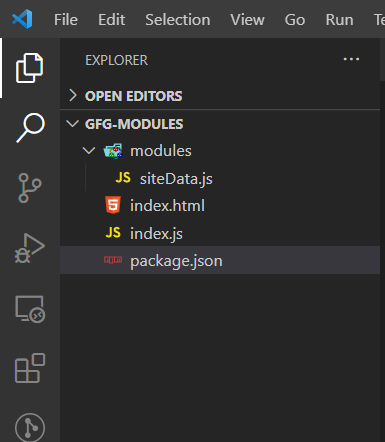
在“GFG-MODULES”的根文件夹中,有3个文件,分别是“index.html”,“index.js”和我们的“package.json”文件,另外还有一个名为“modules”的文件夹,其中包含一个名为“siteData.js”的文件。
示例: 在siteData.js中,我们有以下代码:
siteData.js
export const siteName = "GeeksForGeeks";
export const url = "https://www.geeksforgeeks.org/";
export const founderName = "Sandeep Jain";
export const aboutSite = "A Computer Science portal for geeks";
export let siteContent =
    "Computer science and Programming articles along with Courses";
在这个文件中,我们从我们的模块“siteName”中导出了多个元素:
index.js
import * as site from "./modules/siteData.js";

console.log(site);

console.log("Site Data is as follows:");
console.log(`Site name: \t{site.siteName}`);
console.log(`Site url : \t{site.url}`);
console.log(`Founder name: \t{site.founderName}`);
console.log(`About site: \t{site.aboutSite}`);
console.log(`Site Content: \t${site.siteContent}`);
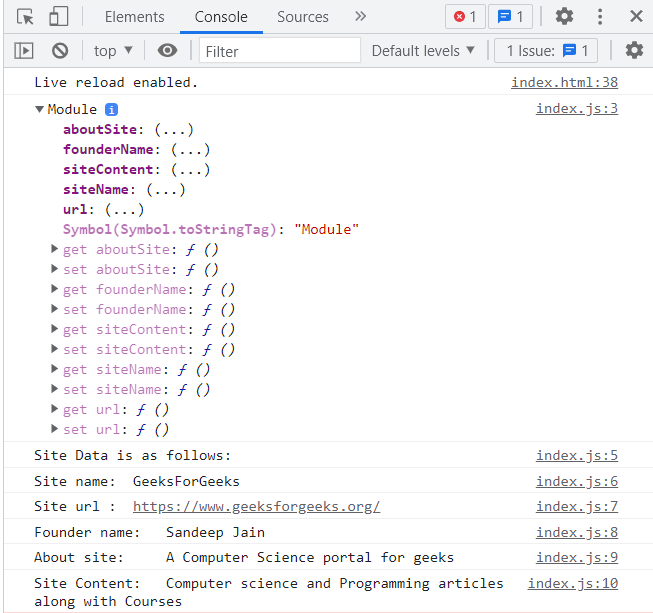
这里,我们从模块“siteData.js”中导入了所有的导出内容到一个名为“site”的对象中,并且稍后使用了它们。
输出: