极客教程
极客教程JavaScript 如何创建“显示更多”和“显示更少”功能来隐藏文本
“显示更多”和“显示更少”功能在文本内容较多的网站上非常有用,比如新闻和杂志网站上的单页文章。这可以帮助网页设计师给用户提供根据需要阅读更多或更少内容的自由。
方法: 点击按钮可以改变显示的内容量。在网页上不是完整地显示一个段落,而是初始时只显示部分文本,同时添加一个按钮,点击该按钮后会显示更多文本。开发人员可以决定在点击按钮之前和之后显示的文本量。
示例: 可以通过使用简单的if-else条件来实现上述方法,该条件检查文本的当前状态,并根据该状态显示或隐藏文本。下面的示例演示了这种方法:
<!DOCTYPE html>
<html>

<head>
    <title>
        How to create Show More and Show Less
        functionality for hiding text using JavaScript ?
    </title>
    <style>
        /* Initially, hide the extra text that
            can be revealed with the button */
        #moreText {

            /* Display nothing for the element */
            display: none;
        }
    </style>
</head>

<body>
    <h1 style="color: green;">
        GeeksforGeeks
    </h1>

    <h3>Show More and Show Less Example</h3>

    <p>
        GeeksforGeeks was born out of necessity-
        a need to provide a convenient and
        one-stop educational portal to all the
        students of Computer Science.
        <span id="points">...</span>

        <!-- Define the text that would be
                hidden by default and only shown
                when clicked on the button -->
        <span id="moreText"> This necessity was
            as personal to me as it was universal.
            This need combined with my passion for
            teaching resulted in GeeksforGeeks as
            we know today. My message to you, in
            our inaugural edition of Geeks Digest,
            would be that if you are looking for
            a problem to work on, you don’t need
            to look very far for it. All you should
            do is to look around yourself.
        </span>
    </p>


    <!-- Trigger toggleText() when the
            button is clicked -->
    <button onclick="toggleText()" id="textButton">
        Show More
    </button>

    <script>
        function toggleText() {

            // Get all the elements from the page
            let points =
                document.getElementById("points");

            let showMoreText =
                document.getElementById("moreText");

            let buttonText =
                document.getElementById("textButton");

            // If the display property of the dots
            // to be displayed is already set to
            // 'none' (that is hidden) then this
            // section of code triggers
            if (points.style.display === "none") {

                // Hide the text between the span
                // elements
                showMoreText.style.display = "none";

                // Show the dots after the text
                points.style.display = "inline";

                // Change the text on button to
                // 'Show More'
                buttonText.innerHTML = "Show More";
            }

            // If the hidden portion is revealed,
            // we will change it back to be hidden
            else {

                // Show the text between the
                // span elements
                showMoreText.style.display = "inline";

                // Hide the dots after the text
                points.style.display = "none";

                // Change the text on button
                // to 'Show Less'
                buttonText.innerHTML = "Show Less";
            }
        }
    </script>
</body>
</html>
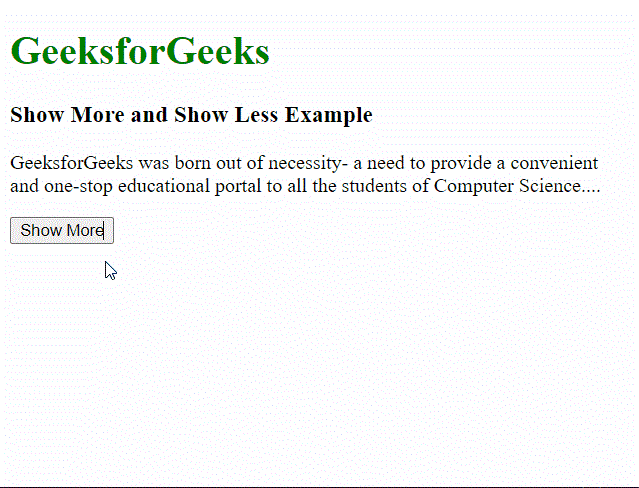
输出结果: