极客教程
极客教程JavaScript 如何高亮显示搜索字符串的结果
下面是一个关于如何高亮显示搜索字符串结果的HTML文档。在本文中,我们将使用HTML、CSS、JavaScript、Bootstrap和mark.js使我们的网站更加有效。此外,专门用于在给定的上下文或段落中高亮显示搜索字符串,mark.js在这个特定的代码中发挥了重要作用。在解决这个问题之前,记住我的话,这个问题可以用很多其他方法解决,但我认为这也是一种更好的方法来解决这个问题。
什么是mark.js?
mark.js是一个简单的JavaScript工具,用于高亮文本。它用于动态标记搜索词或自定义正则表达式,并提供一些内置选项,如支持音标、分词搜索等。
方法:
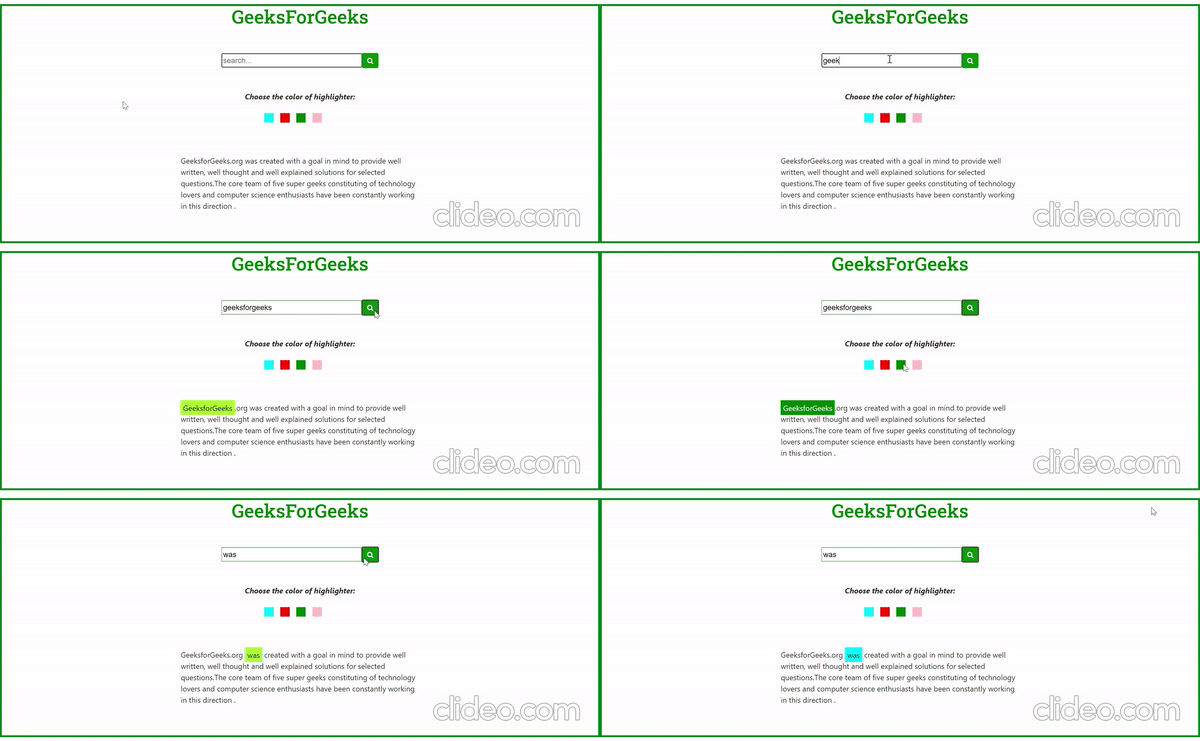
- 首先,当您在搜索框中输入一些字符串并按下搜索按钮时,一个名为highlight()的简单JavaScript函数将被调用,其主要作用是高亮显示您在搜索框中输入的搜索文本。在这个小示例中,我们将使用mark.js代码来高亮显示文本。
- mark.js中有许多内置函数,但我们分别对我们的要求使用了两个函数,即mark()和unmark()函数。其中,mark()用于高亮显示搜索文本,unmark()用于取消之前高亮显示的文本。
mark()的语法:
var context = document.querySelector(".context");
var obj = new Mark(context);
obj.mark(searchkeyword [, options]);
- 让我们通过一些技术方式来理解这段代码,
- 首先我们声明了一个变量,它包含了要查找和突出显示的文本的上下文。
- 创建一个mark对象,然后通过之前创建的obj调用mark()方法。
- 它有两个参数,一个是要搜索的关键字,另一个是可选的。
unmark()的语法:
var context = document.querySelector(".context");
var obj = new Mark(context);
obj.unmark(options);
- 这与上面的技术几乎相同,但唯一的微小差异是unmark()方法只需要一个可选的参数。另外,如果你想改变高亮器的颜色和填充,我们需要在mark标签内的CSS代码中做出一些细微的改变,如下所示:
mark {
    color: black;
    background: green;
    padding: 5px;
}
- 希望您已成功按照上述步骤来更改特定高亮文本的颜色。但请确保没有任何字符串被任何特定的颜色所高亮,如果有的话,请不要忘记取消之前搜索到的文本的高亮。然后,标记新的要搜索的字符串,您可以根据需要更改其颜色。
示例:
<!DOCTYPE html>
<html>

<head>
    <meta name="viewport" content=
        "width=device-width, initial-scale=1.0">

    <!-- CDN of fontawsome -->
    <link rel="stylesheet" href=
"https://cdnjs.cloudflare.com/ajax/libs/font-awesome/4.7.0/css/font-awesome.min.css">

    <!-- CDN of Bootstrap -->
    <link rel="stylesheet" href=
"https://maxcdn.bootstrapcdn.com/bootstrap/4.0.0-alpha.6/css/bootstrap.min.css"
        integrity=
"sha384-rwoIResjU2yc3z8GV/NPeZWAv56rSmLldC3R/AZzGRnGxQQKnKkoFVhFQhNUwEyJ"
        crossorigin="anonymous">

    <!-- CDN of mark.js -->
    <script src="https://cdnjs.cloudflare.com/ajax/libs/mark.js/8.11.1/mark.min.js"
        integrity=
"sha512-5CYOlHXGh6QpOFA/TeTylKLWfB3ftPsde7AnmhuitiTX4K5SqCLBeKro6sPS8ilsz1Q4NRx3v8Ko2IBiszzdww=="
        crossorigin="anonymous">
    </script>

    <!-- CDN of google font -->
    <style>
        @import url('https://fonts.googleapis.com/css2?family=Roboto+Slab:wght@500&display=swap'
        );
    </style>

    <style>
        mark.a0 {
            color: black;
            padding: 5px;
            background: greenyellow;
        }

        mark.a1 {
            color: black;
            padding: 5px;
            background: cyan;
        }

        mark.a2 {
            color: black;
            padding: 5px;
            background: red;
        }

        mark.a3 {
            color: white;
            padding: 5px;
            background: green;
        }

        mark.a4 {
            color: black;
            padding: 5px;
            background: pink;
        }
    </style>
</head>

<body style="border:4px solid rgb(0, 128, 28);">
    <h1 style="font-family: 'Roboto Slab',
        serif;text-align: center;color:green;">
        GeeksForGeeks
    </h1>
    <br><br>

    <form>
        <div class="container-fluid" align="center">
            <input type="text" size="30"
                placeholder="search..." id="searched"
                style="border: 1px solid green;
                        width:300px;height:30px;">

            <button type="button" class="btn-primary btn-sm"
                style="margin-left:-5px;height:32px;width:35px;
                        background-color:rgb(12, 138, 12);
                        border:0px;" onclick="highlight('0');">

                <i class="fa fa-search"></i>
            </button>
        </div>
    </form>
    <br><br>

    <div align="center">
        <div>
            <b><i>Choose the color of highlighter:</i></b>
        </div>
        <br>
        <div style="background-color: cyan;
            width: 20px; height: 20px;
            display: inline-block; margin-left: -30px;"
            onmouseover="highlight('1')">
        </div>

        <div style="background-color: red;
            width: 20px; height: 20px;
            display: inline-block; margin-left: 10px;"
            onmouseover="highlight('2')">
        </div>

        <div style="background-color: green;
            width: 20px; height: 20px;
            display: inline-block; margin-left: 10px;"
            onmouseover="highlight('3')">
        </div>

        <div style="background-color: pink;
            width: 20px; height: 20px;
            display: inline-block; margin-left: 10px;"
            onmouseover="highlight('4')">
        </div>
    </div>

    <div class="container-fluid" style=
        "padding-left: 30%; padding-right: 30%;
        padding-top: 5%;">

        <p class="select">
            GeeksforGeeks.org was created with a
            goal in mind to provide well written,
            well thought and well explained solutions
            for selected questions.The core team of
            five super geeks constituting of technology
            lovers and computer science enthusiasts
            have been constantly working in this
            direction.
        </p>
    </div>

    <script>
        function highlight(param) {

            // Select the whole paragraph
            var ob = new Mark(document.querySelector(".select"));

            // First unmark the highlighted word or letter
            ob.unmark();

            // Highlight letter or word
            ob.mark(
                document.getElementById("searched").value,
                { className: 'a' + param }
            );
        }
    </script>
</body>

</html>
输出: