 极客教程
极客教程JavaScript 冒泡排序可视化
图形用户界面(GUI) 比程序更容易理解。在本文中,我们将使用JavaScript来可视化冒泡排序。我们将看到在冒泡排序中元素是如何交换以及我们如何获得最终排序的数组。我们还将可视化冒泡排序的时间复杂度。
参考:
- 冒泡排序
- JavaScript中的异步函数
方法:
- 首先,我们将使用 Math.random() 函数生成一个随机数组。
- 使用不同的颜色来指示哪些元素正在被 比较、排序 和 未排序 。
- 由于算法执行操作非常快,所以使用 setTimeout() 函数来放慢过程。
- 可以通过按下 “Ctrl+R” 键来生成新数组。
- 使用 BubbleSort() 函数进行排序,使用 swap() 函数
示例: 下面是上述步骤的实现。
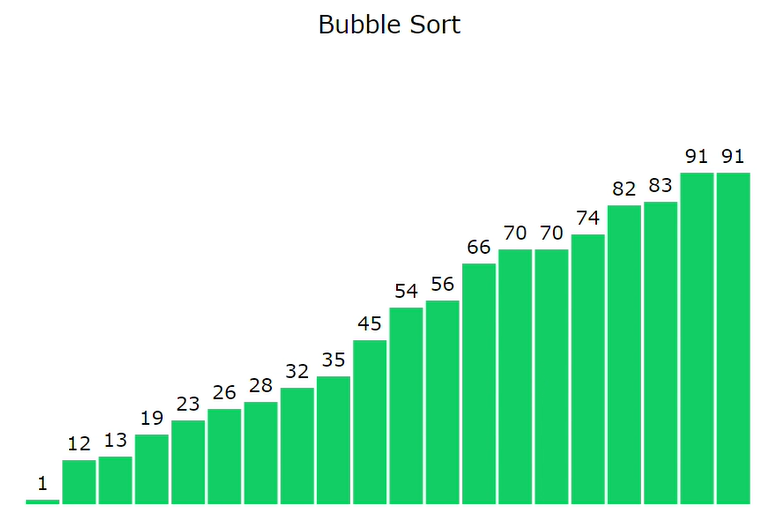
以下是可视化冒泡排序算法的程序。
index.html
<!DOCTYPE html>
<html lang="en">
<head>
    <meta charset="UTF-8" />
    <meta name="viewport" content=
        "width=device-width, initial-scale=1.0" />
    <link rel="stylesheet" href="style.css" />
</head>

<body>
    <br />
    <p class="header">Bubble Sort</p>

    <div id="array"></div>
    <script src="script.js"></script>
</body>
</html>
style.css: 以下是上面文件中使用的“style.css”的内容。
* {
    margin: 0px;
    padding: 0px;
    box-sizing: border-box;
}

.header {
    font-size: 20px;
    text-align: center;
}

#array {
    background-color: white;
    height: 413px;
    width: 598px;
    margin: auto;
    position: relative;
    margin-top: 64px;
}

.block {
    width: 28px;
    background-color: #6b5b95;
    position: absolute;
    bottom: 0px;
    transition: 0.2s all ease;
}

.block_id {
    position: absolute;
    color: black;
    margin-top: -20px;
    width: 100%;
    text-align: center;
}
script.js: 上述HTML代码中使用的“script.js”文件的内容如下。
var container = document.getElementById(& quot; array & quot;);

// Function to generate the array of blocks
function generatearray() {
    for (var i = 0; i & lt; 20; i++) {

        // Return a value from 1 to 100 (both inclusive)
        var value = Math.ceil(Math.random() * 100);

        // Creating element div
        var array_ele = document.createElement(& quot; div & quot;);

        // Adding class 'block' to div
        array_ele.classList.add(& quot; block & quot;);

        // Adding style to div
        array_ele.style.height = `{value * 3}px`;
        array_ele.style.transform = `translate({i * 30}px)`;

        // Creating label element for displaying
        // size of particular block
        var array_ele_label = document.createElement(& quot; label & quot;);
        array_ele_label.classList.add(& quot; block_id & quot;);
        array_ele_label.innerText = value;

        // Appending created elements to index.html
        array_ele.appendChild(array_ele_label);
        container.appendChild(array_ele);
    }
}

// Promise to swap two blocks
function swap(el1, el2) {
    return new Promise((resolve) =& gt; {

        // For exchanging styles of two blocks
        var temp = el1.style.transform;
        el1.style.transform = el2.style.transform;
        el2.style.transform = temp;

        window.requestAnimationFrame(function () {

            // For waiting for .25 sec
            setTimeout(() =& gt; {
                container.insertBefore(el2, el1);
                resolve();
            }, 250);
    });
});
}

// Asynchronous BubbleSort function
async function BubbleSort(delay = 100) {
    var blocks = document.querySelectorAll(& quot;.block & quot;);

    // BubbleSort Algorithm
    for (var i = 0; i & lt; blocks.length; i += 1) {
        for (var j = 0; j & lt; blocks.length - i - 1; j += 1) {

            // To change background-color of the
            // blocks to be compared
            blocks[j].style.backgroundColor = & quot; #FF4949 & quot;;
            blocks[j + 1].style.backgroundColor = & quot; #FF4949 & quot;;

            // To wait for .1 sec
            await new Promise((resolve) =& gt;
            setTimeout(() =& gt; {
                resolve();
            }, delay)
            );

            console.log(& quot; run & quot;);
            var value1 = Number(blocks[j].childNodes[0].innerHTML);
            var value2 = Number(blocks[j + 1]
                .childNodes[0].innerHTML);

            // To compare value of two blocks
            if (value1 & gt; value2) {
                await swap(blocks[j], blocks[j + 1]);
                blocks = document.querySelectorAll(& quot;.block & quot;);
            }

            // Changing the color to the previous one
            blocks[j].style.backgroundColor = & quot;#6b5b95 & quot;;
            blocks[j + 1].style.backgroundColor = & quot;#6b5b95 & quot;;
        }

        //changing the color of greatest element
        //found in the above traversal
        blocks[blocks.length - i - 1]
            .style.backgroundColor = & quot;#13CE66 & quot;;
    }
}

// Calling generatearray function
generatearray();

// Calling BubbleSort function
BubbleSort();