极客教程
极客教程JavaScript 可视化桶排序
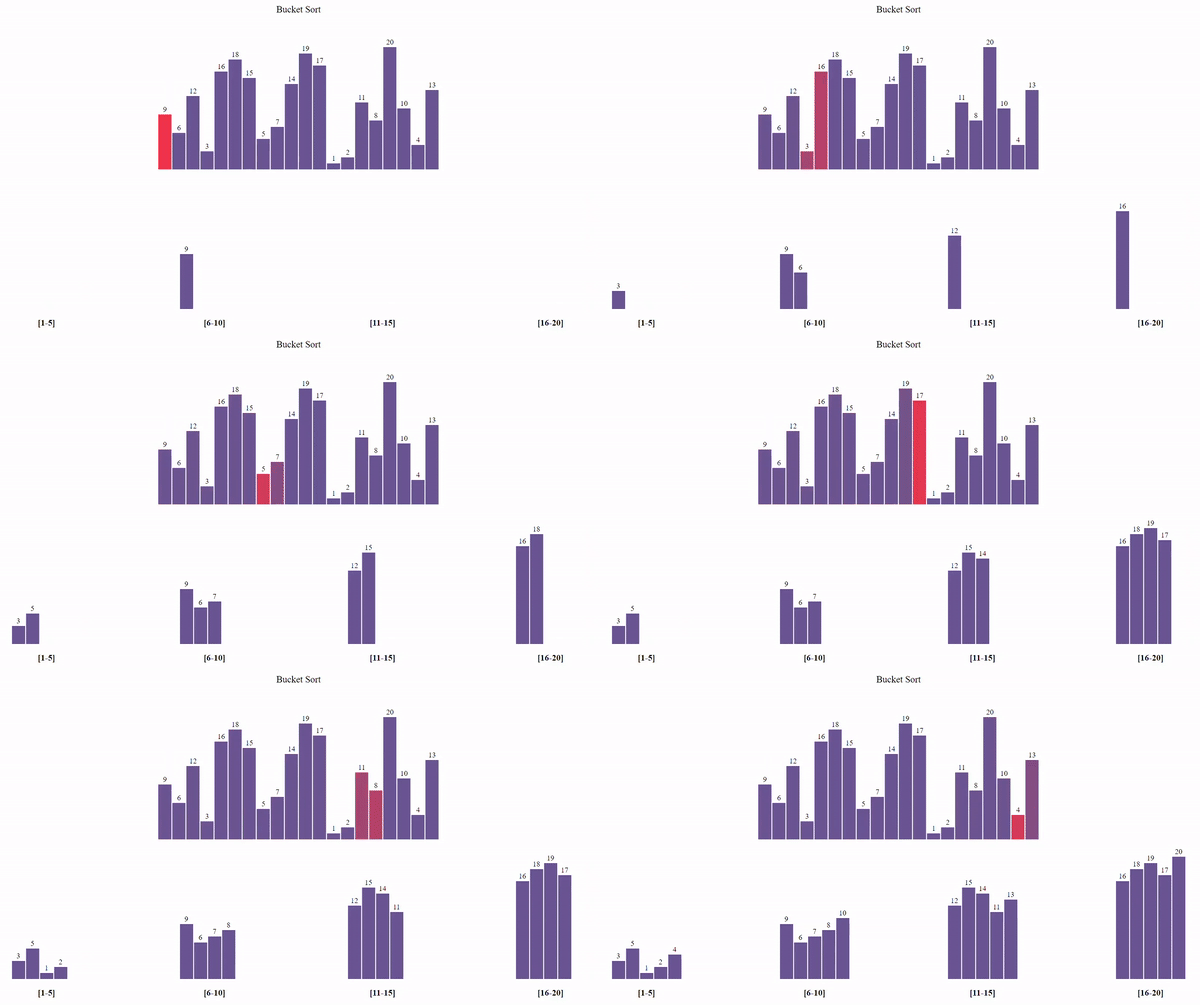
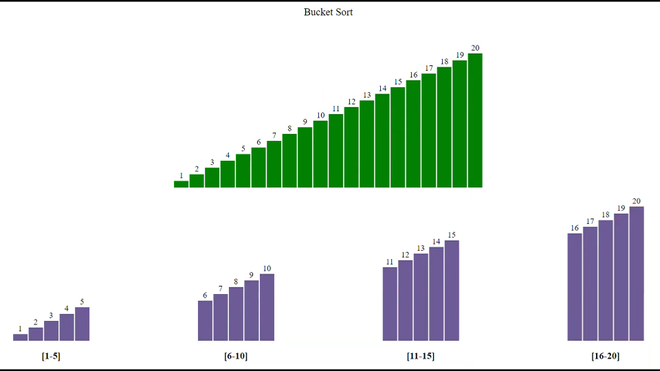
图形用户界面(GUI) 比程序更易于理解。在本文中,我们将使用JavaScript可视化桶排序。我们将看到元素如何存储在桶中,然后桶如何被遍历以得到最终的排序数组。我们还将可视化桶排序的时间复杂度。
参考:
- 桶排序
- JavaScript中的异步函数
方法:
- 首先,我们将使用 Math.random() 函数生成一个随机数组。
- 使用不同的颜色来表示正在 遍历 的元素。
- 每个遍历的元素都被放入一个 适当的桶中 。
- 使用 插入排序 对这些桶进行排序。
- 进一步遍历这些 桶 以得到最终的排序数组。
- 由于算法执行非常快,使用 setTimeout() 函数来减慢过程。
- 按下 “Ctrl+R” 键可以生成新的数组。
- 使用Buckets中的 BucketSort() 函数执行排序。
示例: 在这个示例中,我们将看到桶排序方法。
HTML代码
<!DOCTYPE html>
<html lang="en">
<head>
    <link rel="stylesheet" href="style.css" />
</head>
<body>
    <br />
    <p class="header">Bucket Sort</p>
    <div id="array"></div>
    <br />
    <br />
    <div style="display: flex; justify-content: space-evenly">
        <div class="bucket">
            <div id="one" class="bucket2"></div>
            <br />
            <h3 style="text-align: center">[1-5]</h3>
        </div>

        <div class="bucket">
            <div id="two" class="bucket2"></div>
            <br />
            <h3 style="text-align: center">[6-10]</h3>
        </div>

        <div class="bucket">
            <div id="three" class="bucket2"></div>
            <br />
            <h3 style="text-align: center">[11-15]</h3>
        </div>

        <div class="bucket">
            <div id="four" class="bucket2"></div>
            <br />
            <h3 style="text-align: center">[16-20]</h3>
        </div>
    </div>
    <script src="script.js"></script>
</body>
</html>
style.css: 以下是上面的文件中使用的“style.css”的内容。
CSS代码
* {
    margin: 0px;
    padding: 0px;
    box-sizing: border-box;
}

.header {
    font-size: 20px;
    text-align: center;
}

#array {
    background-color: white;
    height: 265px;
    width: 598px;
    margin: auto;
    position: relative;
    margin-top: 64px;
}

.block {
    width: 28px;
    background-color: #6b5b95;
    position: absolute;
    bottom: 0px;
    transition: 0.2s all ease;
}

.block_id {
    position: absolute;
    color: black;
    margin-top: -20px;
    width: 100%;
    text-align: center;
}

.block_id2 {
    position: absolute;
    color: black;
    margin-top: 22px;
    width: 100%;
    text-align: center;
}

.block_id3 {
    position: absolute;
    color: black;
    margin-top: 1px;
    width: 100%;
    text-align: center;
}

.bucket {
    width: 256px;
    height: 260px;
    position: relative;
}

.bucket2 {
    margin: auto;
    width: 148px;
    height: 260px;
}

.firstbucket {
    width: 28px;
    background-color: #6b5b95;
    position: absolute;
    bottom: 0px;
    transition: 0.2s all ease;
}

.secondbucket {
    width: 28px;
    background-color: #6b5b95;
    position: absolute;
    bottom: 0px;
    transition: 0.2s all ease;
}

.thirdbucket {
    width: 28px;
    background-color: #6b5b95;
    position: absolute;
    bottom: 0px;
    transition: 0.2s all ease;
}

.fourthbucket {
    width: 28px;
    background-color: #6b5b95;
    position: absolute;
    bottom: 0px;
    transition: 0.2s all ease;
}
script.js: 上述HTML代码中使用的“script.js”文件内容如下。
JavaScript代码
let container = document.getElementById("array");
// Function to randomly shuffle the array
function shuffle(arr) {
    for (let i = arr.length - 1; i > 0; i--) {

        // Generate random number
        let j = Math.floor(Math.random() * (i + 1));
        let temp = arr[i];
        arr[i] = arr[j];
        arr[j] = temp;
    }
}
function generatearray() {

    // Creating an array
    let arr = [];

    // Filling array with values from 1 to 20
    for (let i = 0; i < 20; i++) {
        arr.push(i + 1);
    }

    // Shuffling the array
    shuffle(arr);
    for (let i = 0; i < 20; i++) {
        let value = arr[i];

        // Creating element div
        let array_ele = document.createElement("div");

        // Adding class 'block' to div
        array_ele.classList.add("block");

        // Adding style to div
        array_ele.style.height = `{value * 13}px`;
        array_ele.style.transform = `translate({i * 30}px)`;

        // Creating label element for displaying
        // size of particular block
        let array_ele_label = document.createElement("label");
        array_ele_label.classList.add("block_id");
        array_ele_label.innerText = value;

        // Appending created elements to index.html
        array_ele.appendChild(array_ele_label);
        container.appendChild(array_ele);
    }
}

async function InsertionSort(clsnam, delay = 600) {
    let blocks = document.getElementsByClassName(clsnam);
    blocks[0].style.backgroundColor = "rgb(49, 226, 13)";

    for (let i = 1; i < blocks.length; i += 1) {
        let j = i - 1;

        // To store the integer value of ith block to key
        let key = parseInt(blocks[i].childNodes[0].innerHTML);

        // To store the ith block height to height
        let height = blocks[i].style.height;

        // Provide darkblue color to the ith block
        blocks[i].style.backgroundColor = "darkblue";

        // To pause the execution of code for 600 milliseconds
        await new Promise((resolve) =>
            setTimeout(() => {
                resolve();
            }, 600)
        );
        // For placing selected element at its correct position
        while (j >= 0 && parseInt(blocks[j].childNodes[0].innerHTML) > key) {

            // Provide darkblue color to the jth block
            blocks[j].style.backgroundColor = "darkblue";

            // For placing jth element over (j+1)th element
            blocks[j + 1].style.height = blocks[j].style.height;
            blocks[j + 1].childNodes[0].innerText =
                blocks[j].childNodes[0].innerText;
            j = j - 1;

            // To pause the execution of code for 600 milliseconds
            await new Promise((resolve) =>
                setTimeout(() => {
                    resolve();
                }, delay)
            );

            // Provide lightgreen color to the sorted part
            for (let k = i; k >= 0; k--) {
                blocks[k].style.backgroundColor = " rgb(49, 226, 13)";
            }
        }
        // Placing the selected element to its correct position
        blocks[j + 1].style.height = height;
        blocks[j + 1].childNodes[0].innerHTML = key;

        // To pause the execution of code for 600 milliseconds
        await new Promise((resolve) =>
            setTimeout(() => {
                resolve();
            }, delay)
        );
        // Provide light green color to the ith block
        blocks[i].style.backgroundColor = " rgb(49, 226, 13)";
    }
}
// Asynchronous CountingSort function
async function CountingSort(delay = 250) {
    let blocks = document.querySelectorAll(".block");

   let block1 = 0,
        block2 = 0,
        block3 = 0,
        block4 = 0;

    // CountingSort Algorithm
    for (let i = 0; i < blocks.length; i += 1) {
        blocks[i].style.backgroundColor = "#FF4949";
        let value =
            Number(blocks[i].childNodes[0].innerHTML);

        // Creating element div
        let array_ele = document.createElement("div");

        // Adding style to div
        array_ele.style.height = `{value * 13}px`;

        // Creating label element for displaying
        // size of particular block
        let array_ele_label = document.createElement("label");
        array_ele_label.classList.add("block_id");
        array_ele_label.innerText = value;

        array_ele.appendChild(array_ele_label);

        // Adding block to first bucket
        if (value >= 1 && value <= 5) {
            array_ele.classList.add("firstbucket");
            var container = document.getElementById("one");
            array_ele.style.transform =
                `translate({block1 * 30}px)`;
            container.appendChild(array_ele);
            block1++;
        }

        // Adding block to second bucket
        if (value >= 6 && value <= 10) {
            array_ele.classList.add("secondbucket");
            var container = document.getElementById("two");
            array_ele.style.transform =
                `translate({block2 * 30}px)`;
            container.appendChild(array_ele);
            block2++;
        }

        // Adding block to third bucket
        if (value >= 11 && value <= 15) {
            array_ele.classList.add("thirdbucket");
            var container = document.getElementById("three");
            array_ele.style.transform = `translate({block3 * 30}px)`;
            container.appendChild(array_ele);
            block3++;
        }

        // Adding block to fourth bucket
        if (value >= 16 && value <= 20) {
            array_ele.classList.add("fourthbucket");
            var container = document.getElementById("four");
            array_ele.style.transform =
                `translate(${block4 * 30}px)`;
            container.appendChild(array_ele);
            block4++;
        }

        // To wait for 250 milliseconds
        await new Promise((resolve) =>
            setTimeout(() => {
                resolve();
            }, delay)
        );

        blocks[i].style.backgroundColor = "#6b5b95";
    }

    // Performing insertion sort on every bucket
    await InsertionSort("firstbucket");
    await InsertionSort("secondbucket");
    await InsertionSort("thirdbucket");
    await InsertionSort("fourthbucket");

    // Copying elements from buckets to main array
    for (let i = 0; i < 4; i++) {
        var bucket_idx = 0;
        var block_idx;
        if (i == 0) block_idx =
            document.getElementsByClassName("firstbucket");
        if (i == 1) block_idx =
            document.getElementsByClassName("secondbucket");
        if (i == 2) block_idx =
            document.getElementsByClassName("thirdbucket");
        if (i == 3) block_idx =
            document.getElementsByClassName("fourthbucket");
        for (var j = i * 5; j < 5 * (i + 1); j++, bucket_idx++) {
            block_idx[bucket_idx].style.backgroundColor = "red";

            // To wait for 300 milliseconds
            await new Promise((resolve) =>
                setTimeout(() => {
                    resolve();
                }, 300)
            );

            blocks[j].style.height =
                block_idx[bucket_idx].style.height;
            blocks[j].childNodes[0].innerText =
                block_idx[bucket_idx].childNodes[0].innerText;
            blocks[j].style.backgroundColor = "green";

            // To wait for 300 milliseconds
            await new Promise((resolve) =>
                setTimeout(() => {
                    resolve();
                }, 300)
            );

            block_idx[bucket_idx]
                .style.backgroundColor = "#6b5b95";
        }
    }
}

// Calling generatearray function
generatearray();

// Calling CountingSort function
CountingSort();
输出: