极客教程
极客教程JavaScript 解释读写文件
在客户端上,无法使用JavaScript浏览器读取或写入文件。在服务器端可以使用Node.js的fs模块来实现。该模块具有同步和异步的读写文件的方法。让我们通过一些使用Node.js fs模块读写文件的示例来演示。
使用fs.readFile()和fs.writeFile()方法可以使用JavaScript读写文件。使用fs.readFile()函数读取文件,这是一个内置方法。该方法将整个文件读取到内存中并存储在缓冲区中。
语法:
fs.readFile( file_name, encoding, callback_function )
参数:
- filename: 它包含要读取的文件名,或者如果文件保存在其他地方,则包含整个路径。
- encoding: 它存储文件的编码。’utf8’是默认设置。
- 回调函数: 这是在文件读取后被调用的函数。它需要两个输入:
- err: 如果有错误发生。
- data: 文件的内容。
- 返回值: 它返回文件中包含的内容,以及可能发生的任何错误。
fs.writeFile()函数用于以异步方式将数据写入文件。如果文件已经存在,将被替换。
语法:
fs.writeFile( file_name, data, options, callback )
参数:
- file_name :字符串、缓冲区、URL或文件描述符整数,指定要写入文件的位置。当使用文件描述符时,它将类似于fs.write()方法。
- data :将要发送到文件的数据是字符串、缓冲区、TypedArray或DataView。
- options :字符串或对象,用于指示可选的输出选项。它包含三个可能选择的更多参数。
- encoding :表示文件编码的字符串值。默认设置为’utf8’。
- mode :文件模式由一个称为mode的整数值指定。默认值为0o666。
- flag :这是一个指示文件写入标志的字符串。默认值为’w’。
- callback :当运行该方法时,将调用此函数。
- err :如果进程失败,将抛出此错误。
让我们通过一个示例来了解如何写入和读取文件:
在下面的示例中,我们使用writeFile()方法创建一个文件,并使用readFile()方法读取文件的内容。
项目结构:
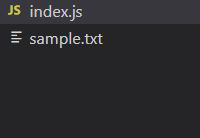
index.js
var fs = require("fs");
console.log(" Writing into an file ");

// Sample.txt is an empty file
fs.writeFile(
  "sample.txt",
  "Let's write a few sentences in the file",
  function (err) {
    if (err) {
      return console.error(err);
    }

    // If no error the remaining code executes
    console.log(" Finished writing ");
    console.log("Reading the data that's written");

    // Reading the file
    fs.readFile("sample.txt", function (err, data) {
      if (err) {
        return console.error(err);
      }
      console.log("Data read : " + data.toString());

    });
  }
);
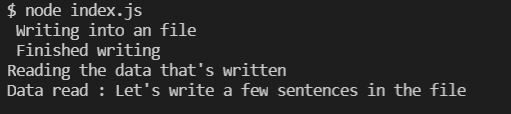
输出: