极客教程
极客教程JavaScript 如何在网站中添加WhatsApp分享按钮
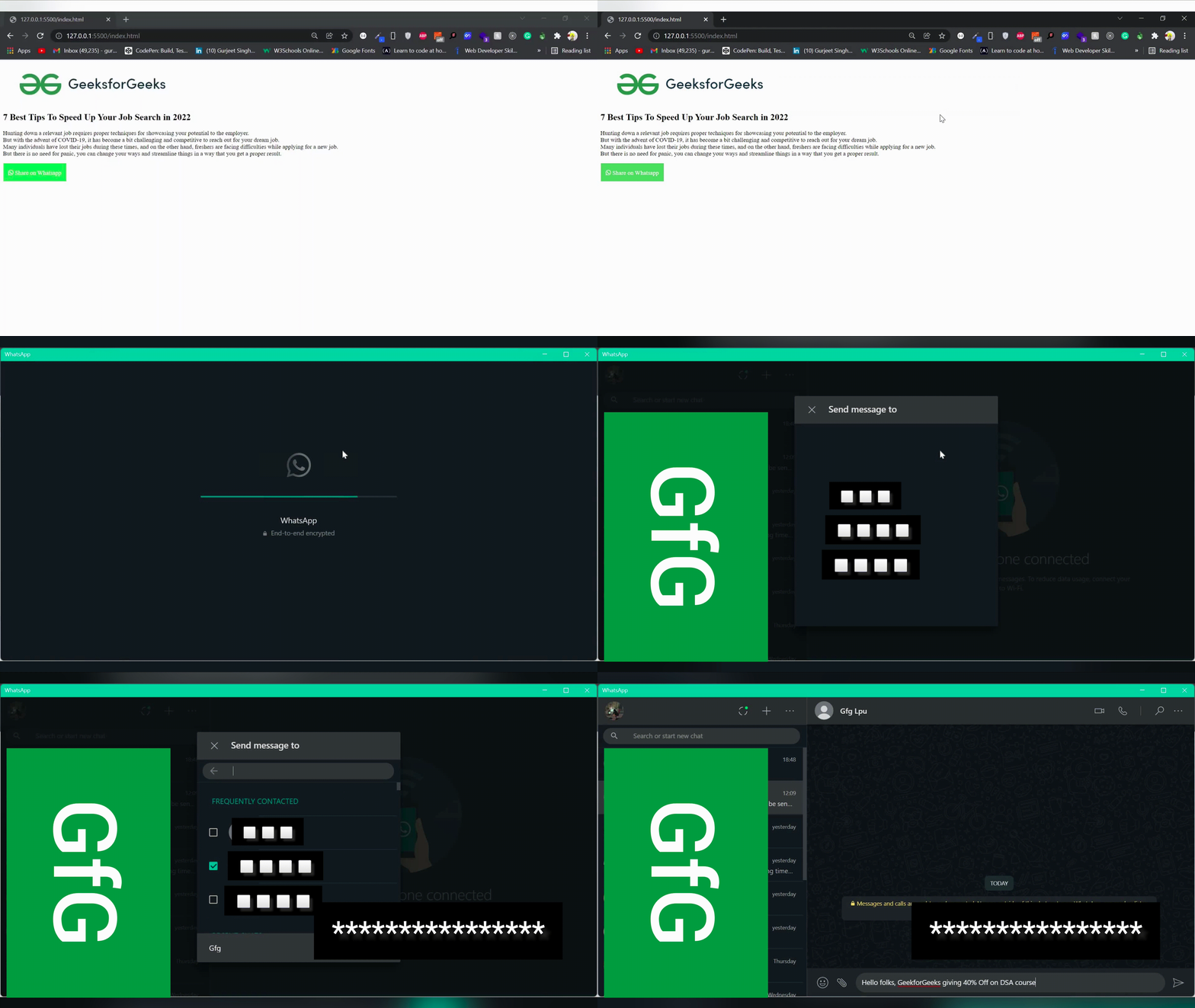
WhatsApp是最流行的即时通讯应用程序。本文介绍如何将WhatsApp分享按钮添加到您的网站中。在这个示例中,我们创建一个简单的网站,当您点击WhatsApp分享按钮时,它会在您的系统上打开WhatsApp应用程序,并且您的消息已经被打印在那里。
注意:这仅适用于已在您的系统中安装WhatsApp的情况(桌面/笔记本电脑)
示例: 创建一个简单的网页,使用该函数在用户点击按钮时进行分享。
HTML
<!DOCTYPE html>
<html lang="en">

<head>
    <meta charset="UTF-8">
    <meta http-equiv="X-UA-Compatible" content="IE=edge">
    <meta name="viewport" content=
        "width=device-width, initial-scale=1.0">
    <link rel="stylesheet" href=
"https://use.fontawesome.com/releases/v5.15.4/css/all.css"
        integrity=
"sha384-DyZ88mC6Up2uqS4h/KRgHuoeGwBcD4Ng9SiP4dIRy0EXTlnuz47vAwmeGwVChigm"
    crossorigin="anonymous">

    <style>
        button {
            width: 170px;
            height: 50px;
            background-color: #4ECC5B;
            color: #fff;
            border: 1px solid white;
            font-size: 1rem;
            cursor: pointer;
        }

        button:hover {
            background-color: #3ae04b;
        }
    </style>
</head>

<body>
    <div>
        <nav class="navbar background">
            <ul class="nav-list">
                <div class="logo">
                    <img src=
"https://media.geeksforgeeks.org/wp-content/cdn-uploads/20210420155809/gfg-new-logo.png" />
                </div>
            </ul>
        </nav>
        <section class="section">
            <div class="box-main">
                <div class="firstHalf">
                    <h1 class="text-big">
                        7 Best Tips To Speed Up Your
                        Job Search in 2022
                    </h1>
                    <p class="text-small">
                        Hunting down a relevant job requires
                        proper techniques for showcasing your
                        potential to the employer. <br> But with
                        the advent of COVID-19, it has become
                        a bit challenging and competitive to
                        reach out for your dream job. <br> Many
                        individuals have lost their jobs
                        during these times, and on the other
                        hand, freshers are facing difficulties
                        while applying for a new job. <br> But
                        there is no need for panic, you can
                        change your ways and streamline things
                        in a way that you get a proper result.
                    </p>

                    <button class="fab fa-whatsapp"
                        onclick="whatsapp()">
                        Share on Whatsapp
                    </button>
                </div>
            </div>
        </section>
    </div>
</body>
<script type="text/javascript">
    function whatsapp() {
        window.open
('whatsapp://send?text=Hello folks, GeekforGeeks giving 40% Off on DSA course')
    }
</script>

</html>
输出: