极客教程
极客教程HTML 如何允许跨域使用图像和画布
在本文中,我们将看到如何允许在图像和画布中使用跨域,即从外部网站利用图像和画布。为了完成这个任务,可以通过实现 < img>标签并将URL分配给 src 属性,从其他网站中使用图像到我们的HTML文档中。但是,很可能会遇到 CORS (跨源资源共享) 错误。出于安全目的,我们不能直接使用这些图像,可能需要发送带有或不带有凭据(如cookies)的请求。为此,将使用crossorigin属性,该属性描述了元素对跨域请求的处理方式,从而使得能够为元素的获取数据配置CORS请求。换句话说,crossorigin属性在进行HTTP CORS请求时设置凭据的模式,但仅适用于具有Access-Control-Allow-Origin HTTP标头的主机服务网站。
语法 :使用以下语法来使用crossorigin属性:
<img src="https://the_image_URL" cross-origin="use-credentials">
属性值: cross-origin 属性的可能取值为“”、 “anonymous” 或 “use-credentials”,如下所述:
- use-credentials: 使用CORS标头发出请求,该标头设置为 “include”,以通过提供用户凭据(如cookies、SSL证书或HTTP身份验证)使元素与外部站点进行交互。
- anonymous: 使用CORS标头发出请求,并将凭据标志的值设置为 “same-origin”。在不同的目的地情况下,不会使用cookies、SSL证书或HTTP身份验证来交换用户凭据。
“”:通过将属性名称设置为空值来发出请求,即向外部站点发送请求而不提供任何用户凭证。
使用canvas显示跨域图片: 现在,有很多情况下,我们希望将图片作为画布使用(或许用于动画),但是为了能够使用它,我们必须在Javascript中使用 crossorigin 属性。
Canvas安全性: 使用canvas可以显示来自各种来源的图像和视频,但是如果源不允许 crossOrigin 的话,可能会导致安全问题。如果在一个没有CORS授权的情况下使用来自任何外部来源的数据绘制canvas,那么canvas将变得不安全。当canvas变得不安全时,就无法获取检索到的数据,因为这将引发异常。
对于canvas元素有一些限制,如下所述:
- canvas不允许从外部来源检索
<img>或<svg>HTML元素。 - 如果canvas用于获取 HTMLCanvasElement 或 ImageBitMap 的图像,并且该图像不符合同源规则,则会阻止读取canvas数据。
如果canvas变得不安全,那么调用 getImageData() 、 toBlob() 和 toDataURL() 函数将导致安全错误。安全错误会阻止从未经许可的外部网站获取的图像暴露私有数据。
显示或存储来自外部来源的图像: 第一步是拥有一个配置了 Access-Control-Allow-Origin HTTP头的Web服务器。该头允许对图像文件进行跨域访问。
在Web服务器上进行的先决条件配置: 将以下代码添加到Apache服务器中将允许访问此服务器上的图形文件的任何网站对其进行访问。
<IfModule mod_setenvif.c>
  <IfModule mod_headers.c>
    <FilesMatch "\.(avifs?|bmp|cur|gif|ico|jpe?g|jxl|a?png|svgz?|webp)$">
      SetEnvIf Origin ":" IS_CORS
      Header set Access-Control-Allow-Origin "*" env=IS_CORS
    </FilesMatch>
  </IfModule>
</IfModule>
注意: 对于不同的服务器,添加HTTP标头的过程与上面的Apache服务器代码不同。
在网站上显示图像: 您想要显示图像的服务器必须具备上述先决条件。
示例1: 下面的示例演示了使用canvas从外部站点显示图像,并使用 crossOrigin 属性。
HTML
<!DOCTYPE html>
<html lang="en">

<head>
    <title>
        Allowing cross-origin use of images and canvas
    </title>
</head>

<body>
    <canvas id="Canvas"></canvas>

    <script>

        // Any foreign website URl
        var imageUrl =
'https://media.geeksforgeeks.org/wp-content/uploads/20220726175411/GFG.jpg';

        // Creating canvas element
        var canvas = document.getElementById('Canvas');

        // Creating new Image object with the name img
        var img = new Image();

        // Setting cross origin value to anonymous
        img.crossOrigin = 'anonymous'

        // The Image URL is been set to the
        // src property of the image
        img.src = imageUrl

        // This function waits until the image being loaded.
        img.onload = function () {

            // Matches the canvas width to that of the image
            canvas.width = this.width

            // Matches the canvas height to that of the image
            canvas.height = this.height

            // Displays the image to the canvas tag of id Canvas
            canvas.getContext('2d').drawImage(this, 0, 0)
        }
    </script>
</body>

</html>
注意: 由于GFG服务器不支持crossorigin,所以如果我们使用代码中使用的图片URL,可能无法获得输出。
输出:

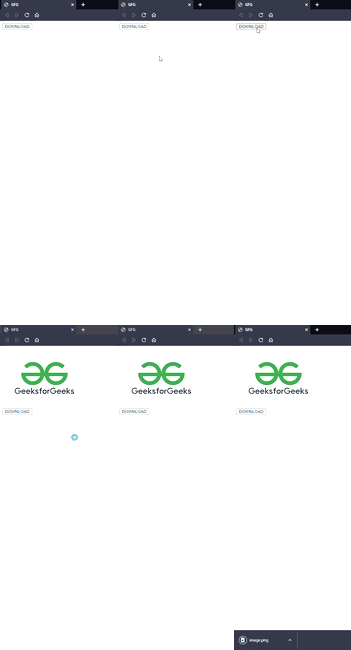
添加图片的下载按钮: 想要显示图片的服务器必须具备上述先决条件。
示例2: 下面的示例描述了允许用户使用下载按钮下载外部图片。然后,我们将图片转换为 DataUrl 并使用<a>标签触发下载。
HTML
<!DOCTYPE html>
<html lang="en">

<head>
    <meta charset="UTF-8" />
    <meta http-equiv="X-UA-Compatible" content="IE=edge" />
    <meta name="viewport" content=
        "width=device-width, initial-scale=1.0" />

    <title>
        Allowing cross-origin use of images and canvas
    </title>
</head>

<body>
    <div id="display"></div>

    <button onclick="Download()">
        DOWNLOAD
    </button>

    <script>
        function Download() {

            // Hard coded image URL change the URL according
            // to the image you want to download
            let imgURL =
"https://media.geeksforgeeks.org/wp-content/uploads/20220726175411/GFG.jpg";

            let foreignImg = new Image();

            // Set the cross origin to "anonymous" or
            // "use-credentials" according to the
            // server needs
            foreignImg.crossOrigin = "anonymous";
            foreignImg.src = imgURL;

            // The imageLoad function is called after proper
            // loading of the image
            foreignImg.addEventListener("load", imageLoad);

            function imageLoad() {

                // This function is called display and start
                // the download of the image
                const display = document.getElementById("display");
                let canvas = document.createElement("canvas");
                let context = canvas.getContext("2d");
                canvas.width = foreignImg.width;
                canvas.height = foreignImg.height;
                context.drawImage(foreignImg, 0, 0);
                display.appendChild(canvas);
                var image = canvas.toDataURL();
                var tempLink = document.createElement("a");
                tempLink.download = "image.png";
                tempLink.href = image;
                document.body.appendChild(tempLink);
                tempLink.click();
                document.body.removeChild(tempLink);
            }
        }
    </script>
</body>

</html>
注意 : 由于GFG服务器不支持crossorigin属性来访问,所以,如果我们使用代码中使用的图片URL,可能无法获得输出。
输出: