极客教程
极客教程使用HTML CSS和JavaScript开发温度转换器
在本文中,我们将使用 HTML CSS和JavaScript 查看摄氏度、华氏度和开尔文之间的温度转换。温度通常以度为单位进行测量,即摄氏度、华氏度和开尔文。
- 摄氏度 是摄氏温度标度上的标准温度单位,用°C符号表示。
- 华氏度 使用华氏度作为温度单位,并用°F符号表示。
- 开尔文 是一种国际上公认的科学温度测量标准。它是通过将摄氏度标度移动−273.15°来获得的,以使绝对零度对应为0K。
以下示例显示了0°C在华氏度和开尔文的对应温度:
Input: 0 in Celsius
Output: 32 in Fahrenheit and 273.15 in Kelvin

Input: 0 in Fahrenheit
Output: -17.78 in Celsius and 255.37 in Kelvin

Input: 0 in Kelvin
Output: -273.15 in Celsius and -459.67 in Fahrenheit
将摄氏温度转换为华氏温度和开尔文温度的公式:
T(°F) = (T(°C) * 9)/5 + 32
T(°K) = T(°C) + 273.15
将华氏温标转换为摄氏温标和开尔文温标的公式:
T(°C) = ((T(°F) - 32) * 5) / 9
T(°K) = (T(°F)  - 32) * 5 / 9 + 273.15
将开尔文温度转换为摄氏温度和华氏温度的公式:
T(°C) = (T(°K) - 273.15
T(°F) = (T(°K) - 273.15) * 9 / 5 + 32;
方法:
- 创建一个包含所有元素的容器。
- 在这个容器中添加3个输入字段,一个用于摄氏度,另一个用于华氏度,还有一个用于开尔文。
- 现在按照你想要的样式,将这个容器居中。
- 现在添加Javascript代码,将以下 温度(华氏度、摄氏度、开尔文) 转换为对应的 另外两个温度 ,并在不同的 输入字段 中显示结果。
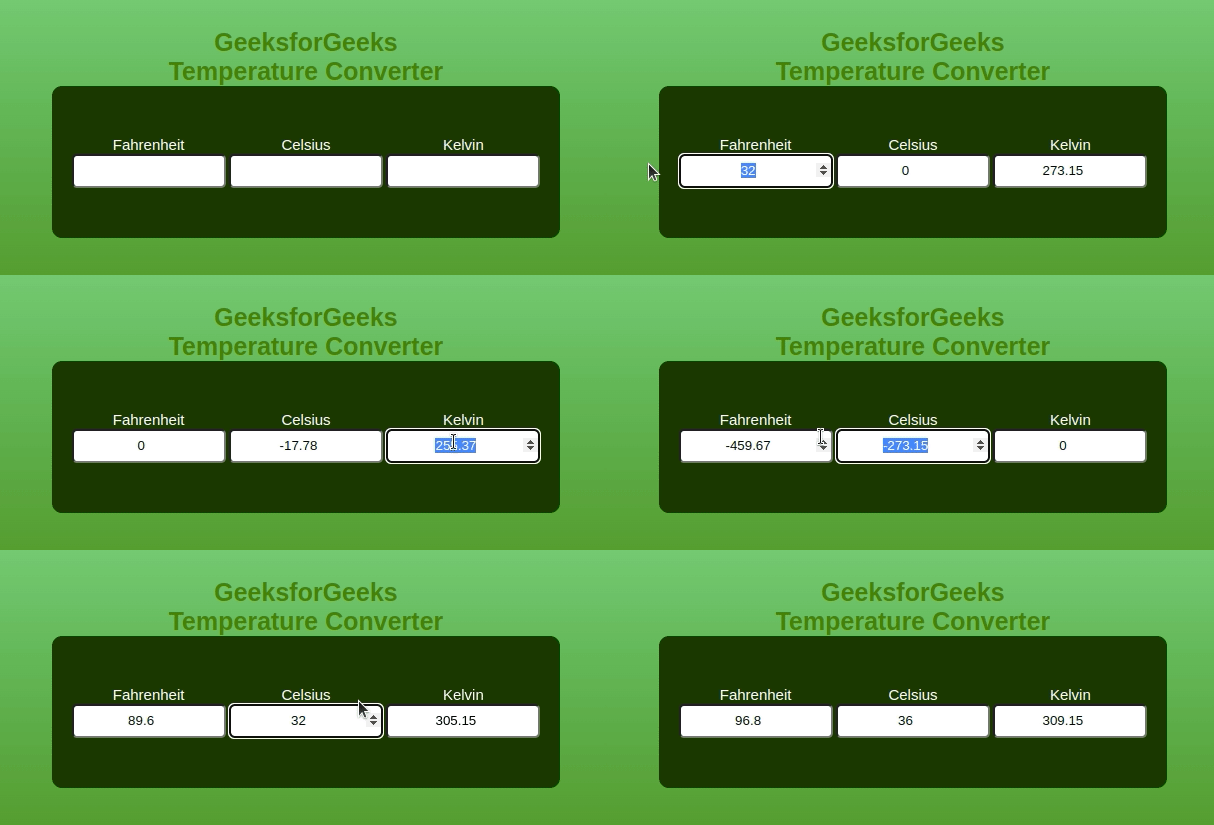
示例: 这个示例演示了使用HTML、CSS和JS进行摄氏度、华氏度和开尔文之间的基本温度转换。
HTML
<!DOCTYPE html>
<html lang="en">

<head>
    <meta charset="UTF-8">
    <meta name="viewport"
          content="width=device-width,
                   initial-scale=1.0">

    <style>
        * {
            margin: 0;
            padding: 0;
            font-family:
                Verdana, Geneva, Tahoma, sans-serif;
        }

        .container {
            width: 100%;
            height: 100vh;
            background-image:
                linear-gradient(rgb(140, 219, 140),
                                rgb(20, 141, 20));
            display: flex;
            flex-direction: column;
            justify-content: center;
            align-items: center;
        }

        .container h1 {
            color: green;
            font-weight: 700;
            font-size: 25px;
            text-align: center;
        }

        .converter-row {
            display: flex;
            width: 40%;
            justify-content: space-between;
            align-items: center;
            background: rgb(0, 56, 0);
            border-radius: 10px;
            padding: 50px 20px;
        }

        .col {
            flex-basis: 32%;
            text-align: center;
        }

        .col label {
            font-size: 15px;
            font-weight: 500;
            margin-bottom: 10px;
            color: #fff;
        }

        .col input {
            width: 150px;
            height: 30px;
            background: white;
            border-radius: 5px;
            text-align: center;
        }
    </style>
</head>

<body>
    <div class="container">
        <h1>GeeksforGeeks <br>
            Temperature Converter</h1>
        <div class="converter-row">
            <div class="col">
                <label>Fahrenheit</label>
                <input type="number"
                       id="fahrenheit">
            </div>

            <div class="col">
                <label>Celsius</label>
                <input type="number"
                       id="celsius">
            </div>

            <div class="col">
                <label>Kelvin</label>
                <input type="number"
                       id="kelvin">
            </div>
        </div>
    </div>

    <script>
        let celsius =
            document.getElementById('celsius');
        let fahrenheit =
            document.getElementById('fahrenheit');
        let kelvin =
            document.getElementById('kelvin');
        celsius.oninput = function () {
            let f = (parseFloat(celsius.value) * 9) / 5 + 32;
            fahrenheit.value = parseFloat(f.toFixed(2));

            let k = (parseFloat(celsius.value) + 273.15);
            kelvin.value = parseFloat(k.toFixed(2));
        }
        fahrenheit.oninput = function () {
            let c = ((parseFloat(
                fahrenheit.value) - 32) * 5) / 9;
            celsius.value = parseFloat(c.toFixed(2));

            let k = (parseFloat(
                fahrenheit.value) - 32) * 5 / 9 + 273.15;
            kelvin.value = parseFloat(k.toFixed(2));
        }
        kelvin.oninput = function () {
            let f = (parseFloat(
                kelvin.value) - 273.15) * 9 / 5 + 32;
            fahrenheit.value = parseFloat(f.toFixed(2));

            let c = (parseFloat(kelvin.value) - 273.15);
            celsius.value = parseFloat(c.toFixed(2));
        }
    </script>
</body>

</html>
输出: