极客教程
极客教程使用HTML CSS和JavaScript创建乘法测验Web应用
本文介绍如何使用HTML、CSS和JavaScript创建一个乘法测验Web应用。
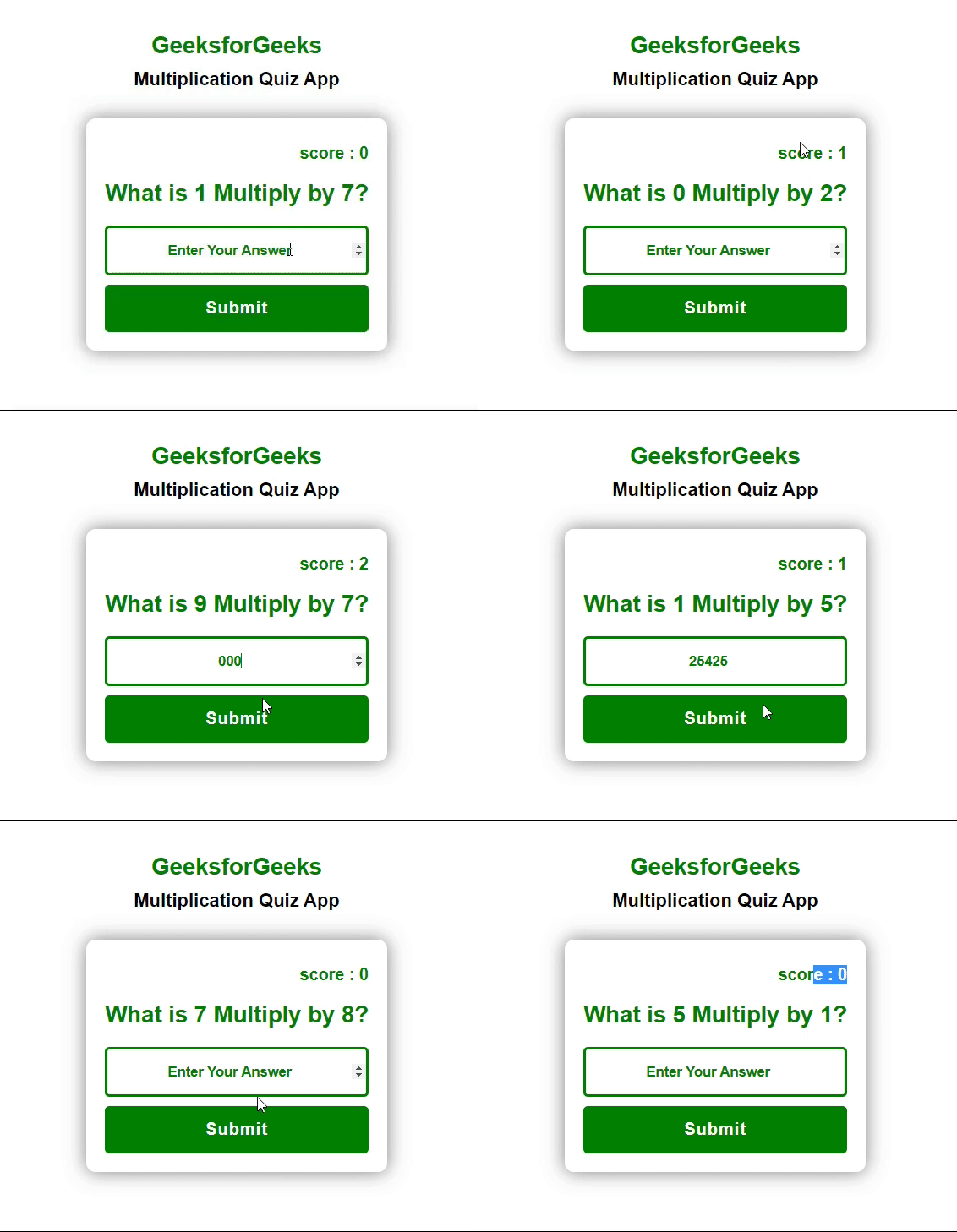
Web应用描述: 在这个Web应用中,基于基本乘法原则,随机问题会逐个出现。如果你给出正确答案,分数将增加 1,如果你给出错误答案,分数将减少 1。
文件结构: 本应用包含三个文件: index.html (HTML文件),使用 style.css (CSS文件)为网页中的所有元素进行布局,使用 script.js (JavaScript文件)实现所有逻辑功能。
- index.html
- style.css
- script.js
前提条件:
- HTML 中的和标签。
- CSS 中的 display: flex。
- JavaScript 中的基本 DOM 和本地存储概念。
HTML 文件:
- 创建一个 container 类,其中包含所有元素。
- 在 container 中创建一个 form,并移除 action 属性。
- 表单提供问题和分数标题,用户答案的输入字段以及一个“提交”按钮。
index.html
<!DOCTYPE html>
<html lang="en">

<head>
    <meta charset="UTF-8">
    <meta http-equiv="X-UA-Compatible" content="IE=edge">
    <meta name="viewport" content="width=device-width, initial-scale=1.0">
    <title>Multiplication Quiz WebApp</title>

    <link rel="stylesheet" href="style.css">

</head>

<body>
    <div class="container">
        <h1>GeeksforGeeks</h1>
        <h3><b> Multiplication Quiz App </b></h3>
        <form id="form">
            <p id="score">score : 0</p>
            <h1 id="question">What is X Multiply of X?</h1>
            <input type="number" id="inp" placeholder="Enter Your Answer"
                   autofocus autocomplete="off">
            <button id="btn" type="submit">Submit</button>
        </form>
    </div>

    <script src="script.js"></script>
</body>
</html>
CSS文件:
- 从body中移除默认的边距和内边距。
- 在容器中设置display: flex,并通过flex属性将所有项目居中对齐。
- 其余的元素根据开发者的需要进行设计。
style.css
body {
    margin: 0;
    padding: 0;
    font-family: sans-serif;
}

.container {
    width: 100%;
    height: 100vh;
    display: flex;
    justify-content: center;
    align-items: center;
    text-align: center;
    flex-direction: column;
}

h1{
    font-size: 25px;
    font-weight: 700;
    margin-bottom: 20px;
    color: green;
}

h3
{
    font-size: 20px;
    font-weight: 700;
    margin: -10px 0 20px;
}
#form {
    padding: 10px 20px;
    margin: 10px;
    background-color: white;
    border-radius: 10px;
    box-shadow: 0 0 20px rgba(0, 0, 0, 0.5);
}

#score {
    font-size: 18px;
    text-align: right;
    font-weight: 700;
    color: green;
}

#question {
    color: green;
    font-weight: 700;
    font-size: 25px;
}

#inp {
    color: green;
    border: 3px solid green;
    border-radius: 5px;
    padding: 15px 0;
    margin: 10px 0px;
    display: block;
    width: 100%;
    box-sizing: border-box;
    font-size: 15px;
    font-weight: 700;
    text-align: center;
    outline: none;
}

#inp::placeholder {
    color: green;
}

#btn {
    background-color: green;
    outline: none;
    border: none;
    border-radius: 5px;
    padding: 15px 0;
    margin: 10px 0px;
    display: block;
    width: 100%;
    box-sizing: border-box;
    font-size: 18px;
    font-weight: 700;
    text-align: center;
    color: white;
    letter-spacing: 1px;
}
JavaScript文件:
- 创建两个变量,使用math对象存储随机数。在问题中,通过JavaScript的innerText属性将这两个数相加。此外,将这两个随机数的答案存储在一个变量中。
- 如果用户点击“提交”按钮,将比较用户的答案和正确的答案。如果两者相等,则将得分增加1,否则将得分减少1。
- 使用localStorage.getItem()方法将得分添加到本地存储中。
script.js
const questionElement = document.getElementById("question");

let num1 = Math.floor(Math.random() * 10);
let num2 = Math.floor(Math.random() * 10);
let correctAnswer = num1 * num2;

questionElement.innerText = `What is {num1} Multiply by{num2}?`;

const form = document.getElementById('form');
const input = document.getElementById('inp');
let scoreElement = document.getElementById('score');

let score = Number(localStorage.getItem("score"));
if(!score) {
    score = 0;
}

scoreElement.textContent = `score : ${score}`;

form.addEventListener('submit',function() {
    let userAnswer = +input.value;
    if(correctAnswer === userAnswer) {
        score++;
        updateScore();
    }
    else {
        score--;
        updateScore();
    }
});

function updateScore() {
    localStorage.setItem("score",String(score));
}

// Clear Local Storage
// localStorage.removeItem("score");
输出: