极客教程
极客教程使用HTML CSS和JavaScript的单词和字符计数器
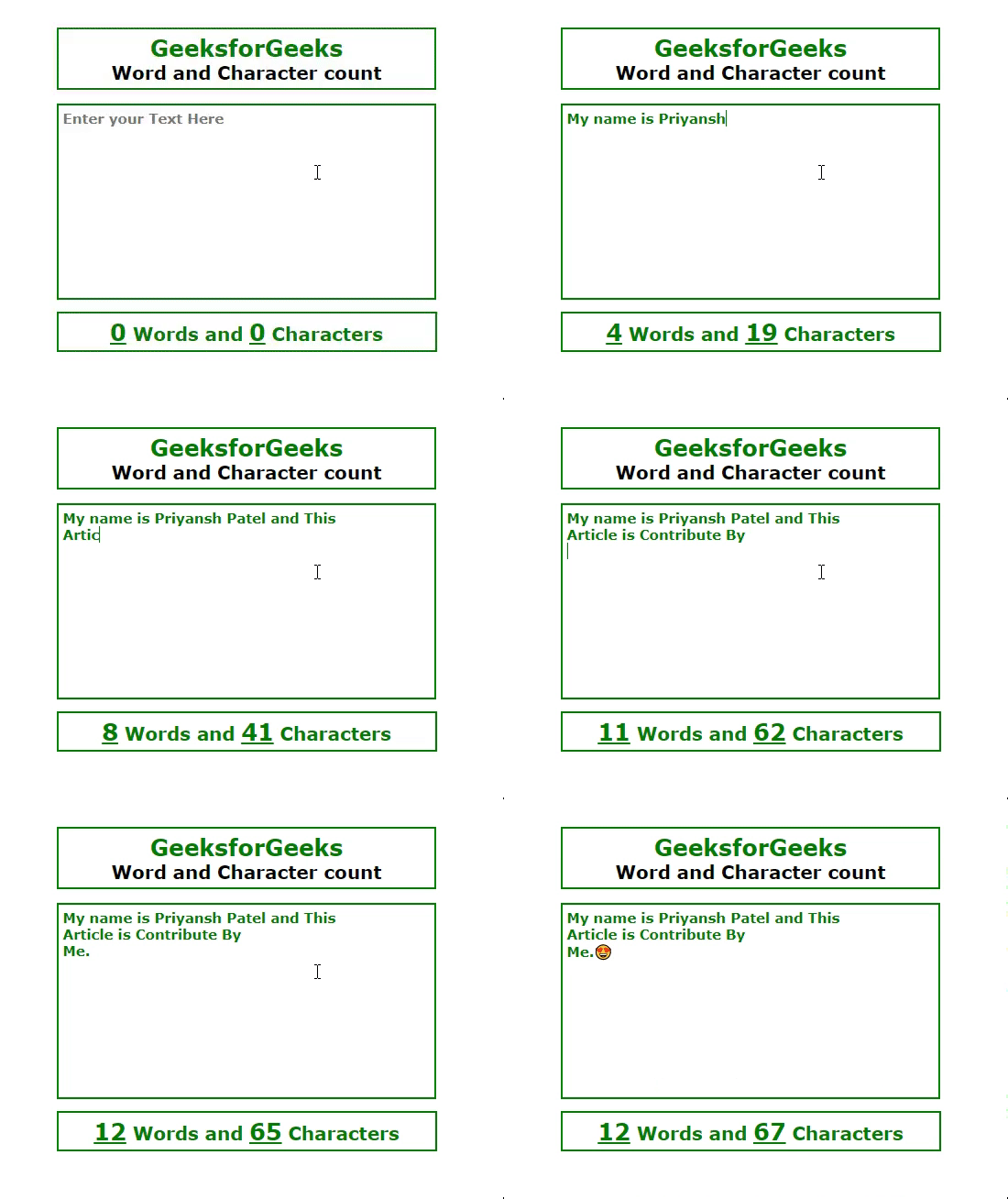
在这篇文章中,我们将看到使用HTML、CSS和JavaScript的单词和字符计数器网络应用程序。
在这个文本框中,用户可以写任何用户想要的内容,这个应用程序会显示用户添加了多少个单词以及文本区域中添加了多少个字符。
方法:
- 创建一个容器,其中包含所有的元素。
- 添加一个文本区域字段,用户可以在其中编写文本。
- 添加JavaScript逻辑,计算文本框中的单词和字符,并在一个p元素中打印结果。
- 在段落元素中,为单词计数器和字符计数器提供2个span元素。
示例: 这个示例演示了使用HTML、CSS和JavaScript的基本的单词和字符计数器。
HTML文件:
- 创建一个名为container的类,其中包含所有的元素,并添加一个用于用户输入的文本区域。
- 我们提供了2个span元素,一个用于单词计数器,另一个用于字符计数器。
HTML
<!DOCTYPE html>
<html lang="en">
<head>
    <meta charset="UTF-8">
    <meta http-equiv="X-UA-Compatible"
          content="IE=edge">
    <meta name="viewport"
          content="width=device-width, initial-scale=1.0">
    <title>Word and Character Counter</title>
</head>
<body>
    <div class="container">
       <div class="heading">
        <h1 style="color:green">GeeksforGeeks</h1>
        <h3><b>Word and Character count<b></h3>
       </div>
        <textarea id="area"
                  placeholder="Enter your Text Here">
        </textarea>
        <p class="result">
          <span id="word">0</span> Words and
            <span id="char">0</span> Characters
        </p>
    </div>
</body>
</html>
CSS文件:
- 从body中移除默认的margin和padding。
- 在容器中设置display flex,并通过flex属性将所有项目居中对齐。
- 其余元素根据开发者的需求进行设计。
CSS
* {
    margin: 0;
    padding: 0;
    font-family: Verdana, Geneva, Tahoma, sans-serif;
}

.container {
    width: 100%;
    height: 100vh;
    display: flex;
    flex-direction: column;
    justify-content: center;
    align-items: center;
}

.container h1 {
    font-size: 25px;
}
.container h3 {
    font-size: 20px;
}

.heading {
    border: 2px solid green;
    padding: 5px;
    font-weight: 700;
    text-align: center;
    width: 400px;
}

#area {
    height: 200px;
    width: 400px;
    resize: none;
    font-size: 15px;
    font-weight: 700;
    padding: 5px;
    margin-top: 15px;
    color: green;
    outline: none;
    border: 2px solid green;
}

#area:focus {
    border: 2px solid green;
    outline: none;
}

.result {
    color: green;
    font-size: 20px;
    width: 401px;
    text-align: center;
    font-weight: 700;
    padding: 5px;
    border: 2px solid green;
    margin-top: 10px;
}

#word,
#char {
    font-size: 25px;
    font-weight: bold;
    text-decoration: underline;
}
JavaScript文件:
- 通过document.getElementById()方法获取字符和单词。
- 在输入上添加一个事件,并在JavaScript中获取所有输入内容的长度,这个内容的大小将是字符数。
- 使用trim和split函数来计算单词数量,最后使用一个filter方法来移除单词之间的空格。
JavaScript
let area = document.getElementById('area');
let char = document.getElementById('char');
let word = document.getElementById('word');

area.addEventListener('input', function () {
    // count characters
    let content = this.value;
    char.textContent = content.length;

    // remove empty spaces from start and end
    content.trim();
    console.log(content);

    let wordList = content.split(/\s/);

    // Remove spaces from between words
    let words = wordList.filter(function (element) {
        return element != "";
    });

    // count words
    word.textContent = words.length;
});
最终代码: 以下是以上所有内容的组合。
HTML
<!DOCTYPE html>
<html lang="en">

<head>
    <meta charset="UTF-8">
    <meta http-equiv="X-UA-Compatible"
          content="IE=edge">
    <meta name="viewport"
          content="width=device-width, initial-scale=1.0">
    <title>Word and Character Counter</title>

    <style>
        * {
            margin: 0;
            padding: 0;
            font-family: Verdana, Geneva, Tahoma, sans-serif;
        }

        .container {
            width: 100%;
            height: 100vh;
            display: flex;
            flex-direction: column;
            justify-content: center;
            align-items: center;
        }

        .container h1 {
            font-size: 25px;
        }

        .container h3 {
            font-size: 20px;
        }

        .heading {
            border: 2px solid green;
            padding: 5px;
            font-weight: 700;
            text-align: center;
            width: 400px;
        }

        #area {
            height: 200px;
            width: 400px;
            resize: none;
            font-size: 15px;
            font-weight: 700;
            padding: 5px;
            margin-top: 15px;
            color: green;
            outline: none;
            border: 2px solid green;
        }

        #area:focus {
            border: 2px solid green;
            outline: none;

        }

        .result {
            color: green;
            font-size: 20px;
            width: 401px;
            text-align: center;
            font-weight: 700;
            padding: 5px;
            border: 2px solid green;
            margin-top: 10px;
        }

        #word,
        #char {
            font-size: 25px;
            font-weight: bold;
            text-decoration: underline;
        }
    </style>
</head>

<body>
    <div class="container">
        <div class="heading">
            <h1 style="color:green">GeeksforGeeks</h1>
            <h3><b>Word and Character count<b></h3>
        </div>
        <textarea id="area"
                  placeholder="Enter your Text Here">
        </textarea>
        <p class="result">
          <span id="word">0</span> Words and
            <span id="char">0</span> Characters
        </p>
    </div>
    <script>
        let area = document.getElementById('area');
        let char = document.getElementById('char');
        let word = document.getElementById('word');

        area.addEventListener('input', function () {
            // count characters
            let content = this.value;
            char.textContent = content.length;

            // remove empty spaces from start and end
            content.trim();
            console.log(content);

            let wordList = content.split(/\s/);

            // Remove spaces from between words
            let words = wordList.filter(function (element) {
                return element != "";
            });

            // count words
            word.textContent = words.length;
        });
    </script>
</body>

</html>
输出: