极客教程
极客教程如何使用HTML CSS和JavaScript制作Moore的投票算法可视化工具
本文将展示如何使用HTML、CSS和JavaScript制作Moore的投票算法可视化工具。该算法用于超过数组大小的一半的元素,该元素必须连续重复出现,这是该算法的关键方法。
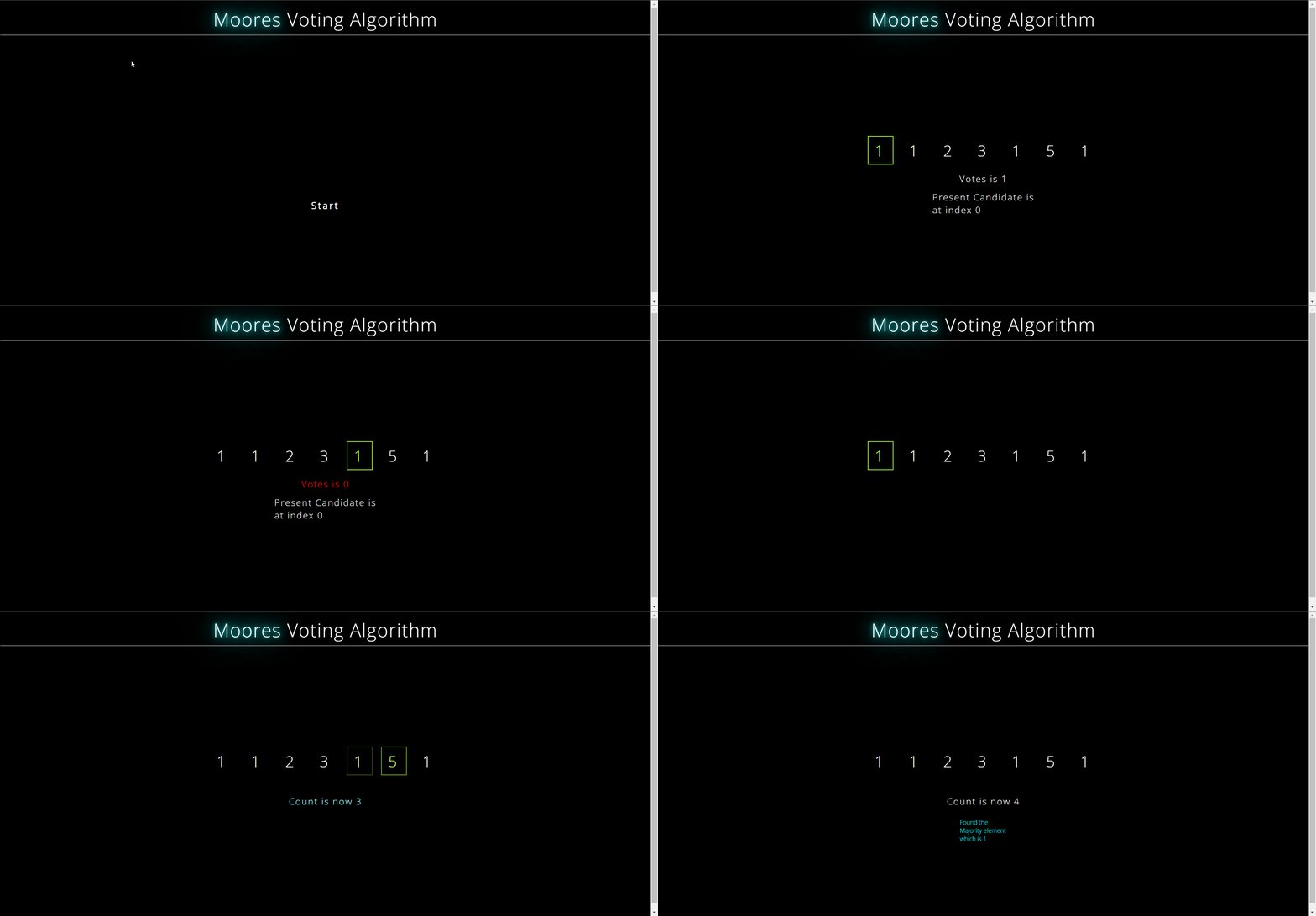
方法: 我们将使用相同的算法,但我们将输入文本和模式,然后计算一个LPS数组,然后比较文本和模式。这个算法的主要思想是,如果一个元素重复出现,那么它将重复出现N/2次,当在数组上迭代时,它必须有在参考元素末尾留下的出现。然后,在此之后,我们开始遍历数组,将每个元素添加到容器的CSS标题类中,同时遍历数组,然后应用Moore投票算法的逻辑。本文的主要思想是,如果在一个数组中有超过n/2次重复出现的元素(其中n是数组的大小),那么这个元素在特定数组中需要连续出现n/2次。
步骤1: 让我们使用HTML创建网页的基本结构。
index.html
HTML
<!DOCTYPE html>
<html lang="en">

<head>
    <meta charset="UTF-8">
    <meta http-equiv="X-UA-Compatible"
          content="IE=edge">
    <meta name="viewport"
          content="width=device-width, initial-scale=1.0">
    <link href=
"https://fonts.googleapis.com/css2?family=Open+Sans:wght@300&display=swap"
          rel="stylesheet" />
    <script src="script.js"></script>
    <link rel="stylesheet" href="style.css">
    <title>Document</title>
</head>

<body>
    <div class="header">
        <span id="span">Moores
        </span>Voting Algorithm
    </div>
    <div id="container"></div>
    <div class="container_2">
        <div id="votes"></div>
        <div id="candidate"></div>
        <div id="count"></div>
        <div id="message"></div>
        <div id="start">Start</div>
    </div>
</body>

</html>
步骤2: 现在在style.css文件中,我们将样式化网页的结构。
style.css
CSS
* {
    color: white;
}

#span {
    font-weight: normal;
    text-shadow: 0 0 10px cyan, 0 0 40px cyan, 0 0 80px cyan;
    letter-spacing: 2px;
}

html {
    background-color: black;
    font-family: "Open sans", sans-serif;
}

body {
    display: flex;
    flex-direction: column;
    align-items: center;
    height: 100vmin;
}

.container_2 {
    display: flex;
    flex-direction: column;
    align-items: center;
}

#container {
    width: 100%;
    margin-top: 15%;
    display: flex;
    justify-content: center;
    flex-direction: row;
    font-size: 5vmin;
    letter-spacing: 2vmin;
    font-weight: normal;
}

.tile {
    display: flex;
    align-items: center;
    justify-content: center;
    margin: 10px;
    padding: 1vmin;
    padding-left: 2vmin;
    border: 2px solid black;
}

.onover {
    color: cyan;
}

#candidate,
#count {
    font-size: 5vmin;
}

#start {
    align-self: center;
    background-color: black;
    font-size: 3vmin;
    box-sizing: border-box;
    padding: 1vmin;
    color: white;
    cursor: pointer;
    border: none;
    margin-top: 2vmin;
    transition: 0.5s ease-in-out;
    font-weight: bold;
    letter-spacing: 4px;
}

#start:hover {
    transform: scale(1.5);
    text-shadow: 0 0 10px cyan, 0 0 20px cyan, 0 0 40px cyan;
}

#array {
    display: flex;
    font-size: 10vmin;
}

#votes,
#candidate,
#count {
    display: flex;
    justify-content: center;
    align-items: center;
    padding: 1vmin;
    font-size: 3vmin;
    letter-spacing: 2px;
    transition: all 0.5s ease-in-out;
}

#votes:hover,
#candidate:hover,
#count:hover {
    transform: scale3d(1.5);
}

.header {
    text-align: center;
    padding: 1vmin;
    width: 100%;
    font-size: 6vmin;
    letter-spacing: 2px;
    border-bottom: 1px solid white;
}

input {
    margin-top: 2vmin;
}

#message {
    width: 50%;
    height: 7vmin;
    margin: 3vmin;
    font-size: 5vmin;
    display: flex;
    align-items: center;
    justify-content: center;
    color: cyan;
    font-size: 2vmin;
}

.cyans {
    color: cyan;
    border: 2px solid cyan;
    transition: all 0.5s ease-in-out;
}

.greenyellow {
    color: greenyellow;
    border: 2px solid greenyellow;
    transition: all 0.5s ease-in-out;
}

.normal {
    color: white;
    border: 2px solid black;
}
步骤3: 现在我们将看到该算法的所有逻辑的JS文件的代码。当窗口加载时,我们创建一个数组,当点击开始时,我们显示一个数组。我们将其设置为异步,以便当消息显示时,我们将其等待7000毫秒,以便人们可以看到它。然后我们将其设置为display none,然后使用tile class向容器添加元素。现在我们有一个找到多数元素的墨尔投票算法函数,我们首先显示初始化的元素,然后使用async/await和promises等待它一段时间,然后对其进行迭代,对于迭代我们使用绿色、黄色边框颜色和相同的字体颜色,然后如果数字存在,我们使用青色边框颜色和字体颜色,如果数字等于候选项,我们不断显示投票和候选项,并在message div中显示一条消息,如果重要的是我们只用了javascript文件但是要理解它,我们必须对该算法有一个简要的了解。
script.js
Javascript
function id(id) {
    return document.getElementById(id);
}
var array = [1, 1, 2, 3, 1, 5, 1];
window.onload = () => {
    id("start").addEventListener('click', async () => {
        id("start").style.display = "none";
        id("message").innerText = "Main intuition behind this algorithm is "
            + "if a element is repeating than it will repeat N / 2 times "
            + "that it must have occurrences which will be left at the "
            + "reference element at the end when iterated over the array "
            + "How let us see!"
        await new Promise((resolve) =>
            setTimeout(() => {
                resolve();
            }, 7000)
        )
        id("start").style.display = "none";
        let idcount = 0;
        for (let i = 0; i < array.length; i++) {
            let tile = document.createElement('span');
            tile.id = idcount;
            tile.classList.add("tile");
            tile.innerText = array[i];
            id("container").appendChild(tile);
            idcount++;
            MooresVoting(array, array.length);
        }
    })

}
const MooresVoting = async (array, size) => {
    // console.log("inside function")
    var count = 0;
    var candidate = -1;
    var votes = 0;
    id("message").innerText = "Watching the initializer elements first";
    await new Promise((resolve) =>
        setTimeout(() => {
            resolve();
        }, 2000)
    )
    id("votes").innerText = `Votes is {votes}`;
    id("candidate").innerText = `Present Candidate
        is at index{candidate}`;
    // id("count").innerText = `Count is {count}`;
    await new Promise((resolve) =>
        setTimeout(() => {
            resolve();
        }, 3000)
    )
    id("message").innerText = `iterating over the array now`
    id("message").innerText = "Main intuition behind this algorithm "
        + "is if a element is repeating than it will repeat N / 2 "
        + "times that it must have occurrences which will be left at "
        + "the reference element at the end when iterated over the "
        + "array How let us see!"
    await new Promise((resolve) =>
        setTimeout(() => {
            resolve();
        }, 3000)
    )
    id("message").innerText = "";
    for (let i = 0; i{candidate}`;
            id("votes").innerText = `Votes is {votes}`;
            await new Promise((resolve) =>
                setTimeout(() => {
                    resolve();
                }, 3000)
            )
            // id("candidate").style.color="white";
            // id("votes").style.color="white";
            id("candidate").classList.remove("cyan");
            id("votes").classList.remove("cyan");
        } else {
            // console.log("inside else");
            // console.log(`{i} {candidate}`);
            console.log(`inside else{array[i]} and
                cand {candidate}`);
            if (array[i] == array[candidate]) {
                console.log("inside array[i]==candidate");
                id(i).style.borderColor = "cyan";
                id(i).style.color = "cyan";
                id(candidate).style.borderColor = "cyan";
                id(candidate).style.color = "cyan"
                id("votes").style.color = "cyan";
                await new Promise((resolve) => {
                    setTimeout(() => {
                        resolve();
                    }, 2000);
                })
                votes++;
                id("votes").innerText = `Votes is{votes}`;
                await new Promise((resolve) => {
                    setTimeout(() => {
                        resolve();
                    }, 3000);
                })
                id("votes").style.color = "white";
                id(i).style.borderColor = "black";
                id(candidate).style.color = "white"
                id(candidate).style.borderColor = "black";
            }
            else {
                id("votes").style.color = "cyan";
                await new Promise((resolve) => {
                    setTimeout(() => {
                        resolve();
                    }, 3000);
                })
                votes--;
                id("votes").innerText = `Votes is {votes}`
                await new Promise((resolve) => {
                    setTimeout(() => {
                        resolve();
                    }, 2000);
                })
                id("votes").style.color = "white";
            }
        }
        id(i).style.color = "white";
        id(i).style.borderColor = "black"
    }
    id("message").innerText = `Now we gonna check element we
        found was actually occurring more than N/2 times
        and that candidate is{candidate}`;
    await new Promise((resolve) => {
        setTimeout(() => {
            resolve();
        }, 3000);
    })
    id("message").innerText = "";
    id("votes").innerText = "";
    id("candidate").innerText = "";
    for (let i = 0; i < size; i++) {
        id(i).style.borderColor = "greenyellow";
        id(i).style.color = "greenyellow";
        await new Promise((resolve) => {
            setTimeout(() => {
                resolve();
            }, 3000);
        })
        // console.log(`array of candidate {array[candidate]} and{ array[i] } `);
        if (array[i] == array[candidate]) {
            id("count").style.color = "cyan";
            await new Promise((resolve) => {
                setTimeout(() => {
                    resolve();
                }, 3000);
            })
            count++;
            id("count").innerText = `Count is now {count} `
            id("count").style.color = "white";
        }
        id(i).style.color = "white";
        id(i).style.borderColor = "black"
    }
    await new Promise((resolve) => {
        setTimeout(() => {
            resolve();
        }, 3000);
    })
    // console.log(`count is{ count } and size is { size / 2 } `);
    if (count>size / 2) {
        id("message").innerText = `Found the Majority element
            which is{array[candidate]} `;
    } else {
        id("message").innerText = `Didn't found the
            Majority Element`;
    }
}
输出: