极客教程
极客教程three.js 旋转对象时出现“Object is undefined”错误
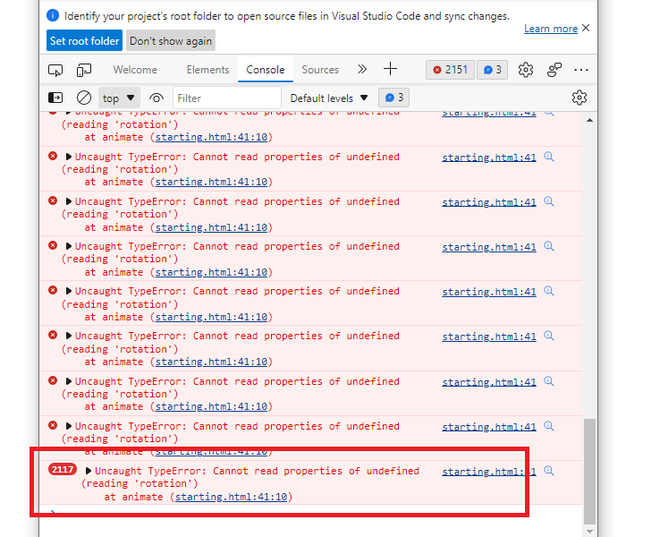
在本文中,我们将看到 “Uncaught TypeError: Cannot read properties of undefined (reading ‘rotation’) at animate” 。这是一个 类型错误 ,用于 变量 ,在 Three.js 中,当变量被声明但值未 分配 或者值是undefined时,就会出现这个错误。我们可以从错误信息中观察到,这个错误发生在变量被调用时,用于修改 旋转 的 animate 。
这里的变量是 THREE.Object3D 的一个实例。
示例: 这个示例创建了上述显示的错误,即 “Uncaught TypeError: Cannot read properties of undefined (reading ‘rotation’)at animate” 。
这是一个创建 圆锥 的three.js代码,它在 x 轴和 y轴 上进行旋转。在这里,变量名 ‘cone’ 被 声明 ,但 未分配 一个 3D对象 。因此,当我们尝试访问变量的旋转关键字时,它无法读取,从而显示错误。
HTML
<!DOCTYPE html>
<html>

<head>
    <meta charset="utf-8">
    <title>
        Solving errors with
        geeksforgeeks in three.js
    </title>

    <script src="three.js"></script>
</head>

<body>
    <script>

        // Adding scene and camera
        const scene = new THREE.Scene();
        const camera = new THREE.PerspectiveCamera(
            75, window.innerWidth / window.innerHeight,
            0.1, 1000);

        // Adding rendering
        const renderer = new THREE.WebGLRenderer();
        renderer.setSize(window.innerWidth,
                window.innerHeight);
        document.body.appendChild(renderer.domElement);

        // Creating a cone geometry, and material.
        const geometry = new THREE.ConeGeometry();
        const material = new THREE.MeshBasicMaterial({
            color: 'purple'
        });

        // Declaring Variable
        let cone;

        // Adding cone to the scene.
        scene.add(cone);

        camera.position.z = 7;

        // Writing an animate() function.
        function animate() {
            requestAnimationFrame(animate);

            // Cone not assigned, with a
            // 3D object but still trying
            // to rotate an, undefined object.
            cone.rotation.x += 0.01;
            cone.rotation.y += 0.01;
            renderer.render(scene, camera);
        };
        animate();
    </script>
</body>

</html>
输出:
为了解决这个错误,我们需要创建一个Mesh,该Mesh将之前声明的几何体和材质结合在一起。Mesh函数被赋给变量 ‘cone’ ,这样错误就被解决了。所赋的值是 “new THREE.Mesh( geometry, material )”
示例: 下面的示例通过给 ‘cone’ 赋值来解决错误。
HTML
<!DOCTYPE html>
<html>

<head>
    <meta charset="utf-8">
    <title>
        Solving errors with
        geeksforgeeks in three.js
    </title>

    <script src="three.js"></script>
</head>

<body>
    <script>

        // Adding scene and camera
        const scene = new THREE.Scene();
        const camera = new THREE.PerspectiveCamera(
            75, window.innerWidth / window.innerHeight,
            0.1, 1000);

        // Adding rendering
        const renderer = new THREE.WebGLRenderer();
        renderer.setSize(window.innerWidth, window.innerHeight);
        document.body.appendChild(renderer.domElement);

        // Creating a cone geometry, and material.
        const geometry = new THREE.ConeGeometry();
        const material = new THREE.MeshBasicMaterial({
            color: 'purple'
        });

        // Declaring variable and assigning its value
        const cone = new THREE.Mesh(geometry, material);

        // Adding cone to the scene.
        scene.add(cone);

        camera.position.z = 7;

        // Writing an animate() function.
        function animate() {
            requestAnimationFrame(animate);

            // Adding rotations, in x and y direction,
            // in the cone.
            cone.rotation.x += 0.01;
            cone.rotation.y += 0.01;

            renderer.render(scene, camera);
        };
        animate();
    </script>
</body>

</html>
输出: