极客教程
极客教程JavaScript 更改HTML元素的边框
在本文中,我们将看到如何使用JavaScript更改HTML元素的边框。要更改元素的边框,首先选择该元素,然后使用HTML DOM边框样式属性来更改边框。
CSS边框属性如下:
- border-style: 在JavaScript中,元素的颜色属性用于指定元素边框的颜色。
- border-color: 要更改边框的颜色,请使用border-color属性。
- border-width: 可以使用border-width属性来修改边框的宽度。它具有像素设置。
- border-radius: border-radius CSS属性用于为元素的外部边框边缘圆角。
语法:
element.style.borderColor
示例1: 在以下示例中,JavaScript代码现在还使用其ID定位按钮元素,并使用addEventListener函数将点击事件监听器添加到按钮上。当按钮被按下时,事件监听器函数的代码被调用,将div元素的边框样式更改为3像素宽,实线,绿色,并且我们添加了一个border-radius属性来使线条圆润。要更改边框的新设计或颜色,可以调整事件监听器函数内的代码。我们还为按钮添加了一些样式,使其更具吸引力。
HTML
<!DOCTYPE html>
<html>
<head>
    <title>Change Border</title>
    <style>
        button {
            margin-top: 0.5rem;
            padding: 10px 10px 10px 10px;
            background: crimson;
            color: white;
            border: none;
            border-radius: 10px;
            cursor: pointer;
        }
    </style>
</head>

<body>
    <div id="gfg">
        <h1>Welcome to geeksforgeeks!!</h1>
        <p>
              A Computer Science portal for geeks. It
            contains well written, well thought and
            well explained computer science and
            programming articles, quizzes and
            practice/competitive programming/company
            interview Questions.
        </p>
    </div>
    <button id="changeBorder">
        Change border
    </button>
    <script>
        var gfg = document.getElementById("gfg");
        var changeBorder =
            document.getElementById("changeBorder");
        changeBorder.addEventListener("click", function () {
            gfg.style.border = "3px solid green";
            gfg.style.borderRadius = "10px";
        });
    </script>
</body>

</html>
输出:

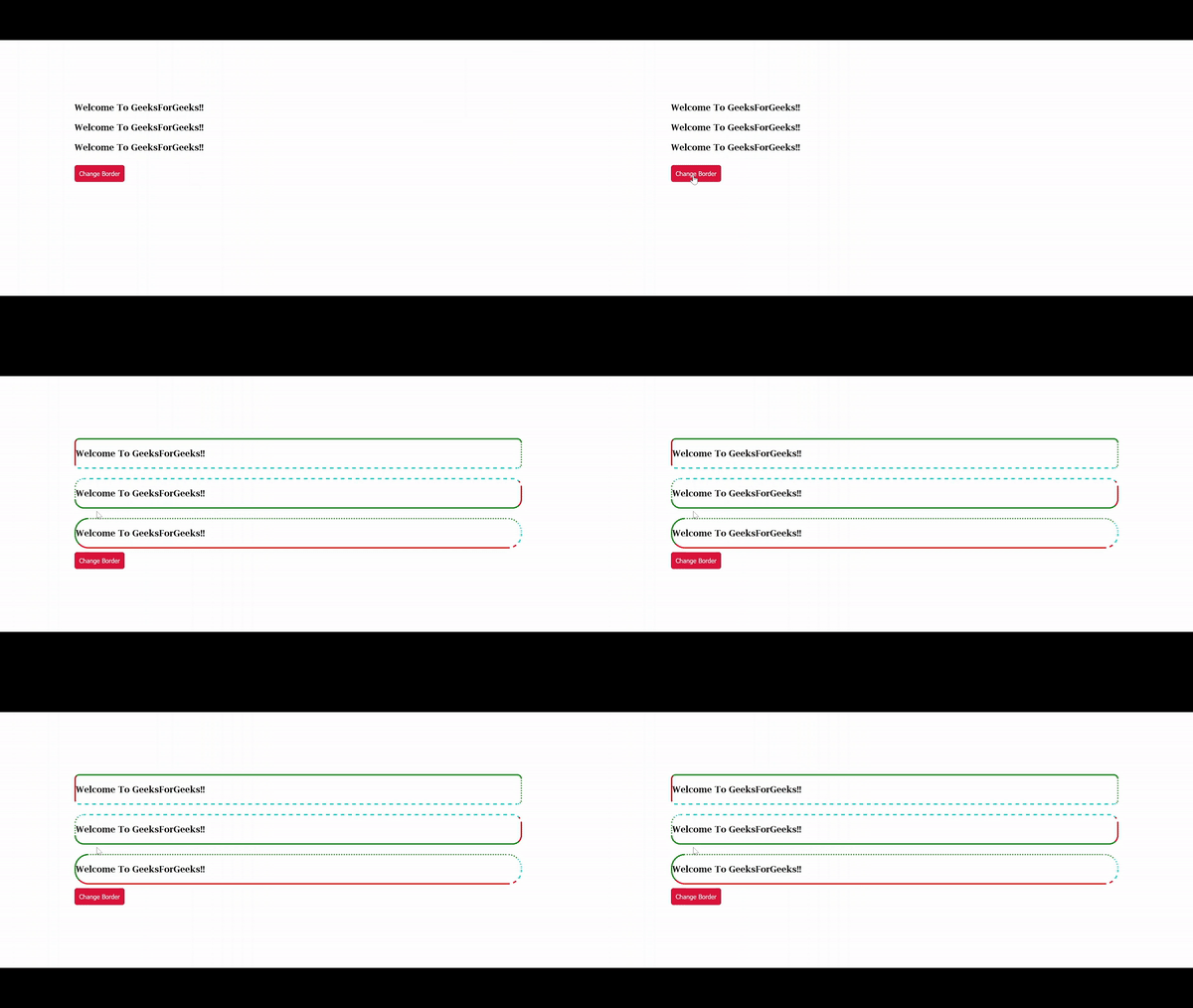
示例2: 在下面的示例中有三个div。当点击按钮时,javascript将执行并更改每个div元素的边框样式,在此示例中div具有不同类型的边界半径。 使用border-top,border-right,border-bottom和border-left属性可以为边框的每一边设置不同的边框样式。
HTML
<!DOCTYPE html>
<html>
<head>
    <title>Change Border - Method 2</title>
    <style>
        .gfg {
            margin-top: 20px;
        }

        button {
            margin-top: 0.5rem;
            padding: 10px 10px 10px 10px;
            background: crimson;
            color: white;
            border: none;
            border-radius: 5px;
            cursor: pointer;
        }
    </style>
</head>

<body>
    <div class="gfg" id="gfg1">
        <h3>
            Welcome To GeeksForGeeks!!
        </h3>
    </div>
    <div class="gfg" id="gfg2">
        <h3>
            Welcome To GeeksForGeeks!!
        </h3>
    </div>
    <div class="gfg" id="gfg3">
        <h3>
            Welcome To GeeksForGeeks!!
        </h3>
    </div>
    <button id="changeBorder">
        Change Border
    </button>

    <script>
        var gfg1 = document.getElementById("gfg1");
        var gfg2 = document.getElementById("gfg2");
        var gfg3 = document.getElementById("gfg3");

        var changeBorder = document.getElementById("changeBorder");
        changeBorder.addEventListener("click", function () {
            gfg1.style.borderTop = "3px solid green";
            gfg1.style.borderRight = "3px dotted green";
            gfg1.style.borderBottom = "3px dashed #00cec9";
            gfg1.style.borderLeft = "3px solid red";
            gfg1.style.borderRadius = "10px";

            gfg2.style.borderTop = "3px dashed #00cec9";
            gfg2.style.borderRight = "3px solid red";
            gfg2.style.borderBottom = "3px solid green";
            gfg2.style.borderLeft = "3px dotted green";
            gfg2.style.borderRadius = "20px";

            gfg3.style.borderTop = "3px dotted green";
            gfg3.style.borderRight = "3px dashed #00cec9";
            gfg3.style.borderBottom = "3px solid red";
            gfg3.style.borderLeft = "3px solid green";
            gfg3.style.borderRadius = "30px";
        });
    </script>
</body>

</html>
输出: