 极客教程
极客教程React MUI的sx属性
React MUI 是一个庞大的UI组件库,设计师和开发人员可以使用它来构建React应用程序。Material UI提供了一组低级实用函数,称为“样式函数”,用于构建强大的设计系统。
sx属性允许您在元素上添加任何有效的CSS,并使用来自主题的值来保持样式的一致性。在@mui/system中提供的所有样式函数都被打包在一起,作为可以与sx属性一起使用的CSS的扩展集合。这个属性允许您定义任何有效的CSS,以及各种MUI系统特定的主题感知特性。
语法:
<Component sx={{ cssProperty: value }} />
主题感知的属性:
- 边框: 它允许您在一行代码中设置边框的宽度、样式和颜色。
- 显示: 它用于设置元素的显示值,例如:“block”、“inline”、“inline-block”、“flex”、“grid”等。
- 网格: 它允许您指定网格属性,如grid-template-columns、grid-template-rows、grid-column-gap、grid-row-gap、grid-template-areas和grid-area。
- 调色板: 它允许您根据Material-UI主题设置元素的颜色。
- 位置: 它允许您指定位置值,如absolute、relative、fixed、sticky等。
- 阴影: 它用于设置元素的阴影。
- 尺寸: 它允许您设置元素的宽度和高度,并提供一组预定义的尺寸。
- 间距: 它允许您设置元素的外边距和内边距,并提供一组预定义的间距。
- 排版: 它允许您设置元素的字体族、字体大小、字体粗细、行高、字间距和文本对齐方式。
将值传递给sx属性的方式:
回调值:
“sx”属性的值也可以定义为回调函数,在每次渲染时被调用,并返回要应用的样式。这对于应用依赖于组件状态或props的样式非常有用。建议对于简单的样式使用回调函数,并限制使用它们的元素数量以提高性能。
语法:
<Box sx={{ CssProperty: (theme) => theme.themeName(value) }} />
数组值:
在 “sx” 属性中的数组值允许将多个样式对象应用于单个元素上,样式按照数组中定义的顺序进行级联。
语法:
<Component sx={[{ property: "value" }, { property: "value" }]} />
创建React应用程序并安装模块
步骤1: 在任何命令行中写入以下代码创建React应用程序。
npx create-react-app app_name
步骤2: 接下来,我们必须进入我们要工作的文件夹。
cd project_name
步骤3: 我们将安装@mui/material库,用于在我们的项目中工作。
npm install @mui/material @emotion/react @emotion/styled
项目结构: 创建React App并安装所有依赖项后,文件夹的结构将类似于下面给出的图示。
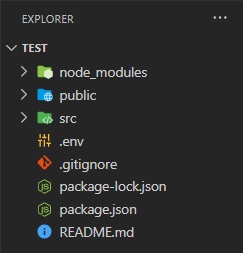
运行应用的步骤: 在终端中写入以下代码来运行服务器:
npm start
示例1: 下面是使用’sx’属性来为Box组件进行样式设置的代码。
App.js
import styled from "@emotion/styled";
import { Box } from '@mui/material';

const Text = styled.div`
 padding-left: 10px;
 padding-right: 5px;
`;

const Logo =
'https://media.geeksforgeeks.org/wp-content/uploads/20230104121959/logo.jpg';

const SimpleExample = () => {
    return (
        <Box sx={{ width: '200px', height: '400px', boxShadow: 2,
            margin: '10px', bgcolor: '#9dedb2' }}>
            <img src={Logo} alt='GFG logo' width='200px'
                height='200px' />
            <Text>A Computer Science portal for geeks.
                It contains well written, well thought and
                well explained computer science and programming
                articles.
            </Text>
        </Box>
    );
}

export default SimpleExample;
输出:

示例2: 下面是使用Material UI的’sx’属性创建一个简单表单的代码。
App.js
import React, { useState } from "react";
import styled from "@emotion/styled";
import { Box, Button, TextField } from '@mui/material';

const Text = styled.div`
  font-size: 20px;
  font-weight: bold;
  margin: 10px;
`;


const Form = () => {
    const [name, setName] = useState('');
    const [password, setPassword] = useState('');

    const handleClick = () => {
        if (!name) {
            alert(`Please Enter Name`)
        }
        else if (!password) {
            alert(`Please Enter Password`)
        }
        else {
            alert(`Thank you ${name} for Signing Up!`)
        }
    }
    const handleChange = (event) => {
        setName(event.target.value);
    }
    const handlePassword = (event) => {
        setPassword(event.target.value);
    }
    return (
        <Box sx={{ display: 'flex', alignItems: 'center',
            justifyContent: 'center', height: '100vh' }}>
            <Box sx={{ width: '200px', height: '400px',
                boxShadow: 2, margin: '10px', display: 'flex',
                flexDirection: 'column', alignItems: 'center' }}>
                <Text>Sign Up</Text>
                <TextField label='Name' variant="outlined"
                    sx={{ margin: '10px' }} onChange={handleChange} />
                <TextField type='password' label='Password'
                    variant="outlined" sx={{ margin: '10px' }}
                    onChange={handlePassword} />
                <Button sx={{ width: '100px' }} variant="contained"
                    onClick={handleClick}>Sign Up</Button>
            </Box>
        </Box>
    );
}

export default Form;
输出:
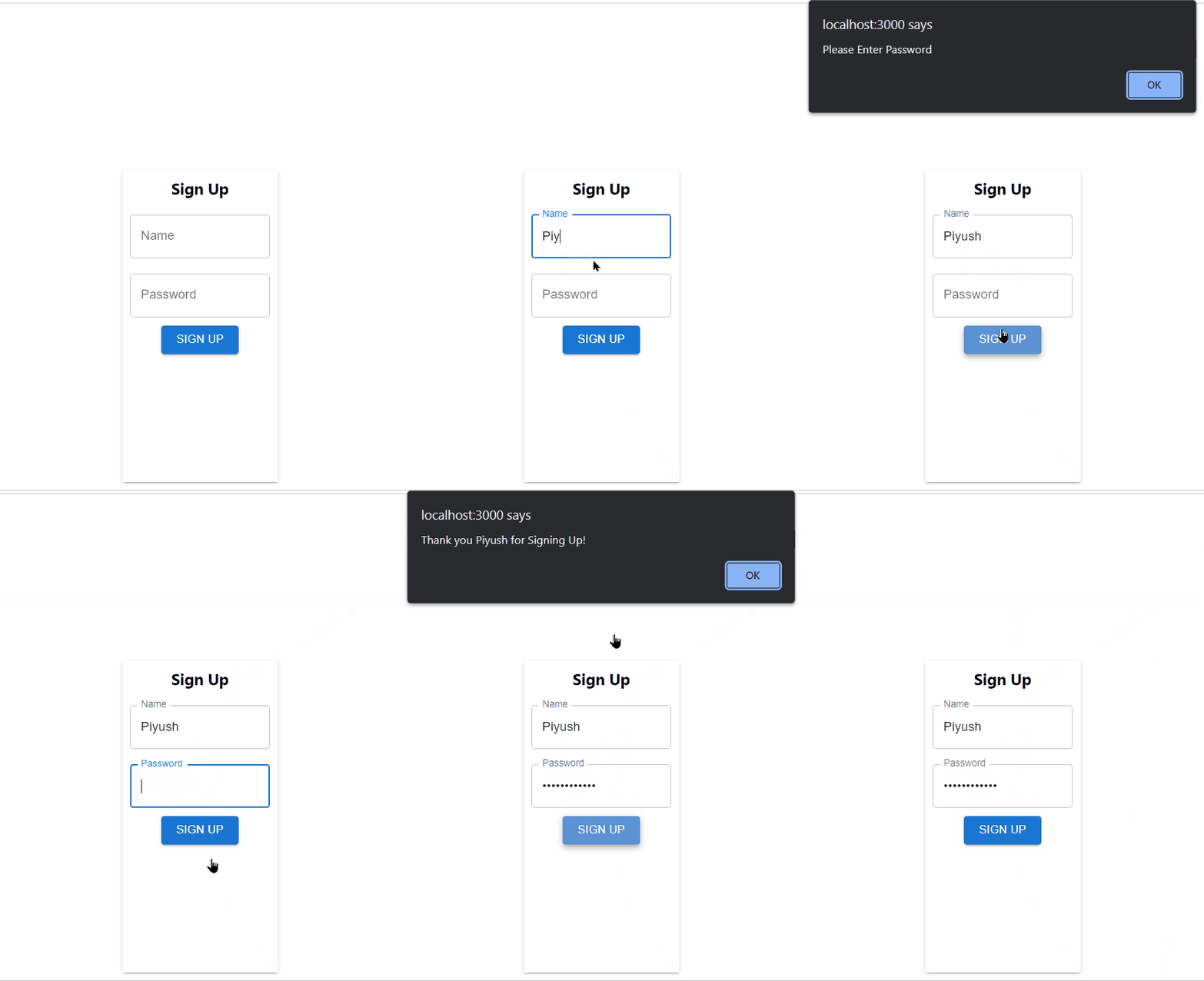
参考: https://mui.com/system/getting-started/the-sx-prop/