极客教程
极客教程如何使用Python可视化API结果
更多Python相关文章,请阅读:Python 教程
介绍..
编写API的最大优势之一是提取当前/实时数据,即使数据正在快速更改,API也始终会获得最新的数据。 API程序将使用非常特定的URL请求某些信息,例如Spotify或Youtube Music中的2020年前100首播放最多的歌曲。请求的数据将以易于处理的格式返回,例如JSON或CSV。
Python允许用户向几乎任何您想要的URL编写API调用。在本例中,我将展示如何从GitHub中提取API结果并将其可视化。
注意 – 计划是展示来自Spotify的API结果,但是Spotify需要更多的先决条件,可能需要超过1次发布,因此我们将坚持GitHUb。
GitHub,通常称为开发人员的Facebook,允许我们编写API调用来提取各种数据。假设您想要搜索JavaScript GitHub存储库,并获得更多的赞数。 GitHub不需要API密钥,而其他存储库可能需要API密钥。
如何做..
1.通过打开Python命令提示符并发出pip install requests安装请求软件包。
import requests

#设置siteurl
site_url = 'https://api.github.com/search/repositories?q=language:javascript&sort=stars'

#设置标题
headers = {'Accept': 'application/vnd.github.v3+json'}

#调用网址并保存响应
response = requests.get(site_url, headers=headers)

#获取响应
print(f"Output \n *** Response from {site_url} is {response.status_code} ")
输出
*** Response from https://api.github.com/search/repositories?q=language:javascript&sort=stars is 200
2. API以JSON格式返回信息,因此我们需要使用json()方法将信息转换为Python字典。
例子
response_json = response.json()
print(f"Output \n *** Json文件中的键为 \n {response_json.keys()} \n")

print(f" *** GitHub中的JavaScript存储库总数为 \n {response_json['total_count']}")
输出
*** Json文件中的键为
dict_keys(['total_count', 'incomplete_results', 'items'])

*** GitHub中的JavaScript存储库总数为
11199577
- 因此,我们有3个钥匙,其中我们可以忽略不完整的结果。 现在让我们检查我们的第一个存储库。
例子
repositories = response_json['items']
first_repo = repositories[0]

print(f"Output \n *** 存储库信息键总数 - {len(first_repo)} - 值为 -\n")
for keys in sorted(first_repo.keys()):
print(keys)

print(f" *** 存储库名称 - {first_repo['name']}, 拥有者 - {first_repo['owner']['login']}, 观察者总数 - {first_repo['watchers_count']} ")
输出
*** 存储库信息键总数 - 74 - 值为 -

archive_url
archived
assignees_url
blobs_url
branches_url
clone_url
collaborators_url
comments_url
commits_url
compare_url
contents_url
contributors_url
created_at
default_branch
deployments_url
description
disabled
downloads_url
events_url
fork
forks
forks_count
forks_url
full_name
git_commits_url
git_refs_url
git_tags_url
git_url
has_downloads
has_issues
has_pages
hasprojects
has_wiki
homepage
hooks_url
html_url
id
issue_comment_url
issue_events_url
issues_url
keys_url
labels_url
language
languages_url
license
merges_url
milestones_url
mirror_url
name
node_id
notifications_url
open_issues
open_issues_count
owner
private
pulls_url
pushed_at
releases_url
score
size
ssh_url
stargazers_count
stargazers_url
statuses_url
subscribers_url
subscription_url
svn_url
tags_url
teams_url
trees_url
updated_at
url
watchers
watchers_count
*** 存储库名称 - freeCodeCamp,拥有者 - freeCodeCamp,总观察者数 - 316079
4. 时间进行可视化,有很多信息需要消化,所以最好的方法是将结果可视化。记住 – “一张图胜过千言万语”。
我已经在其他帖子中介绍了Matplotlib,所以为了改变一下,我们将使用Plotly进行图表绘制。
- 安装模块-plotly。我们将开始导入Plotly。
示例
from plotly.graph_objs import Bar
from plotly import offline
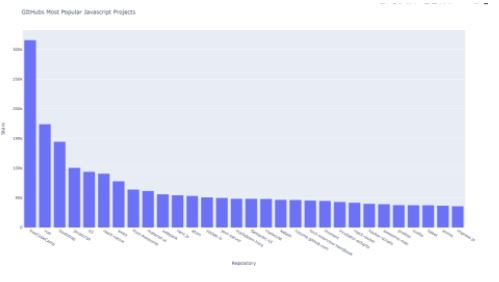
6. 我们将使用柱形图绘制代码库与星号数量之间的关系。星号越多,代码库越受欢迎。因此,这是一个很好的方法来了解谁在排名前列。我们需要两个变量,代码库名称和星号数量。
In[6]:
示例
repo_names, repo_stars = [], []
for repo_info in repositories:
repo_names.append(repo_info['name'])
repo_stars.append(repo_info['stargazers_count'])
7. 准备数据列表启动可视化。这包含一个字典,定义了图的类型并提供了x值和y值的数据。你可能已经猜到了,是的我们将使用x轴来绘制项目名称,y轴来绘制星号。
示例
data_plots = [{'type' : 'bar', 'x':repo_names , 'y': repo_stars}]
8. 我们将添加x轴、y轴和整个图表的标题。
示例
layout = {'title': 'GItHubs Most Popular Javascript Projects',
'xaxis': {'title': 'Repository'},
'yaxis': {'title': 'Stars'}}
9. 时间进行绘图。
import requests
from plotly.graph_objs import Bar
from plotly import offline

site_url = 'https://api.github.com/search/repositories?q=language:javascript&sort=stars'

headers = {'Accept': 'application/vnd.github.v3+json'}
response = requests.get(site_url, headers=headers)
response_json = response.json()

repo_names, repo_stars = [], []
for repo_info in repositories:
repo_names.append(repo_info['name'])
repo_stars.append(repo_info['stargazers_count'])

data_plots = [{'type' : 'bar', 'x':repo_names , 'y': repo_stars}]
layout = {'title': 'GItHubs Most Popular Javascript Projects',
'xaxis': {'title': 'Repository'},
'yaxis': {'title': 'Stars'}}

fig = {'data': data_plots, 'layout': layout}
offline.plot(fig, filename='Most_Popular_JavaScript_Repos.html')
示例
'Most_Popular_JavaScript_Repos.html'
输出
Most_Popular_JavaScript_Repos.html 将在与代码相同的目录中创建,并显示以下输出。