 极客教程
极客教程如何将一个目录下的所有excel文件读成Pandas DataFrame
在这篇文章中,我们将看到如何将一个文件夹中的所有Excel文件读取到单个Pandas数据框中。这项任务可以通过使用glob()方法首先找到特定文件夹中的所有Excel文件,然后通过使用pandas.read_excel()方法读取文件,再显示内容来完成。
步骤:
1.导入必要的python包,如pandas、glob和os。
2.使用glob python包来检索与指定模式相匹配的文件/路径名,如’.xlsx’。
3.循环浏览excel文件列表,使用pandas.read_excel()读取该文件。
4.将每个excel文件转换成一个数据框架。
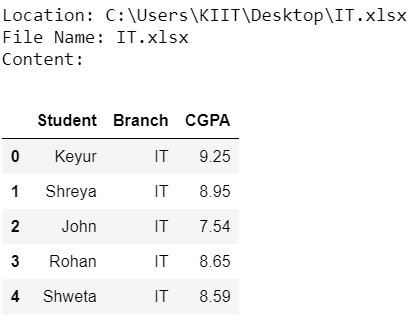
5.显示其位置、名称和内容。
以下是实现情况。
# import necessary libraries
import pandas as pd
import os
import glob


# use glob to get all the csv files
# in the folder
path = os.getcwd()
csv_files = glob.glob(os.path.join(path, "*.xlsx"))


# loop over the list of csv files
for f in csv_files:

    # read the csv file
    df = pd.read_excel(f)

    # print the location and filename
    print('Location:', f)
    print('File Name:', f.split("\\")[-1])

    # print the content
    print('Content:')
    display(df)
    print()
输出 :
注意:程序会读取程序本身所在文件夹中的所有Excel文件。