极客教程
极客教程R语言 ggplot2中显示堆积条形图上的数据值
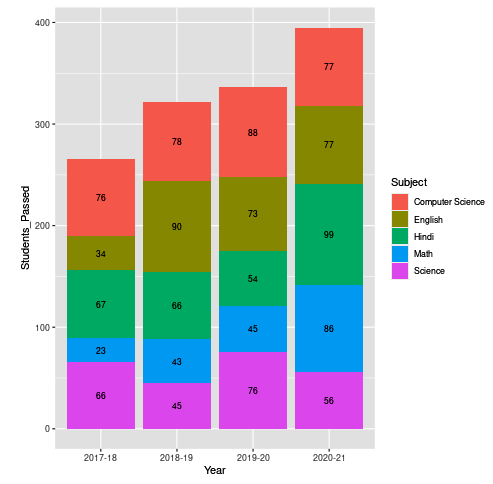
在这篇文章中,你将学习如何在R编程语言中的 ggplot2 ,在堆积条形图上显示数据值。
为了在叠加条形图中显示数据,你必须使用另一个参数,即 geom_text()。
语法
geom_text(size, position = position_stack(vjust = value), color)
这里的size代表将出现在图表上的字体大小,而position_stack()将自动在各自的位置上为图表添加数值。
例1 :
# Creating the Data
Subject = c(rep(c("Hindi", "English", "Math", "Science",
                  "Computer Science"), times = 4))

Year = c(rep(c("2017-18", "2018-19", "2019-20",
               "2020-21"), each = 5))

Students_Passed = c(67,34,23,66,76,66,90,43,45,78,54,73,
                    45,76,88,99,77,86,56,77)

# Passing the Data to DataFrame
Students_Data = data.frame(Subject,Year,Students_Passed)

# loading the Library
library(ggplot2)

# Plotting the Data in ggplot2
ggplot(Students_Data, aes(x = Year, y = Students_Passed,
                          fill = Subject, label = Students_Passed)) +
geom_bar(stat = "identity") + geom_text(
  size = 3, position = position_stack(vjust = 0.5))
输出
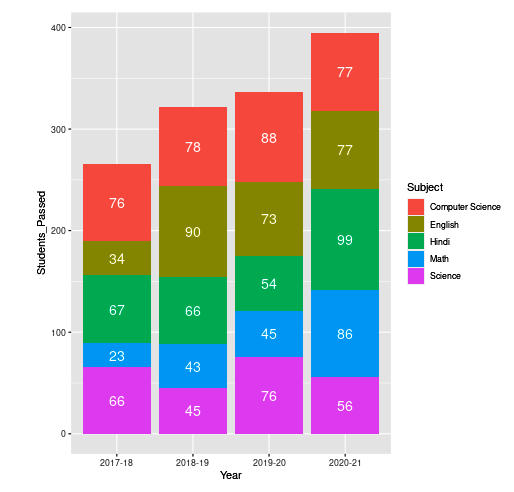
也可以用geom_text()本身来改变数据值的颜色。为此,只需将字体颜色传递给颜色属性。
例2 :
# Creating the Data
Subject = c(rep(c("Hindi", "English", "Math", "Science",
                  "Computer Science"), times = 4))
Year = c(rep(c("2017-18", "2018-19", "2019-20",
               "2020-21"), each = 5))
Students_Passed = c(67,34,23,66,76,66,90,43,45,78,54,
                    73,45,76,88,99,77,86,56,77)

# Passing the Data to DataFrame
Students_Data = data.frame(Subject,Year,Students_Passed)

# loading the Library
library(ggplot2)

# Plotting the Data in ggplot2
ggplot(Students_Data, aes(x = Year, y = Students_Passed,
                          fill = Subject, label = Students_Passed)) +
geom_bar(stat = "identity") + geom_text(
  size = 5, position = position_stack(vjust = 0.5),colour = "white")
输出