极客教程
极客教程R语言 获取DataFrame的统计摘要和性质
在这篇文章中,我们将看到如何找到给定数据框的统计数据。我们将使用 summary() 函数来获取每一列的统计数据。
语法: summary(dataframe_name)
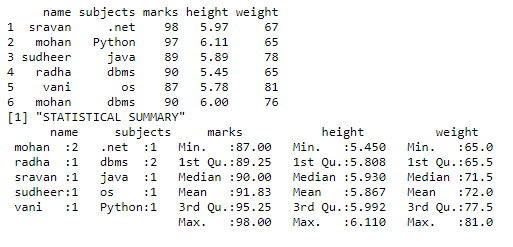
产生的结果将包含以下细节。
- 最小值 – 返回每列的最小值
- 最大值 – 返回每一列的最大值
- 平均值 – 返回每一列的平均值
- 中位数 – 返回每一列的中位数
- 第一四分位数 – 返回每一列的第一四分位数
- 第三四分位数 – 返回每一列的第三四分位数。
例子1: 在这个例子中,我们取得了学生的分数、身高、体重和分数,所以我们要计算这两栏的汇总。
# create vector with names
name = c("sravan", "mohan", "sudheer",
         "radha", "vani", "mohan")

# create vector with subjects
subjects = c(".net", "Python", "java",
             "dbms", "os", "dbms")

# create a vector with marks
marks = c(98, 97, 89, 90, 87, 90)

# create vector with height
height = c(5.97, 6.11, 5.89, 5.45, 5.78, 6.0)

# create vector with weight
weight = c(67, 65, 78, 65, 81, 76)

# pass these vectors to the data frame
data = data.frame(name, subjects,
                  marks, height, weight)

# display
print(data)
print("STATISTICAL SUMMARY")

# use summary function
print(summary(data))
输出
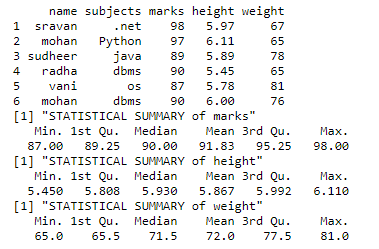
例2: 在这个例子中,我们得到的是单个列的统计摘要
# create vector with names
name = c("sravan","mohan","sudheer",
         "radha","vani","mohan")

# create vector with subjects
subjects = c(".net","Python","java",
             "dbms","os","dbms")

# create a vector with marks
marks=c(98,97,89,90,87,90)

# create vector with height
height=c(5.97,6.11,5.89,
         5.45,5.78,6.0)

# create vector with weight
weight=c(67,65,78,65,81,76)

# pass these vectors to the data frame
data=data.frame(name,subjects,marks,
                height,weight)

# display
print(data)
print("STATISTICAL SUMMARY of marks")

# use summary function  on marks column
print(summary(datamarks))
print("STATISTICAL SUMMARY of height")


# use summary function on height column
print(summary(dataheight))
print("STATISTICAL SUMMARY of weight")

# use summary function on weight column
print(summary(data$weight))
输出
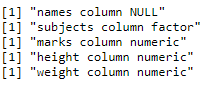
找到数据框的性质
我们可以使用class()函数来获取数据框的性质。
它将返回 。
- 数据是否为空或不为空
- 数据框架中某一列的数据类型
语法: class(dataframe$column_name)
例子
# create vector with names
name = c("sravan","mohan","sudheer",
         "radha","vani","mohan")

# create vector with subjects
subjects = c(".net","Python","java",
             "dbms","os","dbms")

# create a vector with marks
marks=c(98,97,89,90,87,90)

# create vector with height
height=c(5.97,6.11,5.89,
         5.45,5.78,6.0)

# create vector with weight
weight=c(67,65,78,65,81,76)

# pass these vectors to the data frame
data=data.frame(name,subjects,marks,
                height,weight)

# nature of dataframe
print(paste("names column",class(datanames)))
print(paste("subjects column",class(datasubjects)))
print(paste("marks column",class(datamarks)))
print(paste("height column",class(dataheight)))
print(paste("weight column",class(data$weight)))
输出