 极客教程
极客教程在Python中替换CSV文件的列值
让我们看看如何用Python替换CSV文件的列值。CSV文件只不过是一个以逗号分隔的文件。
方法1:使用Native Python方式。
使用replace()方法,我们可以轻松地将一个文本替换成另一个文本。在下面的代码中,让我们有一个输入的CSV文件 “csvfile.csv”,并以 “读取 “模式打开。join()方法将CSV文件的所有行放在一个可迭代文件中,并将它们连接成一个字符串。然后,我们可以在整个字符串上使用replace()方法,并可以执行单个/多个替换。在整个字符串中,给定的文本被搜索并替换为指定的文本。
示例:
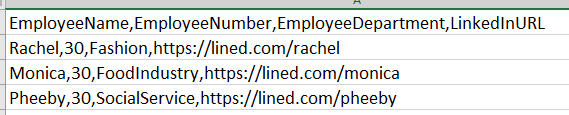
输入的文件将是。
# reading the CSV file
text = open("csvfile.csv", "r")

#join() method combines all contents of
# csvfile.csv and formed as a string
text = ''.join([i for i in text])

# search and replace the contents
text = text.replace("EmployeeName", "EmpName")
text = text.replace("EmployeeNumber", "EmpNumber")
text = text.replace("EmployeeDepartment", "EmpDepartment")
text = text.replace("lined", "linked")

# output.csv is the output file opened in write mode
x = open("output.csv","w")

# all the replaced text is written in the output.csv file
x.writelines(text)
x.close()
输出:

方法2:使用Pandas数据框架
我们可以将CSV文件作为一个DataFrame来读取,然后应用replace()方法。

# importing the module
import pandas as pd

# making data frame from the csv file
dataframe = pd.read_csv("csvfile1.csv")

# using the replace() method
dataframe.replace(to_replace ="Fashion",
                 value = "Fashion industry",
                  inplace = True)
dataframe.replace(to_replace ="Food",
                 value = "Food Industry",
                  inplace = True)
dataframe.replace(to_replace ="IT",
                 value = "IT Industry",
                  inplace = True)

# writing  the dataframe to another csv file
dataframe.to_csv('outputfile.csv',
                 index = False)
输出:
