 极客教程
极客教程在Python中使用Kivy GUI和Pandas验证信息的登录应用和验证
Kivy是一个多平台的GUI库,以响应性强而闻名。它在一个应用程序中提供对多个屏幕的管理。
在这个应用程序中,我们将使用多个屏幕来登录用户的信息并对其进行验证。我们将把信息保存在一个csv文件中,并使用pandas将csv文件中的信息读入一个DataFrame中来进行验证。为了建立GUI,我们将使用.kv文件。
步骤 :
1.将有三个屏幕,一个是让用户登录,第二个是注册,第三个是告诉用户登录是否成功。
2.这些信息将被储存在一个csv文件中。
3.Pandas库将被用来将csv文件读入一个DataFrame,并进一步检查用户信息是否已经存在。
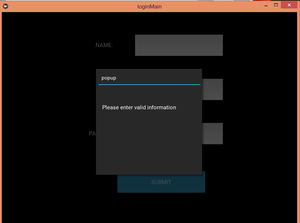
4.如果输入的信息是无效的,弹出窗口将通知用户。
5.最后,用户将被告知是否登录成功。
主要程序:
# import all the relevant classes
from kivy.app import App
from kivy.uix.widget import Widget
from kivy.uix.screenmanager import ScreenManager, Screen
from kivy.properties import ObjectProperty
from kivy.lang import Builder
from kivy.uix.popup import Popup
from kivy.uix.floatlayout import FloatLayout
import pandas as pd

# class to call the popup function
class PopupWindow(Widget):
    def btn(self):
        popFun()

# class to build GUI for a popup window
class P(FloatLayout):
    pass

# function that displays the content
def popFun():
    show = P()
    window = Popup(title = "popup", content = show,
                   size_hint = (None, None), size = (300, 300))
    window.open()

# class to accept user info and validate it
class loginWindow(Screen):
    email = ObjectProperty(None)
    pwd = ObjectProperty(None)
    def validate(self):

        # validating if the email already exists
        if self.email.text not in users['Email'].unique():
            popFun()
        else:

            # switching the current screen to display validation result
            sm.current = 'logdata'

            # reset TextInput widget
            self.email.text = ""
            self.pwd.text = ""


# class to accept sign up info
class signupWindow(Screen):
    name2 = ObjectProperty(None)
    email = ObjectProperty(None)
    pwd = ObjectProperty(None)
    def signupbtn(self):

        # creating a DataFrame of the info
        user = pd.DataFrame([[self.name2.text, self.email.text, self.pwd.text]],
                            columns = ['Name', 'Email', 'Password'])
        if self.email.text != "":
            if self.email.text not in users['Email'].unique():

                # if email does not exist already then append to the csv file
                # change current screen to log in the user now
                user.to_csv('login.csv', mode = 'a', header = False, index = False)
                sm.current = 'login'
                self.name2.text = ""
                self.email.text = ""
                self.pwd.text = ""
        else:
            # if values are empty or invalid show pop up
            popFun()

# class to display validation result
class logDataWindow(Screen):
    pass

# class for managing screens
class windowManager(ScreenManager):
    pass

# kv file
kv = Builder.load_file('login.kv')
sm = windowManager()

# reading all the data stored
users=pd.read_csv('login.csv')

# adding screens
sm.add_widget(loginWindow(name='login'))
sm.add_widget(signupWindow(name='signup'))
sm.add_widget(logDataWindow(name='logdata'))

# class that builds gui
class loginMain(App):
    def build(self):
        return sm

# driver function
if __name__=="__main__":
    loginMain().run()
.kv文件:.kv文件包含所有设计和放置图形用户界面的代码,并定义屏幕的转换方向。
# there are three screens
windowManager:
    loginWindow:
    signupWindow:
    logDataWindow:

# GUI for the login window
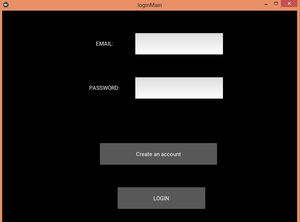
<loginWindow>:
    email : email
    pwd : pwd
    FloatLayout:
        size: root.width, root.height
        Label:
            text : "EMAIL: "
            size_hint : 0.2, 0.1
            pos_hint : {"x":0.25, "top":0.9}
        TextInput:
            id : email
            multiline :False
            size_hint : 0.3, 0.1
            pos_hint : {"x" : 0.45, "top" : 0.9}
        Label:
            text : "PASSWORD: "
            size_hint : 0.2, 0.1
            pos_hint : {"x" : 0.25, "top" : 0.7}
        TextInput:
            id : pwd
            multiline :False
            size_hint : 0.3, 0.1
            pos_hint : {"x" : 0.45, "top" : 0.7}
        Button:
            text : "Create an account"
            size_hint : 0.4, 0.1
            pos_hint : {"x" : 0.33, "top" : 0.4}
            on_release:
                app.root.current = 'signup'
                root.manager.transition.direction = "left"
        Button:
            text : "LOGIN"
            size_hint : 0.3, 0.1
            pos_hint : {"x" : 0.39, "top" : 0.2}
            on_release:
                root.validate()
                root.manager.transition.direction = "up"

# GUI for the signup window
<signupWindow>:
    name2 : name2
    email : email
    pwd : pwd
    FloatLayout:
        Label:
            text : "NAME: "
            size_hint : 0.2, 0.1
            pos_hint : {"x":0.25, "top":0.9}
        TextInput:
            id : name2
            multiline : False
            size_hint : 0.3, 0.1
            pos_hint : {"x" : 0.45, "top" : 0.9}
        Label:
            text : "EMAIL: "
            size_hint : 0.2, 0.1
            pos_hint : {"x" : 0.25, "top" : 0.7}
        TextInput:
            id : email
            multiline : False
            size_hint : 0.3, 0.1
            pos_hint : {"x" : 0.45, "top" : 0.7}
        Label:
            text : "PASSWORD: "
            size_hint : 0.2, 0.1
            pos_hint : {"x" : 0.25, "top" : 0.5}
        TextInput:
            id : pwd
            multiline : False
            size_hint : 0.3, 0.1
            pos_hint : {"x" : 0.45, "top" : 0.5}
        Button:
            text : "SUBMIT"
            size_hint : 0.3, 0.1
            pos_hint : {"x" : 0.39, "top" : 0.28}
            on_press :
                root.signupbtn()
                root.manager.transition.direction = "right"

# GUI to show validation result
<logDataWindow>:
    info : info
    FloatLayout:
        Label:
            id : info
            size_hint : 0.8, 0.2
            pos_hint : {"x" : 0.15, "top" : 0.8}
            text : "SUCCESSFULLY LOGGED IN"
        Button:
            text : "Login"
            size_hint : 0.4, 0.1
            pos_hint : {"x" : 0.33, "top" : 0.55}
            on_release:
                app.root.current = 'login'
                root.manager.transition.direction = "down"
        Button:
            text : "Create new account"
            size_hint : 0.4, 0.1
            pos_hint : {"x" : 0.33, "top" : 0.4}
            on_release:
                app.root.current = 'signup'
                root.manager.transition.direction = "down"


# GUI for pop up window
<P>:
    Label:
        text : "Please enter valid information"
        size_hint : 0.2, 0.1
        pos_hint : {"x" : 0.3, "top" : 0.8}
输出:
注册窗口 :

登录窗口:
Popup Window:
Validation :
