 极客教程
极客教程Golang教程 学习Go编程语言
Golang或Go编程语言是一种静态类型的程序性编程语言,其语法类似于 C语言 。它是由Robert Griesemer、Rob Pike和Ken Thompson于2007年在Google开发的。但他们在2009年将其作为一种开源的编程语言推出。它提供了丰富的标准库、垃圾收集和动态类型的能力,还提供了对环境的支持,采用类似于动态语言的模式。Golang的最新版本是 1. 13.1 ,于2019年9月3日 发布。在这里,我们将提供一个完整的Golang教程和适当的例子。
涵盖的主题
- 为什么选择Golang
- 主要特点
- 安装Golang
- Hello World!程序
- 标识符和关键词
- 数据类型
- 变量
- 常量
- 操作符
- if-else语句
- for 循环
- 循环控制语句(break, goto, continue)
- 开关语句
-
数组
- 切片
- 函数
- 结构
- 包
- 延迟关键字
- 指针
- 方法论
- 方法与函数
- 接口
- 并发性–Goroutines
- 渠道
- 选择语句
为什么是Golang
设计Golang的主要目的是为了消除现有语言的问题。所以让我们看看Python、Java、C/C++编程语言所面临的问题。
- Python: 它很容易使用,但与Golang相比,速度很慢。
- Java: 它有非常复杂的类型系统。
- C/C++: 它有缓慢的编译时间和复杂的类型系统。
- 另外,所有这些语言都是在多线程应用很少的时候设计的,所以对高度可扩展的、并发的和并行的应用没有什么效果。
- 线程消耗1MB的内存,而Goroutine消耗2KB的内存,因此在同一时间,我们可以有数百万个Goroutine被触发。
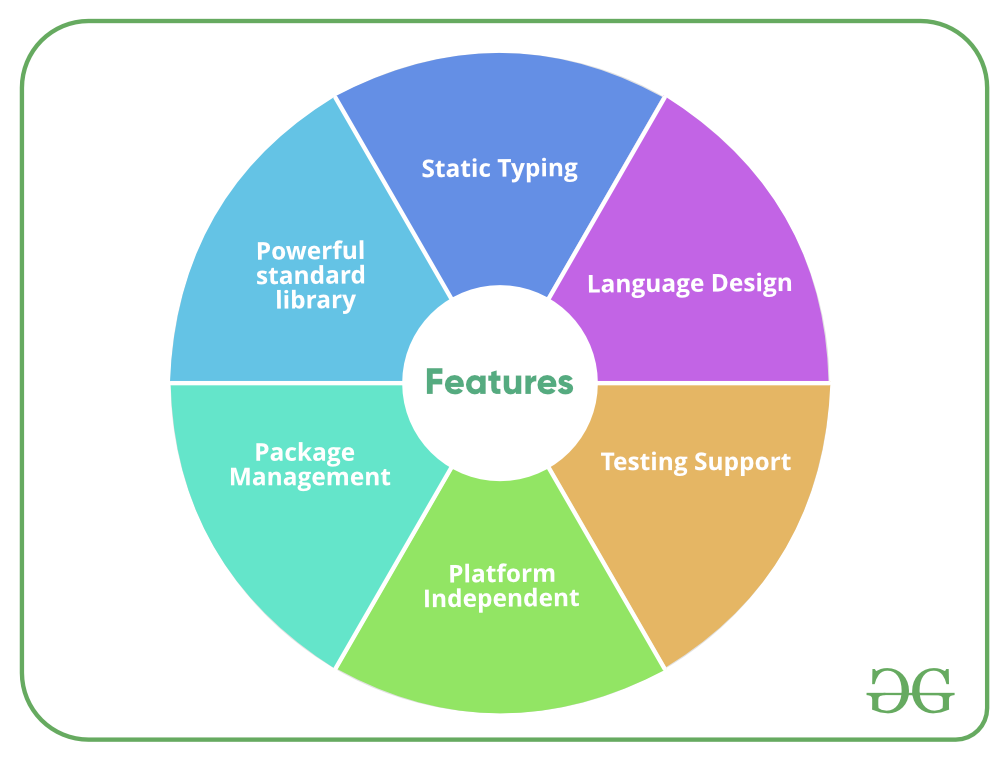
主要特点
下载和安装Golang
在我们开始安装Go之前,最好先检查一下它是否已经安装在你的系统上。要检查你的设备是否预装了Golang,只需进入 命令行 (对于 Windows ,在运行对话框中搜索 cmd ( __ + R )。
现在运行下面的命令。
go version
如果已经安装了Golang,它将产生一个信息,包括所有可用的Golang版本的细节,否则,如果Golang没有安装,那么将产生一个错误,说明 错误的命令或文件名 。
在开始安装过程之前,你需要先下载它。为此,所有版本的Go for Windows都可以在 golang.org 上找到 。
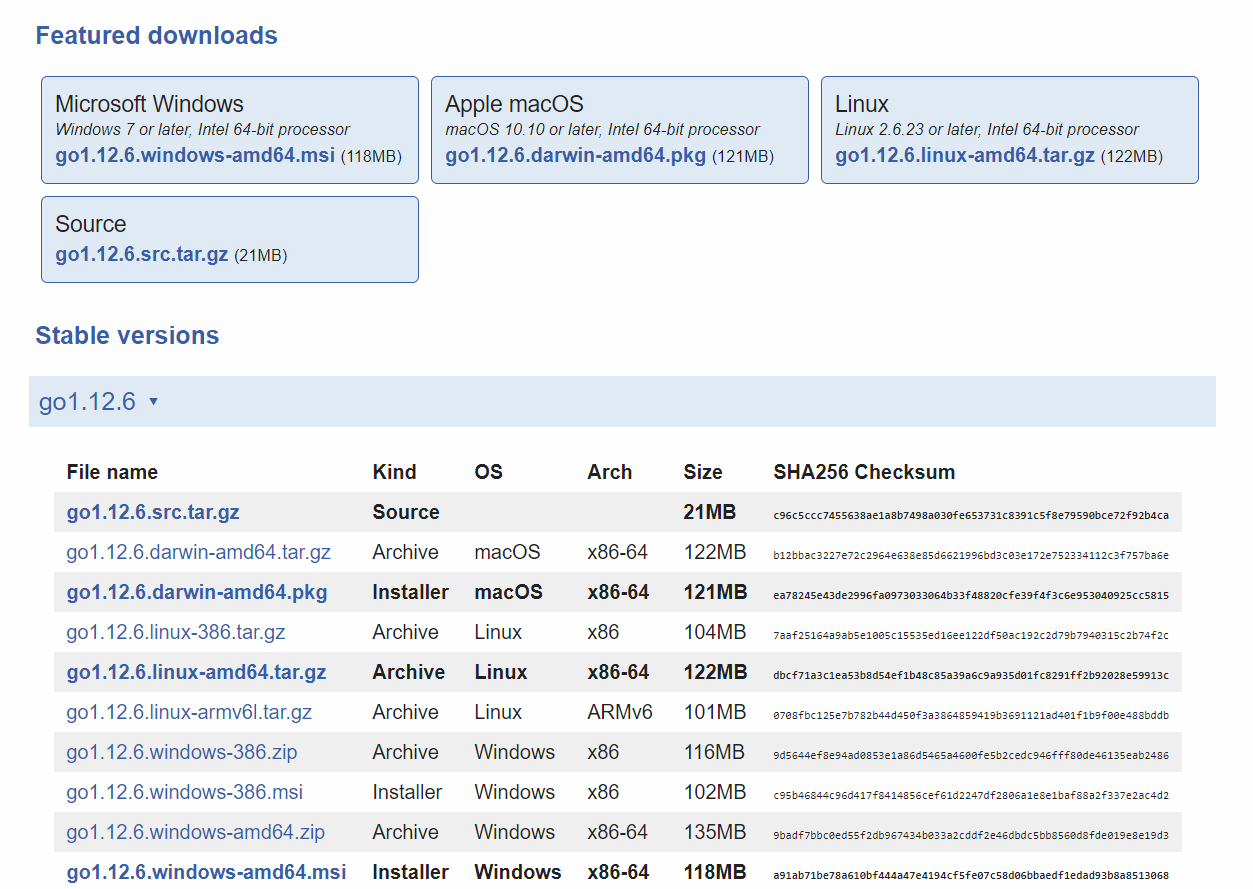
根据你的系统架构下载Golang,并按照进一步的说明安装Golang。
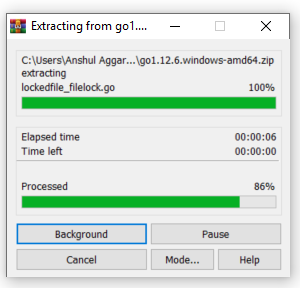
第1步: 下载后,解压下载的存档文件。解压后你会在当前目录下得到一个名为 go 的文件夹。
第2步:** 现在把解压后的文件夹复制并粘贴到你想安装的地方。这里我们要安装在C盘。
第3步: 现在设置环境变量。右键点击 “我的电脑 “并选择 ” 属性”。 从左边选择高级系统设置,然后点击 环境变量 ,如下图所示。
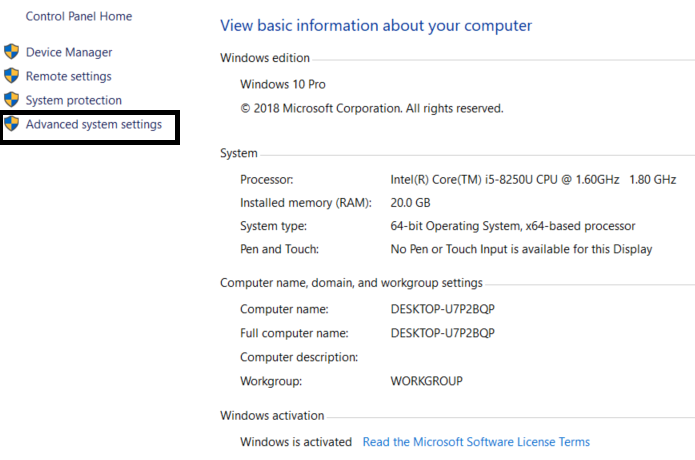
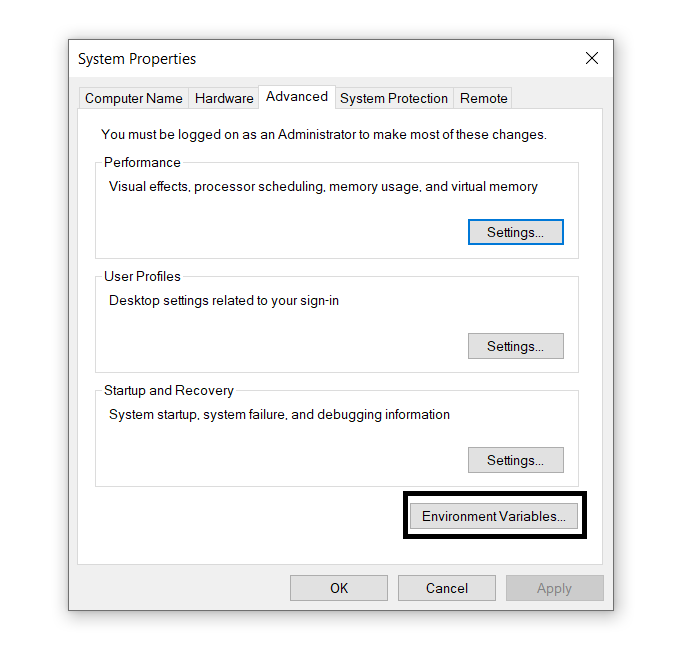
第4步: 从系统变量中点击 路径 ,然后点击 编辑。 然后点击 ” New”(新建 ),然后在你粘贴 Go 文件夹的bin目录中添加路径。在这里,我们正在编辑路径 C: \go\bin,然后点击OK,如下图所示。
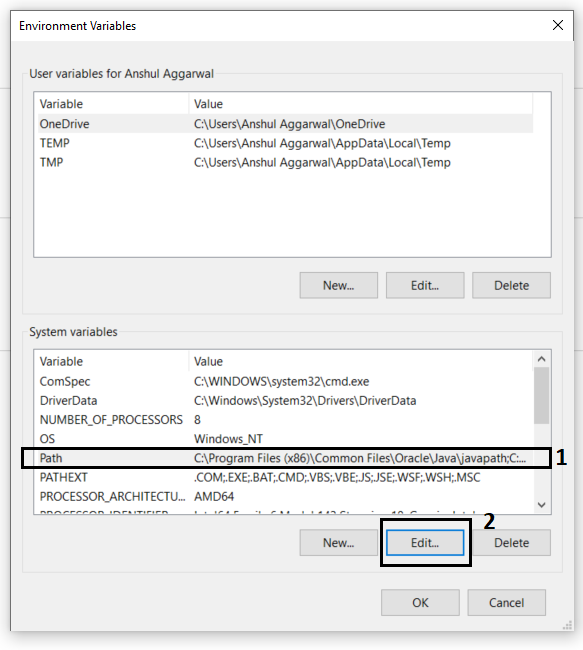
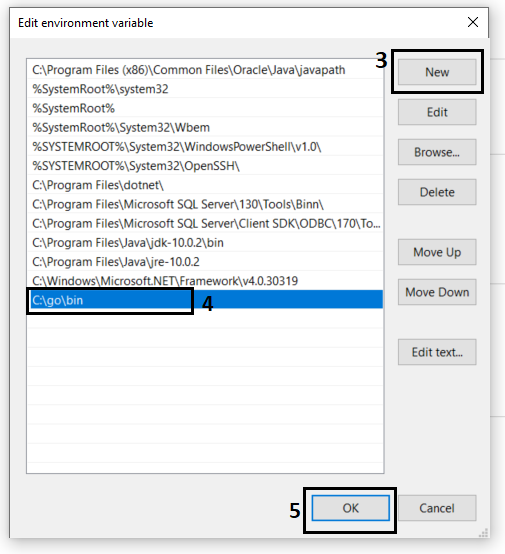
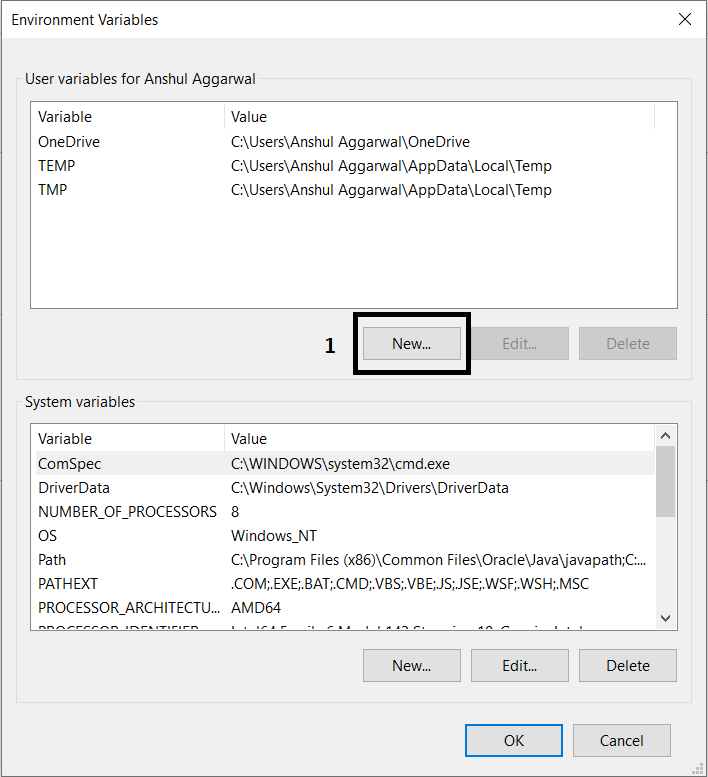
第5步: 现在创建一个新的用户变量,告诉Go命令哪里有Golang库。为此,点击用户变量上的 新建 ,如下面的屏幕截图所示。
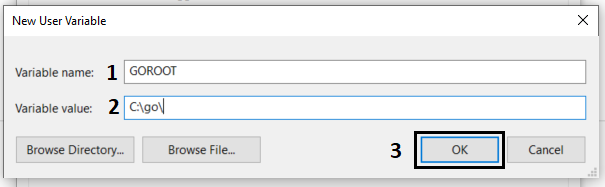
现在把变量名称填成 GOROOT ,变量值是你的Golang文件夹的路径。所以这里的变量值是 C: \go\ 。 填完后点击确定。
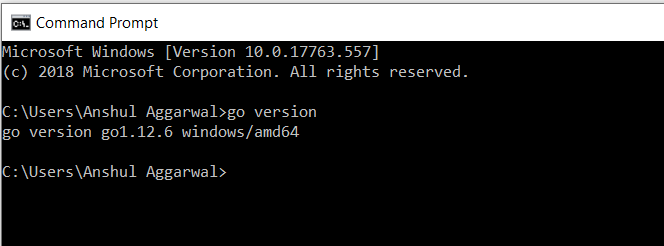
之后,点击环境变量的OK,你的设置就完成了。现在让我们用命令提示符上的 go version 命令来检查Golang的版本。
在完成安装过程后,任何IDE或文本编辑器都可以用来编写Golang代码,并在IDE或命令提示符上使用命令来运行这些代码。
go run filename.go
执行Hello World!程序
要运行一个Go程序,你需要一个Go编译器。在Go编译器中,首先你要创建一个程序,并以 .go 为扩展名保存你的程序,例如, first.go
// First Go program
package main

import "fmt"

// Main function
func main() {

    fmt.Println("!... Hello World ...!")
}
输出
!... Hello World ...!
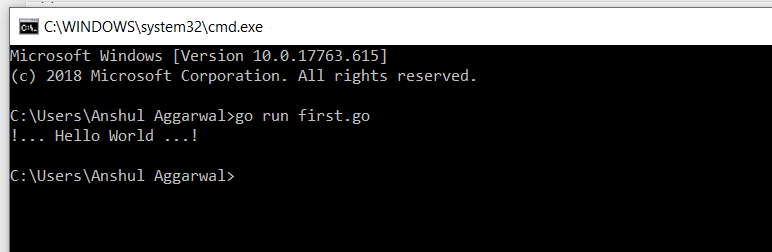
现在我们在go编译器中使用以下命令运行这个 first.go 文件,即
$ go run first.go
关于本程序中使用的不同术语的更多细节,你可以访问 Hello World! in Golang
标识符和关键词
标识符是用户定义的程序组件的名称。在Go语言中,标识符可以是变量名、函数名、常量、语句标签、包名或类型。
例子
// Valid identifiers:
_geeks23
geeks
gek23sd
Geeks
geeKs
geeks_geeks

// Invalid identifiers:
212geeks
if
default
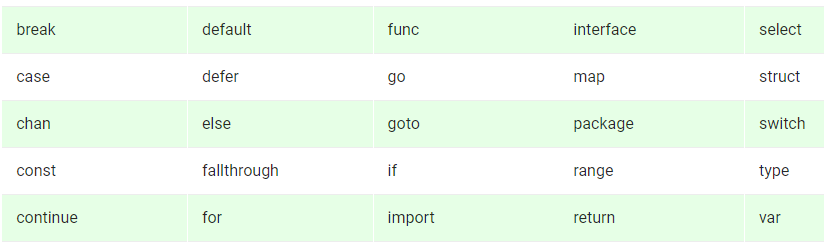
关键词或保留词是一种语言中用于某些内部过程或代表某些预定动作的词。因此,这些词不允许作为标识符使用。这样做会导致编译时的错误。Go语言中 总共有25个关键词 ,如下所示。
例子
// Go program to illustrate
// the use of keywords

// Here package keyword is used to
// include the main package
// in the program
package main

// import keyword is used to
// import "fmt" in your package
import "fmt"

// func is used to
// create function
func main() {

    // Here, var keyword is used
    // to create variables
    // Pname, Lname, and Cname
    // are the valid identifiers
    var Pname = "GeeksforGeeks"
    var Lname = "Go Language"
    var Cname = "Keywords"

    fmt.Printf("Portal name: %s", Pname)
    fmt.Printf("\nLanguage name: %s", Lname)
    fmt.Printf("\nChapter name: %s", Cname)

}
输出
Portal name: GeeksforGeeks
Language name: Go Language
Chapter name: Keywords
数据类型
数据类型指定了一个有效的Go变量所能容纳的数据类型。在Go语言中,类型分为以下四类。
- 基本类型: 数字、字符串和布尔都属于这一类别。
- 聚合类型: 数组和结构属于这一类别。
- 参考类型: 指针、分片、地图、函数和通道都属于这一类。
- 接口类型
这里,我们将讨论Go语言中的基本数据类型。 基本数据类型 进一步分为三个子类别,分别是:。
- 数字
- 布尔
- 字符串
数字: 在Go语言中,数字被分为三个子类别,分别是。
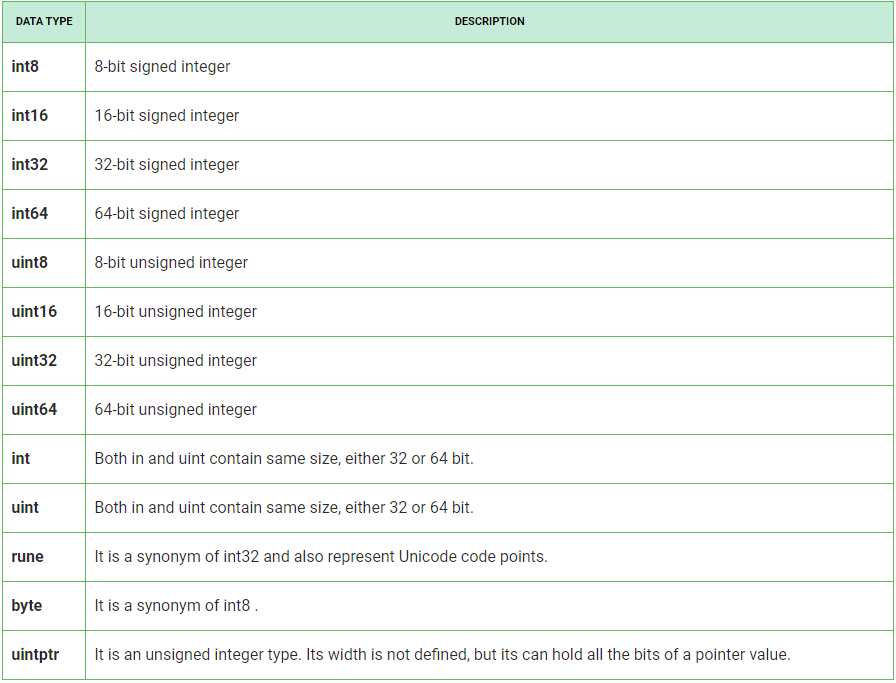
- Integers: 在Go语言中,有符号和无符号的整数都有四种不同的大小,如下表所示。有符号整数用int表示,无符号整数用uint表示。
- Floating-Point Numbers:在Go语言中,浮点数被分为两类,如下表所示。

- Complex Numbers: 复数分为两部分,如下表所示,float32和float64也是这些复数的一部分。内置函数从其虚数和实数部分创建一个复数,内置的虚数和实数函数提取这些部分。

示例:
“`go // Golang program to illustrate
// the use of integers, floating
// and complex numbers
package main
import "fmt"
func main() {
// Using 8-bit unsigned int
var X uint8 = 225
fmt.Println(X+1, X)
// Using 16-bit signed int
var Y int16 = 32767
fmt.Println(Y+2, Y-2)
a := 20.45
b := 34.89
var m complex128 = complex(6, 2)
var n complex64 = complex(9, 2)
// Subtraction of two
// floating-point number
c := b – a
// Display the result
fmt.Printf("Result is: %f\n", c)
// Display the type of c variable
fmt.Printf("The type of c is : %T\n", c)
fmt.Println(m)
fmt.Println(n)
// Display the type
fmt.Printf("The type of m is %T and "+
"the type of n is %T", m, n)
}
<pre><code class=" line-numbers"><br />**输出:**
“`go
226 225
-32767 32765
Result is: 14.440000
The type of c is : float64
(6+2i)
(9+2i)
The type of m is complex128 and the type of n is complex64
布尔型和字符串。
布尔 数据类型只表示一个比特的信息,要么是真,要么是假。布尔类型的值不会隐含地或显式地转换为任何其他类型。
字符串 数据类型表示Unicode代码点的一个序列。或者换句话说,我们可以说字符串是一个不可改变的字节序列,意味着一旦字符串被创建,你就不能改变这个字符串。一个字符串可以包含任意的数据,包括在人类可读的形式下数值为零的字节。
例子。
// Go program to illustrate
// the use of booleans and
// strings
package main

import "fmt"

func main() {

    // variables
    str1 := "GeeksforGeeks"
    str2 := "geeksForgeeks"
    result1 := str1 == str2

    // Display the result
    fmt.Println(result1)

    // Display the type of
    // result1
    fmt.Printf("The type of result1 is %T\n", result1)

    // str variable which stores strings
    str := "GeeksforGeeks"

    // Display the length of the string
    fmt.Printf("Length of the string is: %d", len(str))

    // Display the string
    fmt.Printf("\nString is: %s", str)

    // Display the type of str variable
    fmt.Printf("\nType of str is: %T", str)

}
输出
false
The type of result1 is bool
Length of the string is: 13
String is: GeeksforGeeks
Type of str is: string
变量
变量是一个信息的占位符,可以在运行时改变。变量允许检索和操纵存储的信息。
命名变量的规则。
- 变量名称必须以字母或下划线()开头。名称可以包含字母’a-z’或’A-Z’或数字0-9,以及字符’‘。
Geeks, geeks, _geeks23  // valid variable
123Geeks, 23geeks      // invalid variable
- 变量名称不应该以数字开头。
234geeks // illegal variable
- 变量的名称是区分大小写的。
geeks and Geeks are two different variables
- 关键词不允许作为变量名使用。
- 对变量名称的长度没有限制,但建议只使用4-15个字母的最佳长度。
在Golang中,有两种方法来声明一个变量,如下。
1.使用var关键字: 在Go语言中,变量是用特定类型的var关键字创建的,与名称相连,并提供其初始值。
语法
var variable_name type = expression
例子。
// Go program to illustrate
// the use of var keyword
package main

import "fmt"

func main() {

// Variable declared and
// initialized without the
// explicit type
var myvariable1 = 20

// Display the value and the
// type of the variables
fmt.Printf("The value of myvariable1 is : %d\n",
                                  myvariable1)

fmt.Printf("The type of myvariable1 is : %T\n",
                                  myvariable1)

}
输出
The value of myvariable1 is : 20
The type of myvariable1 is : int
要了解更多关于var关键字的信息,你可以参考 Golang中的var关键字 这篇文章。
2.使用短变量声明: 在函数中声明和初始化的局部变量是使用短变量声明的。
语法
variable_name:= expression
注意: 请不要混淆:=和=之间的关系,因为:=是一个声明,而=是赋值。
例子。
// Go program to illustrate the
// short variable declaration
package main
import "fmt"

func main() {

// Using short variable declaration
myvar1 := 39

// Display the value and type of the variable
fmt.Printf("The value of myvar1 is : %d\n", myvar1)
fmt.Printf("The type of myvar1 is : %T\n", myvar1)

}
输出
The value of myvar1 is : 39
The type of myvar1 is : int
要了解更多关于短变量声明关键字的信息,你可以参考文章《 Golang中的短变量声明操作符(:=) 》。
常量
正如常量这个名字所暗示的那样,在编程语言中也是如此,也就是说,一旦常量的值被定义,就不能进一步修改。常量可以有任何基本的数据类型,如整数常量、浮动常量、字符常量或字符串字面。
如何声明?
常量的声明方式与变量类似,但使用 const 关键字作为前缀来声明具有特定类型的常量。它不能使用 := 语法来声明。
例子。
// Golang program to illustrate
// the constants
package main

import "fmt"

const PI = 3.14

func main() {
    const GFG = "GeeksforGeeks"
    fmt.Println("Hello", GFG)

    fmt.Println("Happy", PI, "Day")

    const Correct = true
    fmt.Println("Go rules?", Correct)
}
输出
Hello GeeksforGeeks
Happy 3.14 Day
Go rules? true
要了解更多关于Golang中常量的信息,你可以参考Golang中常量这篇文章。
操作符
操作符是任何编程语言的基础。因此,如果不使用操作符,Go语言的功能是不完整的。操作符允许我们对操作数进行不同类型的操作。在Go语言中,运算符可以根据其不同的功能进行分类。
- 算术运算符
- 关系运算符
- 逻辑运算符
- 位操作符
- 赋值运算符
- 杂项操作符
例子
// Golang program to illustrate
// the use of operators
package main

import "fmt"

func main() {
    p := 23
    q := 60

    // Arithmetic Operator - Addition
    result1 := p + q
    fmt.Printf("Result of p + q = %d\n", result1)

    // Relational Operators - ‘=='(Equal To)
    result2 := p == q
    fmt.Println(result2)

    // Relational Operators - ‘!='(Not Equal To)
    result3 := p != q
    fmt.Println(result3)

    // Logical Operators
    if p != q && p <= q {
        fmt.Println("True")
    }

    if p != q || p <= q {
        fmt.Println("True")
    }

    if !(p == q) {
        fmt.Println("True")
    }

    // Bitwise Operators - & (bitwise AND)
    result4 := p & q
    fmt.Printf("Result of p & q = %d\n", result4)

    // Assignment Operators - “=”(Simple Assignment)
    p = q
    fmt.Println(p)

}
输出
Result of p + q = 83
false
true
True
True
True
Result of p & q = 20
60
控制流程
决策声明
编程中的决策与现实生活中的决策类似。当给定的条件被满足时,一段代码被执行。有时这些也被称为控制流语句。编程语言使用控制语句来控制基于某些条件的程序的执行流程。这些语句被用来根据程序状态的变化使执行流前进和分支。
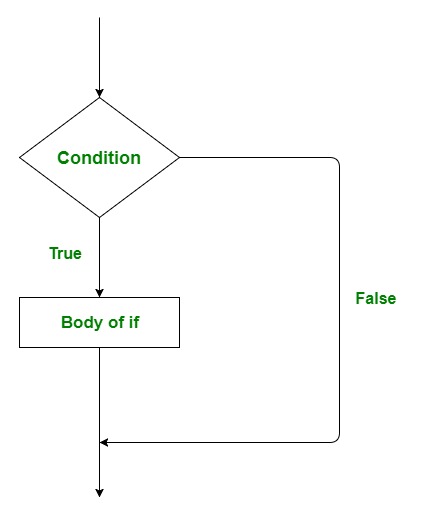
- if : 它用于决定是否执行某个语句或语句块,即如果某个条件为真,则执行某个语句块,否则就不执行。
语法:
if(condition) {

   // Statements to execute if
   // condition is true
}
流程图:
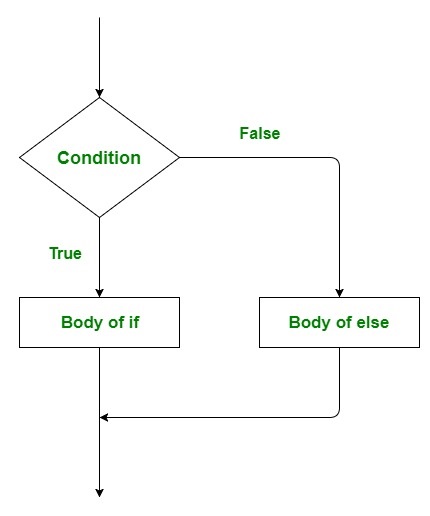
- if-else : 如果我们想在条件为假时做其他事情。这里就出现了else语句。我们可以将else语句与if语句一起使用,在条件为false时执行一个代码块。
语法:
if (condition) {

    // Executes this block if
    // condition is true
} else {

    // Executes this block if
    // condition is false
}
流程图:
- 嵌套 if : 嵌套的if语句是指在一个if语句中包含一个if语句。是的,Golang允许我们在if语句中嵌套if语句,也就是说,我们可以把一个if语句放在另一个if语句中。
语法:
if (condition1) {

   // Executes when condition1 is true

   if (condition2) {

      // Executes when condition2 is true
   }
}
流程图:
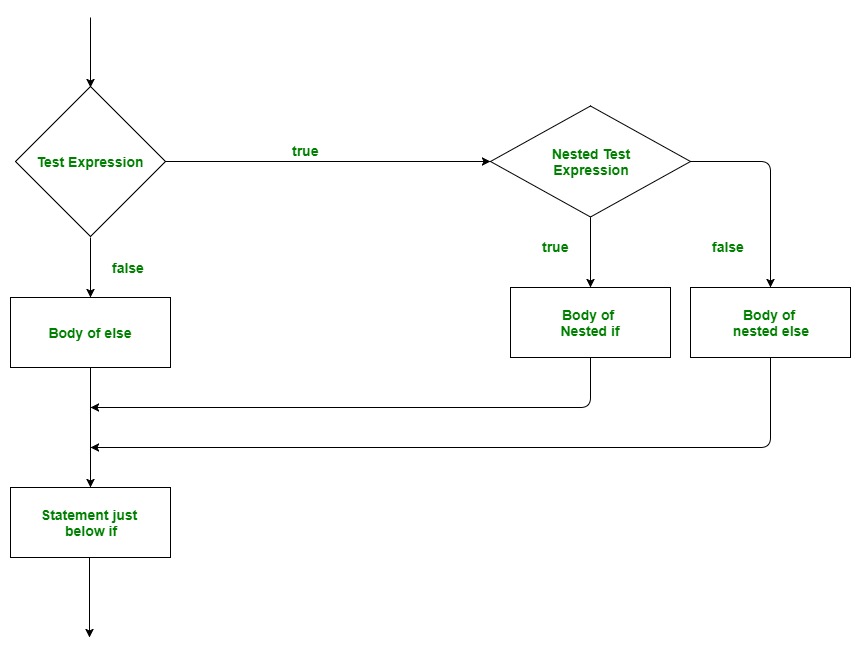
- if-else-if 梯子。这里,用户可以在多个选项中做出决定。if语句是自上而下执行的。只要控制if的一个条件为真,与该if相关的语句就会被执行,而梯子的其他部分则被绕过。如果没有一个条件是真的,那么最后的else语句将被执行。
重要的点:
- if语句可以有零个或一个else,它必须在任何else if之后。
- if 语句可以有零到多个else if,而且必须在else之前。
- 如果一个else if成功了,其余的else if或else都不会被测试。
语法:
if(condition_1) {

     // this block will execute
     // when condition_1 is true

} else if(condition_2) {

    // this block will execute
    // when condition2 is true
}
.
.
. else {

      // this block will execute when none
     // of the condition is true
}
流程图:
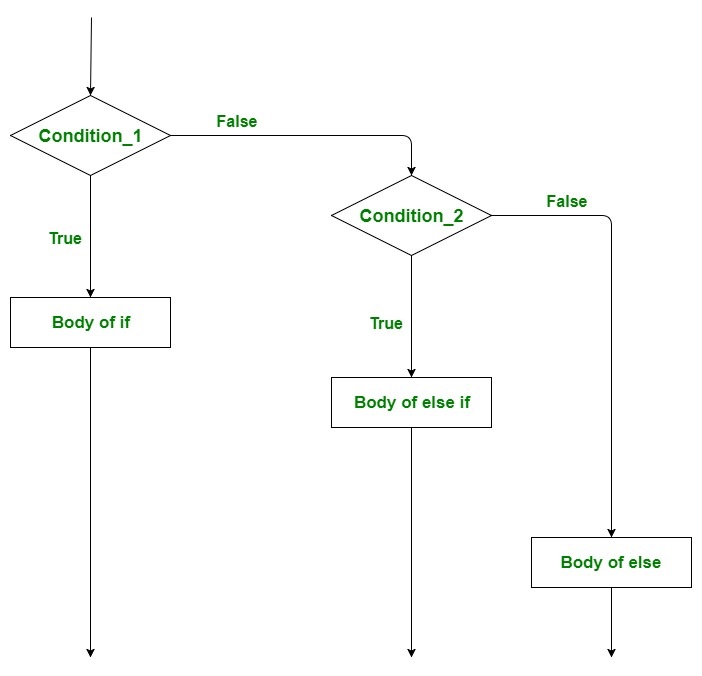
例1: 演示if和if-else语句
// Golang program to illustrate
// the use of if and if-else
// statement
package main

import "fmt"

func main() {

    // taking local variables
    var a int = 100
    var b int = 175

    // using if statement for
    // checking the condition
    if a%2 == 0 {

        // print the following if
        // condition evaluates to true
        fmt.Printf("Even Number\n")

    }

    if b%2 == 0 {

        fmt.Printf("Even Number")

    } else {

        fmt.Printf("Odd Number")
    }
}
输出
Even Number
Odd Number
例2: 演示嵌套-if和if-else-if梯形语句
// Golang program to illustrate
// the use of nested if and
// if-else-if ladder statement
// statement
package main

import "fmt"

func main() {

    // taking two local variable
    var v1 int = 400
    var v2 int = 700

    // ----- Nested if Statement -------

    // using if statement
    if v1 == 400 {

        // if condition is true then
        // check the following
        if v2 == 700 {

            // if condition is true
            // then display the following
            fmt.Printf("Value of v1 is 400 and v2 is 700\n")
        }
    }

    // ----------- if-else-if ladder

    // checking the condition
    if v1 == 100 {

        // if condition is true then
        // display the following */
        fmt.Printf("Value of v1 is 100\n")

    } else if v1 == 200 {

        fmt.Printf("Value of a is 20\n")

    } else if v1 == 300 {

        fmt.Printf("Value of a is 300\n")

    } else {

        // if none of the conditions is true
        fmt.Printf("None of the values is matching\n")
    }

}
输出
Value of v1 is 400 and v2 is 700
None of the values is matching
for 循环
Go语言只包含一个单一的循环,即for-loop。for 循环是一种重复控制结构,允许我们编写一个执行特定次数的循环。一个简单的for循环与我们在其他编程语言中使用的类似,如C , C++ , Java , C#等等。
语法。
for initialization; condition; post{
       // statements....
}
这里。
- 初始化语句是可选的,在for循环开始前执行。初始化语句总是在一个简单的语句中,如变量声明,增量或赋值语句,或函数调用。
- 条件语句持有一个布尔表达式,它在循环的每次迭代开始时被评估。如果条件语句的值为真,那么循环就会执行。
- 后置语句在for-loop的主体之后执行。在post语句之后,如果条件语句的值为false,则循环结束,条件语句再次评估。
例子。
// Go program to illustrate the
// use of simple for loop
package main

import "fmt"

// Main function
func main() {

    // for loop
    // This loop starts when i = 0
    // executes till i<4 condition is true
    // post statement is i++
    for i := 0; i < 4; i++{
      fmt.Printf("GeeksforGeeks\n")
    }

}
输出
GeeksforGeeks
GeeksforGeeks
GeeksforGeeks
GeeksforGeeks
注意: 这个for循环可以作为无限循环和while循环使用。要了解更多关于for循环的信息,你可以参考Golang中的循环一文。
循环控制语句
Go语言中的循环控制语句是用来改变程序的执行的。当给定循环的执行离开其范围时,那么在该范围内创建的对象也会被拆除。Go语言支持3种类型的循环控制语句。
- break
- goto
- continue
break语句
break语句是用来终止它所呈现的循环或语句的。之后,如果有的话,控制权将传递给出现在break语句之后的语句。如果break语句出现在嵌套循环中,那么它只终止那些包含break语句的循环。
流程图。
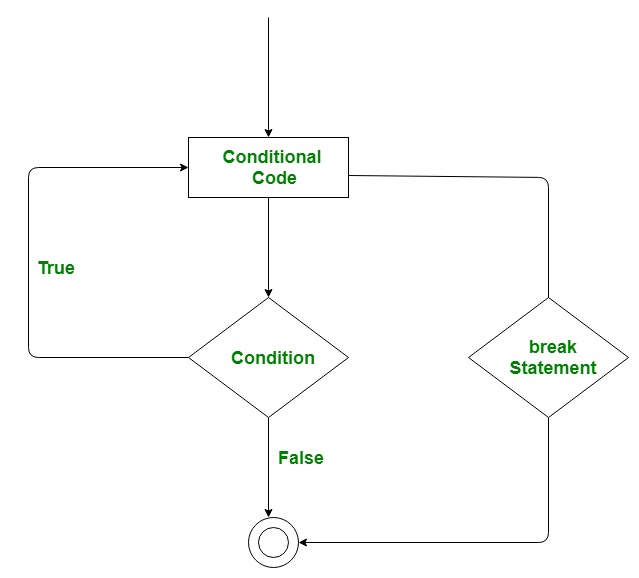
例子。
// Go program to illustrate
// the use of break statement
package main

import "fmt"

// Main function
func main() {
   for i:=0; i<5; i++{

   fmt.Println(i)

   // For loop breaks when the value of i = 3
   if i == 3{
         break;
  }
   }


}
输出
0
1
2
3
goto 语句
该语句用于将控制权转移到程序中带有标签的语句。标签是有效的标识符,放在控制转移的语句之前。一般来说,程序员不使用goto语句,因为很难追踪程序的控制流。
流程图。
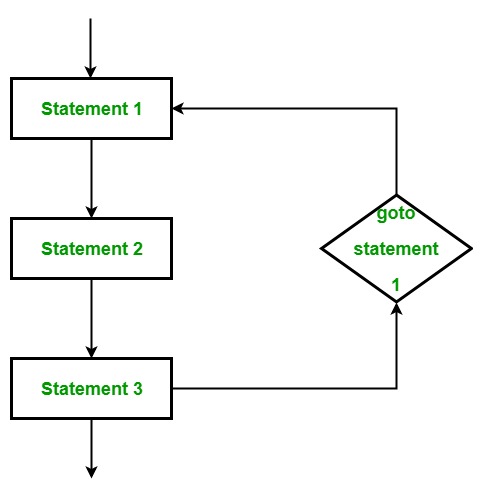
例子。
// Go program to illustrate
// the use of goto statement
package main

import "fmt"

func main() {
   var x int = 0

   // for loop work as a while loop
  Lable1: for x < 8 {
      if x == 5 {

         // using goto statement
         x = x + 1;
         goto Lable1
      }
      fmt.Printf("value is: %d\n", x);
      x++;
   }
}
输出
value is: 0
value is: 1
value is: 2
value is: 3
value is: 4
value is: 6
value is: 7
continue语句
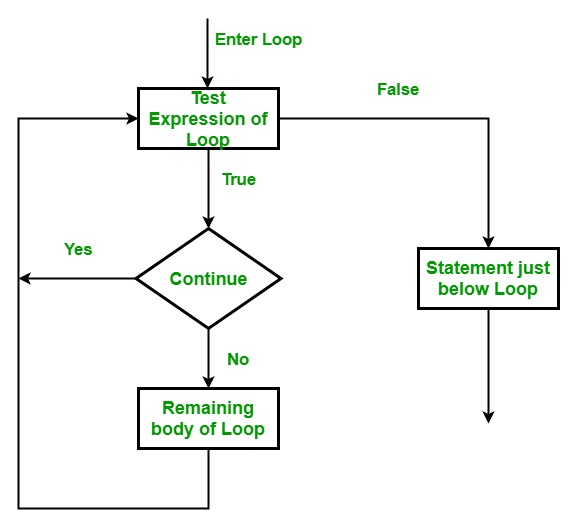
该语句用于跳过循环中某一条件的执行部分。之后,它将控制权转移到循环的起点。它跳过其后面的语句,继续进行循环的下一次迭代。
流程图。
例子。
// Go program to illustrate
// the use of continue statement
package main

import "fmt"

func main() {
   var x int = 0

   // for loop work as a while loop
   for x < 8 {
      if x == 5 {

         // skip two iterations
         x = x + 2;
         continue;
      }
      fmt.Printf("value is: %d\n", x);
      x++;
   }
}
输出
value is: 0
value is: 1
value is: 2
value is: 3
value is: 4
value is: 7
switch语句
switch语句是一个多路分支语句。它提供了一种有效的方式,根据表达式的值(也称为case)将执行转移到代码的不同部分。甚至我们可以通过使用逗号在case语句中添加多个值。
语法
switch expression {
    case value_1:
        statement......1
    case value_2:
        statement......2
    case value_n:
        statement......n
    default:
        statement......default
    }
例子。
// Go program to illustrate the
// concept of switch statement
package main

import "fmt"

func main() {
    var value string = "five"

    // Switch statement without default statement
    // Multiple values in case statement
   switch value {
       case "one":
       fmt.Println("C#")
       case "two", "three":
       fmt.Println("Go")
       case "four", "five", "six":
       fmt.Println("Golang")
   }
}
输出
Golang
想了解更多关于switch语句的信息,可以参考《Golang中的switch语句》一文。
数组
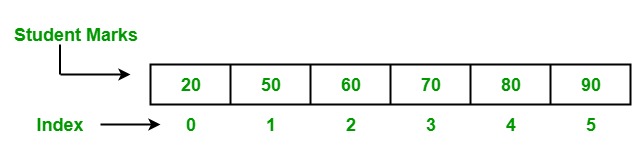
数组是一个固定长度的序列,用来存储内存中的同质元素。由于其固定长度,数组不像Go语言中的Slice那样流行。在一个数组中,你可以在其中存储零个或多个元素。数组中的元素是通过使用[]索引操作符以其零为基础进行索引的,这意味着第一个元素的索引是array[0],最后一个元素的索引是array[len(array)-1] 。
在Golang中,有两种方法来创建一个数组,如下。
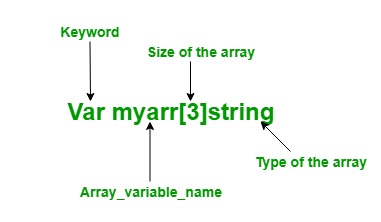
1.使用var关键字: 在Go语言中,使用var关键字创建一个具有名称、大小和元素的特定类型的数组。
语法
Var array_name[length]Type
or
var array_name[length]Typle{item1, item2, item3, ...itemN}
在Go语言中,数组是可变的,因此你可以在赋值的左侧使用array[index]语法来设置给定索引处的数组元素。
Var array_name[index] = element
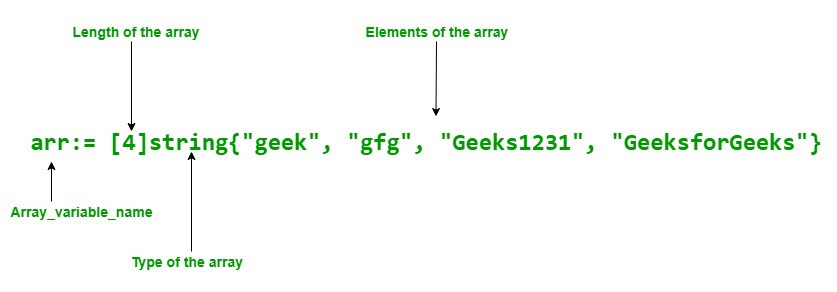
2.使用速记声明: 在Go语言中,数组也可以使用速记声明。它比上面的声明更灵活。
语法
array_name:= [length]Type{item1, item2, item3, ...itemN}
例子。
// Golang program to illustrate the arrays
package main

import "fmt"

func main() {

    // Creating an array of string type
    // Using var keyword
    var myarr [2]string

    // Elements are assigned using index
    myarr[0] = "GFG"
    myarr[1] = "GeeksforGeeks"

    // Accessing the elements of the array
    // Using index value
    fmt.Println("Elements of Array:")
    fmt.Println("Element 1: ", myarr[0])
    fmt.Println("Element 2: ", myarr[1])

    // Shorthand declaration of array
    arr := [4]string{"geek", "gfg", "Geeks1231", "GeeksforGeeks"}

    // Accessing the elements of
    // the array Using for loop
    fmt.Println("\nElements of the array:")

    for i := 0; i < 3; i++ {
        fmt.Println(arr[i])

    }

}
输出
Elements of Array:
Element 1:  GFG
Element 2:  GeeksforGeeks

Elements of the array:
geek
gfg
Geeks1231
要了解更多关于数组的信息,你可以参考《Golang中的数组》一文。
切片
Slice比数组更强大、更灵活、更方便,是一种轻量级的数据结构。切片是一个可变长度的序列,它存储相似类型的元素,你不允许在同一个切片中存储不同类型的元素。它就像一个有索引值和长度的数组一样,但片断的大小是可以调整的,它们不像数组那样是固定大小的。在内部,slice和数组是相通的,slice是对一个底层数组的引用。它允许在片断中存储重复的元素。 分片中的第一个索引位置总是0,最后一个是(分片的长度-1)。
声明的语法。
[]T
or
[]T{}
or
[]T{value1, value2, value3, ...value n}
这里,T是元素的类型。比如说。
var my_slice[]int
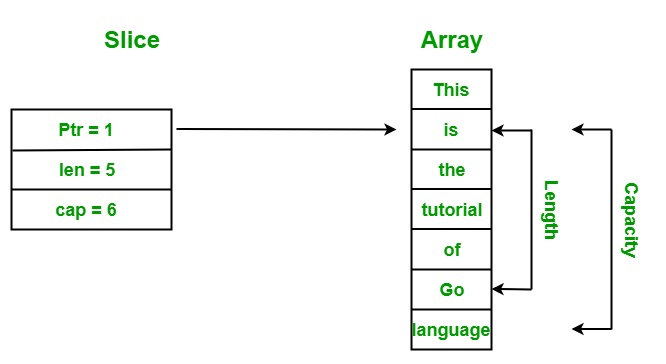
指针、长度和容量 是分片的主要三个组成部分。
例子。
// Golang program to illustrate
// the working of the slice
package main

import "fmt"

func main() {

    // Creating an array
    arr := [7]string{"This", "is", "the", "tutorial",
                         "of", "Go", "language"}

    // Display array
    fmt.Println("Array:", arr)

    // Creating a slice
    myslice := arr[1:6]

    // Display slice
    fmt.Println("Slice:", myslice)

    // Display length of the slice
    fmt.Printf("Length of the slice: %d", len(myslice))

    // Display the capacity of the slice
    fmt.Printf("\nCapacity of the slice: %d", cap(myslice))
}
输出
Array: [This is the tutorial of Go language]
Slice: [is the tutorial of Go]
Length of the slice: 5
Capacity of the slice: 6
解释: 在上面的例子中,我们从给定的数组中创建一个分片。这里分片的指针指向索引1,因为分片的下限被设置为1,所以它从索引1开始访问元素。分片的长度是5,这意味着分片中存在的元素总数是5,分片的容量是6,意味着它最多可以存储6个元素。
要了解更多关于分片的信息,你可以参考Golang中的分片这篇文章。
函数
函数通常是程序中的代码块或语句,使用户能够重复使用相同的代码,最终节省了过多的内存使用,起到了节省时间的作用,更重要的是,提供了更好的代码可读性。因此,基本上,一个函数是一个语句的集合,执行一些特定的任务,并将结果返回给调用者。一个函数也可以执行一些特定的任务而不返回任何东西。
语法
func function_name(Parameter-list)(Return_type){
    // function body.....
}
你可以从该函数中返回多个值。另外,参数和返回类型是可选的。
例子。
// Go program to illustrate the
// use of function
package main
import "fmt"

// area() is used to find the
// area of the rectangle
// area() function two parameters,
// i.e, length and width
func area(length, width int)int{

    Ar := length* width
    return Ar
}

// Main function
func main() {

   // Display the area of the rectangle
   // with method calling
   fmt.Printf("Area of rectangle is : %d", area(12, 10))
}
输出
Area of rectangle is : 120
要了解更多关于函数的信息,你可以参考Golang中的函数这篇文章。
结构体
它是一种用户定义的类型,允许将可能不同类型的项目分组/合并为一个单一的类型。它可以被称为一个轻量级的类,不支持继承,但支持组合。
首先,你需要使用下面的语法来声明一个结构类型。
type struct_name struct {
   variable_1 type_of_variable_1
   variable_2 type_of_variable_2
   variable_n type_of_variable_3
}
第二,你必须创建该类型的变量来存储数值。
var variable_name struct_name
例子。
// Golang program to show how to
// declare and define the struct

package main

import "fmt"

// Defining a struct type
type Address struct {
    Name    string
    city    string
    Pincode int
}

func main() {

    // Declaring a variable of a `struct` type
    // All the struct fields are initialized
    // with their zero value
    var a Address
    fmt.Println(a)

    // Declaring and initializing a
    // struct using a struct literal
    a1 := Address{"Akshay", "Dehradun", 3623572}

    fmt.Println("Address1: ", a1)

    // Naming fields while
    // initializing a struct
    a2 := Address{Name: "Anikaa", city: "Ballia",
                                 Pincode: 277001}

    fmt.Println("Address2: ", a2)

    // Uninitialized fields are set to
    // their corresponding zero-value
    a3 := Address{Name: "Delhi"}
    fmt.Println("Address3: ", a3)
}
输出
{  0}
Address1:  {Akshay Dehradun 3623572}
Address2:  {Anikaa Ballia 277001}
Address3:  {Delhi  0}
要访问结构中的单个字段,你必须使用点(.)操作符。要了解更多关于结构的信息,你可以参考Golang中的结构这篇文章。
软件包
包的目的是为了设计和维护大量的程序,将相关的功能组合成单一的单元,使其易于维护和理解,并独立于其他的包程序。在Go语言中,每个包都被定义了一个不同的名字,这个名字与它们的功能很接近,比如 “字符串 “包,它包含了只与字符串相关的方法和函数。
例子。
// Go program to illustrate the
// concept of packages
// Package declaration
package main

// Importing multiple packages
import (
    "bytes"
    "fmt"
    "sort"
)

func main() {

    // Creating and initializing slice
    // Using shorthand declaration
    slice_1 := []byte{'*', 'G', 'e', 'e', 'k', 's', 'f',
        'o', 'r', 'G', 'e', 'e', 'k', 's', '^', '^'}
    slice_2 := []string{"Gee", "ks", "for", "Gee", "ks"}

    // Displaying slices
    fmt.Println("Original Slice:")
    fmt.Printf("Slice 1 : %s", slice_1)
    fmt.Println("\nSlice 2: ", slice_2)

    // Trimming specified leading
    // and trailing Unicode points
    // from the given slice of bytes
    // Using Trim function
    res := bytes.Trim(slice_1, "*^")
    fmt.Printf("\nNew Slice : %s", res)

    // Sorting slice 2
    // Using Strings function
    sort.Strings(slice_2)
    fmt.Println("\nSorted slice:", slice_2)
}
输出
Original Slice:
Slice 1 : *GeeksforGeeks^^
Slice 2:  [Gee ks for Gee ks]

New Slice : GeeksforGeeks
Sorted slice: [Gee Gee for ks ks]
延迟
这是一个延迟执行函数、方法或匿名方法的关键字,直到附近的函数返回。或者换句话说,延迟函数或方法的调用参数会立即评估,但它们会执行到附近的函数返回。
例子。
// Go program to illustrate the
// concept of the defer statement
package main

import "fmt"

// Functions
func mul(a1, a2 int) int {

    res := a1 * a2
    fmt.Println("Result: ", res)
    return 0
}

func show() {
    fmt.Println("Hello!, GeeksforGeeks")
}

// Main function
func main() {

    // Calling mul() function
    // Here mul function behaves
    // like a normal function
    mul(23, 45)

    // Calling mul()function
    // Using defer keyword
    // Here the mul() function
    // is defer function
    defer mul(23, 56)

    // Calling show() function
    show()
}
输出
Result:  1035
Hello!, GeeksforGeeks
Result:  1288
解释: 在上面的例子中,我们有两个函数,分别是mul()和show()函数。其中show()函数通常在main()函数中调用,但我们以两种不同的方式调用mul()函数。
- 首先,我们像普通函数一样调用mul函数,即mul(23, 45),并在函数调用时执行(输出:结果:1035)。
- 第二,我们使用defer关键字将mul()函数作为defer函数调用,即defer mul(23, 56),当周围的方法都返回时,它就执行(Output: Result: 1288 )。
要想了解更多的信息,你可以参考Golang中的关键字Defer Keyword。
指针
它是一个用来存储另一个变量的内存地址的变量。Golang中的指针也被称为特殊变量。在我们开始之前,有两个重要的操作符我们将在指针中使用,即。
*** 操作符** 也被称为去引用操作符,用于声明指针变量和访问存储在地址中的值。
操作符 被称为地址操作符,用于返回变量的地址或访问指针变量的地址。
声明一个指针:
var pointer_name *Data_Type
例子。 下面是一个字符串类型的指针,它只能存储字符串变量的内存地址。
var s *string
指针的初始化: 要做到这一点,你需要使用地址操作符用另一个变量的内存地址初始化一个指针,如下例所示。
// normal variable declaration
var a = 45

// Initialization of pointer s with
// memory address of variable a
var s *int = &a
例子。
// Golang program to demonstrate the declaration
// and initialization of pointers
package main

    import "fmt"

    func main()
{

    // taking a normal variable
    var x int = 5748

        // declaration of pointer
        var p* int

        // initialization of pointer
        p
        = &x

           // displaying the result
           fmt.Println("Value stored in x = ", x)
               fmt.Println("Address of x = ", &x)
                   fmt.Println("Value stored in variable p = ", p)
}
输出
Value stored in x =  5748
Address of x =  0x414020
Value stored in variable p =  0x414020
要了解更多关于指针的信息,你可以参考《Golang中的指针》一文。
方法
方法在Golang中不是函数。方法中包含一个接收器参数,用来访问接收器的属性。接收者可以是结构类型或非结构类型。当你在代码中创建一个方法时,接收器和接收器类型必须出现在同一个包中。你不允许创建一个接收方类型已经定义在另一个包中的方法,包括int、string等内置的类型。如果你试图这样做,那么编译器将给出一个错误。
语法
func(reciver_name Type) method_name(parameter_list)(return_type){
// Code
}
这里,接收器可以在方法中被访问。
例子。
// Go program to illustrate the
// method
package main

import "fmt"

// Author structure
type author struct {
    name      string
    branch    string
    particles int
    salary    int
}

// Method with a receiver
// of author type
func (a author) show() {

    fmt.Println("Author's Name: ", a.name)
    fmt.Println("Branch Name: ", a.branch)
    fmt.Println("Published articles: ", a.particles)
    fmt.Println("Salary: ", a.salary)
}

// Main function
func main() {

    // Initializing the values
    // of the author structure
    res := author{
        name:      "Sona",
        branch:    "CSE",
        particles: 203,
        salary:    34000,
    }

    // Calling the method
    res.show()
}
输出
Author's Name:  Sona
Branch Name:  CSE
Published articles:  203
Salary:  34000
方法与函数
| 方法 | 函数 |
|---|---|
| 它包含接收器。 | 它不包含接收器。 |
| 它可以同时接受指针和值。 | 它不能同时接受指针和值。 |
| 在程序中可以定义同名但不同类型的方法。 | 同名但不同类型的函数不允许在程序中定义。 |
要了解更多关于方法的信息,你可以参考Golang中的方法这篇文章。
接口
Go语言的接口与其他语言不同。在Go语言中,接口是一种自定义类型,用于指定一组或多个方法签名,接口是抽象的,所以你不允许创建接口的实例。但是你可以创建一个接口类型的变量,这个变量可以被分配一个具体类型的值,这个值具有接口要求的方法。
语法
type interface_name interface{

// Method signatures

}
例子。
// Golang program illustrates how
// to implement an interface
package main

import "fmt"

// Creating an interface
type tank interface {

    // Methods
    Tarea() float64
    Volume() float64
}

type myvalue struct {
    radius float64
    height float64
}

// Implementing methods of
// the tank interface
func (m myvalue) Tarea() float64 {

    return 2*m.radius*m.height +
        2*3.14*m.radius*m.radius
}

func (m myvalue) Volume() float64 {

    return 3.14 * m.radius * m.radius * m.height
}

// Main Method
func main() {

    // Accessing elements of
    // the tank interface
    var t tank
    t = myvalue{10, 14}
    fmt.Println("Area of tank :", t.Tarea())
    fmt.Println("Volume of tank:", t.Volume())
}
输出
Area of tank : 908
Volume of tank: 4396
想了解更多,请参考文章《Golang中的接口》。
并发–Goroutines
一个Goroutine是一个独立执行的函数或方法,同时与你程序中的其他Goroutine相关联。或者换句话说,Go语言中每一个并发执行的活动都被称为Goroutine。你可以把一个Goroutine看作是一个轻量级的线程。每个程序至少包含一个Goroutine,这个Goroutine被 称为主Goroutine。 所有的Goroutine都在主Goroutine下工作,如果主Goroutine终止了,那么程序中的所有Goroutine也就终止了。Goroutine总是在后台工作。
你可以通过使用go关键字作为函数或方法调用的前缀来创建你自己的Goroutine,如下面的语法所示。
语法
func name(){
// statements
}

// using go keyword as the
// prefix of your function call
go name()
例子。
// Go program to illustrate
// the concept of Goroutine
package main

import "fmt"

func display(str string) {
    for w := 0; w < 6; w++ {
        fmt.Println(str)
    }
}

func main() {

    // Calling Goroutine
    go display("Welcome")

    // Calling normal function
    display("GeeksforGeeks")
}
输出
GeeksforGeeks
GeeksforGeeks
GeeksforGeeks
GeeksforGeeks
GeeksforGeeks
GeeksforGeeks
在上面的例子中,我们简单地创建了一个display()函数,然后以两种不同的方式调用这个函数,第一种是Goroutine,即go display(“Welcome”),另一种是普通函数,即display(“GeeksforGeeks”) 。但是有一个问题,它只显示普通函数的结果,而不显示Goroutine的结果,因为当一个新的Goroutine执行时,Goroutine调用立即返回。控件不会像普通函数那样等待Goroutine完成其执行,它们总是在Goroutine调用后前进到下一行,并忽略Goroutine返回的值。因此,为了正确地执行Goroutine,我们在程序中做了一些修改,如下面的代码所示。
修改后的例子。
// Go program to illustrate the concept of Goroutine
package main

import (
    "fmt"
    "time"
)

func display(str string) {
    for w := 0; w < 6; w++ {
        time.Sleep(1 * time.Second)
        fmt.Println(str)
    }
}

func main() {

    // Calling Goroutine
    go display("Welcome")

    // Calling normal function
    display("GeeksforGeeks")
}
输出
Welcome
GeeksforGeeks
GeeksforGeeks
Welcome
Welcome
GeeksforGeeks
GeeksforGeeks
Welcome
Welcome
GeeksforGeeks
GeeksforGeeks
我们在程序中添加了Sleep()方法,使主Goroutine睡眠1秒,在1秒之间,新的Goroutine执行,在屏幕上显示 “欢迎”,然后在1秒后终止,主Goroutine重新计划并执行其操作。这个过程一直持续到z<6的值,然后主Goroutine终止。在这里,Goroutine和普通函数都是同时工作的。
要了解更多关于Goroutines的信息,你可以参考Goroutines这篇文章。
渠道
通道是一种技术,它允许一个Goroutine向另一个Goroutine发送数据。默认情况下,通道是双向的,这意味着goroutine可以通过同一个通道发送或接收数据,如下图所示。
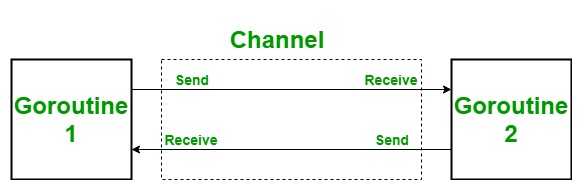
在Go语言中,一个通道是用chan关键字创建的,它只能传输相同类型的数据,不同类型的数据不允许从同一个通道传输。
语法
var Channel_name chan Type
你也可以用make()函数创建一个通道,使用速记声明。
语法
channel_name:= make(chan Type)
下面的语句表明,在<-操作符的帮助下,数据(元素)被发送到通道(Mychannel)。
Mychannel <- element
下面的语句表明,该元素从通道(Mychannel)接收数据。
element := <-Mychannel
如果接收语句的结果不打算使用也是一个有效的语句。你也可以把接收语句写成。
<-Mychannel
例子。
// Go program to illustrate send
// and receive operation
package main

import "fmt"

func myfunc(ch chan int) {

    fmt.Println(234 + <-ch)
}
func main() {
    fmt.Println("start Main method")
    // Creating a channel
    ch := make(chan int)

    go myfunc(ch)
    ch <- 23
    fmt.Println("End Main method")
}
输出
start Main method
257
End Main method
想了解更多,你可以参考Golang中的通道这篇文章。
select语句
选择语句和switch语句一样,但在选择语句中,case语句指的是通信,即在通道上发送或接收操作。
语法
select{

case SendOrReceive1: // Statement
case SendOrReceive2: // Statement
case SendOrReceive3: // Statement
.......
default: // Statement
例子。
// Go program to illustrate the
// concept of select statement
package main

import("fmt"
 "time")

    // function 1
    func portal1(channel1 chan string) {

        time.Sleep(3*time.Second)
        channel1 <- "Welcome to channel 1"
    }

    // function 2
     func portal2(channel2 chan string) {

        time.Sleep(9*time.Second)
        channel2 <- "Welcome to channel 2"
    }

// main function
func main(){

    // Creating channels
   R1:= make(chan string)
   R2:= make(chan string)

   // calling function 1 and
   // function 2 in goroutine
   go portal1(R1)
   go portal2(R2)

   select{

        // case 1 for portal 1
       case op1:= <- R1:
       fmt.Println(op1)

       // case 2 for portal 2
       case op2:= <- R2:
       fmt.Println(op2)
   }

}
输出
Welcome to channel 1
解释: 在上面的程序中,portal 1睡了3秒,portal 2睡了9秒,在他们的睡眠时间结束后,他们将准备进行。现在,选择语句等待他们的睡眠时间,当门户2醒来时,它选择案例2并打印出 “欢迎来到频道1″。如果门户1在门户2之前醒来,那么输出是 “欢迎来到通道2″。