极客教程
极客教程PHP 登录示例
使用会话进行PHP登录
Php登录脚本用于为我们的网页提供身份验证。脚本在用户提交登录按钮后执行。
登录页面
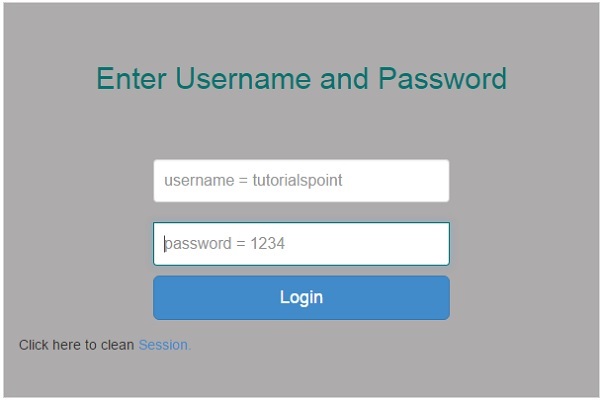
登录页面应该如下所示,并且基于会话工作。如果用户关闭会话,它将擦除会话数据。
<?php
   ob_start();
   session_start();
?>

<?
   // error_reporting(E_ALL);
   // ini_set("display_errors", 1);
?>

<html lang = "en">

   <head>
      <title>Tutorialspoint.com</title>
      <link href = "css/bootstrap.min.css" rel = "stylesheet">

      <style>
         body {
            padding-top: 40px;
            padding-bottom: 40px;
            background-color: #ADABAB;
         }

         .form-signin {
            max-width: 330px;
            padding: 15px;
            margin: 0 auto;
            color: #017572;
         }

         .form-signin .form-signin-heading,
         .form-signin .checkbox {
            margin-bottom: 10px;
         }

         .form-signin .checkbox {
            font-weight: normal;
         }

         .form-signin .form-control {
            position: relative;
            height: auto;
            -webkit-box-sizing: border-box;
            -moz-box-sizing: border-box;
            box-sizing: border-box;
            padding: 10px;
            font-size: 16px;
         }

         .form-signin .form-control:focus {
            z-index: 2;
         }

         .form-signin input[type="email"] {
            margin-bottom: -1px;
            border-bottom-right-radius: 0;
            border-bottom-left-radius: 0;
            border-color:#017572;
         }

         .form-signin input[type="password"] {
            margin-bottom: 10px;
            border-top-left-radius: 0;
            border-top-right-radius: 0;
            border-color:#017572;
         }

         h2{
            text-align: center;
            color: #017572;
         }
      </style>

   </head>

   <body>

      <h2>Enter Username and Password</h2>
      <div class = "container form-signin">

         <?php
            msg = '';

            if (isset(_POST['login']) && !empty(_POST['username'])               && !empty(_POST['password'])) {

               if (_POST['username'] == 'tutorialspoint' &&_POST['password'] == '1234') {
                  _SESSION['valid'] = true;_SESSION['timeout'] = time();
                  _SESSION['username'] = 'tutorialspoint';

                  echo 'You have entered valid use name and password';
               }else {msg = 'Wrong username or password';
               }
            }
         ?>
      </div> <!-- /container -->

      <div class = "container">

         <form class = "form-signin" role = "form"
            action = "<?php echo htmlspecialchars(_SERVER['PHP_SELF']);            ?>" method = "post">
            <h4 class = "form-signin-heading"><?php echomsg; ?></h4>
            <input type = "text" class = "form-control"
               name = "username" placeholder = "username = tutorialspoint"
               required autofocus></br>
            <input type = "password" class = "form-control"
               name = "password" placeholder = "password = 1234" required>
            <button class = "btn btn-lg btn-primary btn-block" type = "submit"
               name = "login">Login</button>
         </form>

         Click here to clean <a href = "logout.php" tite = "Logout">Session.

      </div>

   </body>
</html>
Logout.php
它将删除会话数据。
<?php
   session_start();
   unset(_SESSION["username"]);
   unset(_SESSION["password"]);

   echo 'You have cleaned session';
   header('Refresh: 2; URL = login.php');
?>
将会产生以下的结果 −