 极客教程
极客教程Mongoose Populate Virtuals
使用 mongoose populate 方法可以获取引用的文档并在查询结果中进行填充。虚拟属性是不在数据库中持久化的属性,但可以通过模型进行实时计算。要填充一个虚拟属性,可以使用populate()方法并提供一个包含path属性的选项对象,该属性指定要填充的虚拟属性的名称。path属性应设置为带有下划线(_)前缀的虚拟属性的名称。
语法:
Model.find(query)
   .populate(path, select, model, match, options)
.exec(callback);
参数: Mongoose中的populate方法可以接受多个参数来定制查询:
- path (必需) – 要填充的字段的路径。这可以是一个字符串,也可以是指定路径和其他选项的对象。
- select (可选) – 要包含或排除的填充文档中的字段。这可以是一个字符串,也可以是指定包含或排除字段的对象。
- model (可选) – 用于填充字段的模型的名称,如果与引用的默认模型不同。
- match (可选) – 在填充字段时匹配的附加条件。这可以是指定匹配条件的对象。
- options (可选) – 查询的附加选项,如限制或排序。这可以是指定查询选项的对象。
安装mongoose模块:
您可以使用以下命令来安装此软件包。
npm install mongoose
安装了mongoose模块后,可以使用以下命令在命令提示符中检查mongoose版本。
npm version mongoose
之后,您只需创建一个文件夹并添加一个例如index.js的文件。要运行此文件,您需要运行以下命令。
node index.js
项目结构:
项目的结构将如下所示:
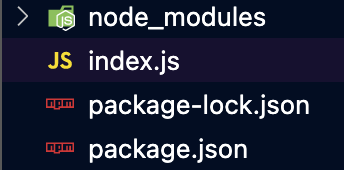
示例 1: 在这个示例中,book.save() 方法接受一个回调函数,在书保存到数据库后执行。在回调函数中,我们调用 Book.findById 并使用 populate() 方法来获取书的作者与 fullName 虚拟字段。这段代码应该在控制台上打印书名和作者的全名,并且没有任何错误。
Index.js
const mongoose = require("mongoose");
mongoose.set("strictQuery", true);
mongoose.connect(
    "mongodb://localhost:27017/geeksforgeeks", {
        useNewUrlParser: true,
    });

// Define the User schema
const userSchema = new mongoose.Schema({
    first: String,
    last: String,
});

// Define a virtual field to retrieve
// the user's full name
userSchema.virtual("fullName").get(function () {
    return `{this.first}{this.last}`;
});

// Define the Book schema
const bookSchema = new mongoose.Schema({
    title: String,
    author: {
        type: mongoose.Schema.Types.ObjectId,
        ref: "User"
    },
});

// Define the User and Book models
const User = mongoose.model("User", userSchema);
const Book = mongoose.model("Book", bookSchema);

// Create a new user and save it to the database
const user = new User({ first: "John", last: "Doe" });
user.save();

// Create a new book and associate it with the user
const book = new Book({
    title: "My Book Title",
    author: user._id,
});
book.save((err) => {
    if (err) console.error(err);

    // Use the populate() method to fetch
    // the book's author with the
    // fullName virtual field
    Book.findById(book._id)
        .populate({
            path: "author",
            select: "first last",
        })
        .exec((err, book) => {
            if (err) console.error(err);
            console.log(book);
            console.log(`Title: {book.title}`);
            console.log(`Author:{book.author.fullName}`);
        });
});
运行步骤:
确保你已经使用以下命令安装了mongoose模块:
npm install mongoose
运行index.js文件,使用以下命令:
在下面的命令中运行index.js文件:
node index.js
输出:
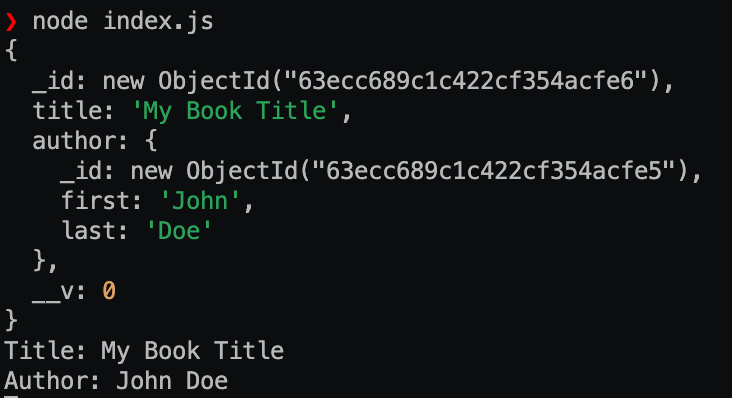
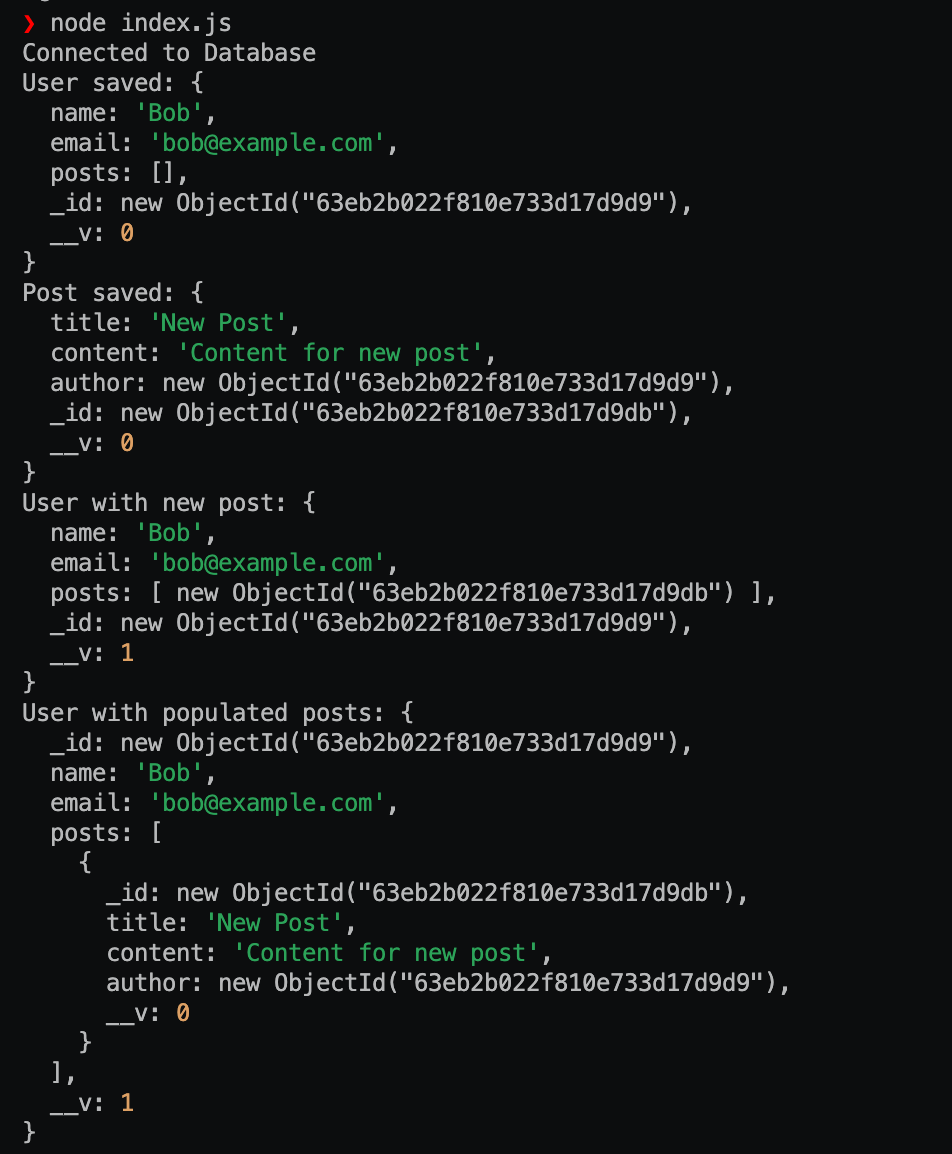
示例2: 在这个示例中,我们创建一个带有空的帖子数组的新用户文档,并将其保存到数据库中。然后我们创建一个新的帖子文档并保存到数据库中,并将帖子文档的id添加到用户的帖子数组中。我们再次保存用户,然后从数据库中获取它,并用实际的帖子文档填充其帖子字段。结果的文档被记录到控制台。
Index.js
const mongoose = require("mongoose");
const Schema = mongoose.Schema;

mongoose.set("strictQuery", true);

const PostSchema = new Schema({
    title: String,
    content: String,
    author: {
        type: Schema.Types.ObjectId,
        ref: "User",
    },
});

// Define the User schema
const UserSchema = new Schema({
    name: String,
    email: String,
    posts: [
        {
            type: Schema.Types.ObjectId,
            ref: "Post",
        },
    ],
});

// Define the models
const User = mongoose.model("User", UserSchema);
const Post = mongoose.model("Post", PostSchema);

mongoose
    .connect("mongodb://localhost:27017/geeksforgeeks")
    .then(() => {
        console.log("Connected to Database");
        // Create a new user
        const user = new User({
            name: "Bob",
            email: "bob@example.com",
            posts: [],
        });

        // Save the user to the database
        user.save((err, user) => {
            if (err) {
                console.log(err);
            } else {
                console.log("User saved:", user);

                // Create a new post
                const post = new Post({
                    title: "New Post",
                    content: "Content for new post",
                    author: user._id,
                });

                // Save the post to the database
                post.save((err, post) => {
                    if (err) {
                        console.log(err);
                    } else {
                        console.log("Post saved:", post);

                        // Add the post to the user's posts array
                        user.posts.push(post._id);

                        // Save the user again
                        user.save((err, user) => {
                            if (err) {
                                console.log(err);
                            } else {
                                console.log("User with new post:", user);

                                // Populate the user's posts array with
                                // actual post documents
                                User.findById(user._id)
                                    .populate("posts")
                                    .exec((err, user) => {
                                        if (err) {
                                            console.log(err);
                                        } else {
                                            console.log(
                                                "User with populated posts:",
                                                user
                                            );
                                        }
                                        mongoose.disconnect();
                                    });
                            }
                        });
                    }
                });
            }
        });
    })
    .catch((err) => {
        console.error("Error connecting to the database", err);
    });
运行步骤:
运行以下命令:
node index.js
输出:
参考文献: https://mongoosejs.com/docs/populate.html