 极客教程
极客教程Mongoose SchemaType.prototype.index()函数
Mongoose SchemaType.prototype.index() 是一个用于在Mongoose模式中的字段上创建索引的方法。索引是一种数据结构,允许在数据库中进行高效的数据查询。可以在一个或多个字段上创建索引,以加快使用这些字段作为搜索条件的查询。当在字段上创建索引时,数据库会创建一个单独的数据结构,存储该字段的值和包含每个值的文档的引用。
语法:
SchemaType.prototype.index( options )
参数: 该方法只接受一个参数:
- options (可选): 指定索引选项的对象。此参数可以传递对象、布尔值、字符串或数字。
返回类型: 返回一个 SchemaType 对象作为响应。
创建节点应用程序并安装Mongoose:
1. 您可以使用此命令来安装此软件包。
npm install mongoose
2. 安装了mongoose模块后,您可以使用命令提示符中的命令来检查您的mongoose版本。
npm version mongoose
3. 此后,您只需创建一个文件夹并添加一个文件,例如index.js,要运行此文件,您需要运行以下命令。
node index.js
项目结构: 项目结构将如下所示:

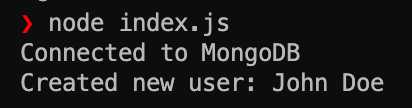
示例1: 在此示例中,我们为用户创建了一个Mongoose模式,包括姓名、电子邮件、年龄和地址字段。然后,我们使用SchemaType.prototype.index()方法在模式中的不同字段上创建各种类型的索引。在定义模式和创建索引之后,我们连接到一个MongoDB数据库,创建一个新用户文档,并将其保存到数据库中。最后,我们记录新创建的用户的姓名。
Index.js
const mongoose = require("mongoose");
const { Schema } = mongoose;
mongoose.set("strictQuery", true);
const userSchema = new Schema({
    name: {
        type: String,
        required: true,
    },
    email: {
        type: String,
        required: true,
    },
    age: Number,
    address: {
        street: String,
        city: String,
        state: String,
        zip: String,
    },
});

// Creating indexes on the email and age fields
userSchema.index({ email: 1 }, { unique: true });
userSchema.index({ age: 1 });

// Creating a compound index on the address fields
userSchema.index({ "address.city": 1, "address.state": 1 });

// Creating a text index on the name and address fields
userSchema.index({
    name: "text",
    "address.street": "text",
    "address.city": "text",
    "address.state": "text",
});

// Creating a 2dsphere index on the address field for
// geo-spatial queries
userSchema.index({ "address.coordinates": "2dsphere" });

// Creating a hashed index on the name field for
//efficient sharding
userSchema.index({ name: "hashed" });

// Creating a partial index on the age field for documents
// where the age field is less than or equal to 30
userSchema.index(
    { age: 1 },
    { partialFilterExpression: { age: { lte: 30 } } }
);

const User = mongoose.model("User", userSchema);

// Connecting to a MongoDB database and creating a new user
mongoose
    .connect("mongodb://localhost:27017/geeksforgeeks",
            { useNewUrlParser: true })
    .then(() => {
        console.log("Connected to MongoDB");

        const newUser = new User({
            name: "John Doe",
            email: "johndoe@example.com",
            age: 25,
            address: {
                street: "123 Main St",
                city: "Anytown",
                state: "CA",
                zip: "12345",
            },
        });

        return newUser.save();
    })
    .then((user) => {
        console.log(`Created new user:{user.name}`);
        mongoose.connection.close();
    })
    .catch((err) => console.error(err));
运行代码的步骤:
1. 确认是否已安装mongoose模块。
npm install mongoose
2. 使用以下命令运行代码:
node index.js
输出结果:
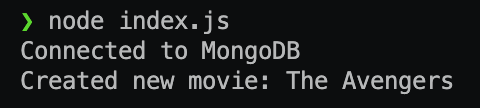
示例2: 在这个示例中,我们定义了一个movieSchema,其中包含一个名为actors的子文档数组字段。然后,我们使用index()方法在actors.name字段上创建了一个唯一索引。该索引将在actors子文档数组中的actors.name字段上实施唯一性约束。
然后,我们创建了一个新电影,其中有一个重复的演员名字,并尝试将其保存到数据库中。由于actors.name字段是唯一的,MongoDB会抛出一个重复键错误,保存操作将失败。
Index.js
const mongoose = require("mongoose");
const { Schema } = mongoose;
mongoose.set("strictQuery", true);
const movieSchema = new Schema({
    title: {
        type: String,
        required: true,
    },
    actors: [
        {
            name: {
                type: String,
                required: true,
            },
            character: {
                type: String,
                required: true,
            },
        },
    ],
});

// Creating a unique index on the 'actors.name' field within
// the 'actors' subdocument array
movieSchema.index({ "actors.name": 1 }, { unique: true });

const Movie = mongoose.model("Movie", movieSchema);

// Connecting to a MongoDB database and creating a new user
mongoose
    .connect("mongodb://localhost:27017/geeksforgeeks",
            { useNewUrlParser: true })
    .then(() => {
        console.log("Connected to MongoDB");

        const newMovie = new Movie({
            title: "The Avengers",
            actors: [
                { name: "Robert Downey Jr.", character: "Iron Man" },
                { name: "Chris Evans", character: "Captain America" },
                { name: "Robert Downey Jr.", character: "Tony Stark" },
                // Duplicate actor name
            ],
        });

        return newMovie.save();
    })
    .then((movie) => {
        console.log(`Created new movie: ${movie.title}`);
        mongoose.connection.close();
    })
    .catch((err) => console.error(err));
运行代码的步骤: 运行以下命令:
node index.js
输出:
参考: https://mongoosejs.com/docs/api/schematype.html#schematype_SchemaType-index