 极客教程
极客教程Mongoose 插件
插件 是一种在多个 mongoose 模式中重用逻辑的技术。插件类似于您可以在模式中使用并在模式的不同实例上重复使用的方法。插件的主要目的是修改您的模式。插件与模型或文档无关,因此它们不能直接执行查询或写入数据库。mongoose插件是一个JavaScript方法,它接受两个参数: Schema 和可选的 Options 对象。
语法:
function plugin_name(schema, options) {}
参数:
- schema: schema参数允许您添加到特定模式。它是必需的。
- options: options参数允许您为插件定义可调参数。它是一个可选参数。
安装mongoose模块:
步骤1: 创建一个文件夹,然后在终端中输入以下命令来安装node_modules。
npm init -y
步骤2: 使用以下命令安装mongoose。
npm i mongoose
步骤3: 安装完之后,您可以使用以下命令检查版本。
npm info mongoose version
步骤4: 此后,创建一个index.js文件并使用以下命令运行。
node index.js
我们可以通过两种方式将插件添加到我们的模式中。
- 创建一个自定义的插件函数
- 安装npm mongoose插件包
示例1: 我们想要创建一个可以自动保存创建时间戳的插件
步骤1: 打开一个文件夹,初始化node项目并安装mongoose
npm init -y
npm i mongoose
步骤2: 然后创建 plugs.js 文件并添加以下代码:
- plugs.js
module.exports = exports =
function time_plugins(schema, options) {

    // Adding  created at and last access
    // date and time to the schema
    schema.add({ lastAccess: Date });
    schema.add({ createdAt: Date });

    // This will executed when save
    // function is called
    schema.pre('save', function (next) {
        this.createdAt = new Date()
        this.lastAccess = new Date();
        next()
    });

    // It will execute when find function
    // is called and update last access
    // value to current date and time
    schema.post('find', async function (result) {
        if (result) {
            await this.updateMany({}, {
                lastAccess: new Date()
            }, ).clone();
        }
    });
}
步骤3 然后创建app.js并添加下面的代码。
- app.js
const mongoose = require('mongoose');
const url = 'mongodb://127.0.0.1:27017/test';
const conn = mongoose.connect(url);
mongoose.set('strictQuery', false)

// User Schema
const userSchema = new mongoose.Schema({
    name: String,
    email: String,
    password: type: String
});
userSchema.plugin(require('./plugs'));

// Compile the schema into a model
const User = mongoose.model('User', userSchema);

// Save a new user to the database
const user = new User({
    name: 'Geeks for Geeks',
    email: 'geeksforgeeks@gfg.com',
    password: 'mongoose'
});
user.save();

// find functions
User.find();
步骤4. 通过写下面的命令来运行代码
node app.js
您可以使用任何GUI工具或终端来查看数据库,就像我们使用了 MongoDB compass GUI工具 一样,如下所示:
输出:
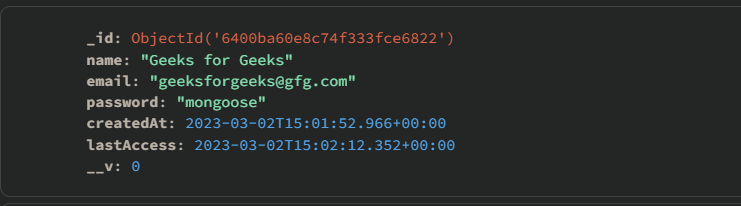
示例2: 在这个示例中,我们将使用mongoose.plugin()将插件添加到数据库中的所有模式中
步骤1: 只需在mongoose.plugin()中添加插件即可,它将被添加到所有插件中,如下所示。
- app.js
const mongoose = require('mongoose');

const url = 'mongodb://127.0.0.1:27017/test';
const conn = mongoose.connect(url);

// This will add the plugin to all the schemas
mongoose.plugin("./plugs")
mongoose.set('strictQuery', false)
const userSchema = new mongoose.Schema({
    name: String,
    email: String,
    password: String
});

const booksSchema = new mongoose.Schema({
    name: String,
    author: String,
})

// Compile the schema into a model
const User = mongoose.model('User', userSchema);
const Book = mongoose.model('Book', bookSchema);

// Save a new user to the database
const user = new User({
    name: 'Geeks for Geeks',
    email: 'geeksforgeeks@gfg.com',
    password: 'mongoose'
});

const book = new Book({
    name: "Mongoose Guides",
    author: "Geeks"
});

user.save();
books.save();
User.find({}, function (err, docs) { });
Book.find({}, function (err, docs) { });
步骤2: 使用以下命令运行代码
node app.js
输出:
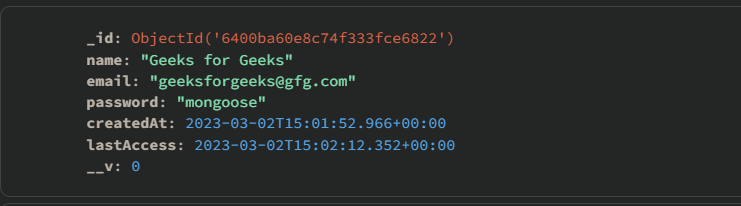
正如您所看到的,这两个架构具有相同的插件功能。
示例3: 在这个示例中,我们有相同的数据库,但是我们将使用一个mongoose插件模块 mongoose-hidden 。
Mongoose-hidden 插件 **** 用于隐藏您不想发送到客户端的属性,例如密码、密钥等。它与 toJSON() 和 toObjects() 一起使用。
步骤1: 使用以下命令安装mongoose-hidden模块。
npm i mongoose-hidden
步骤2: 将mongoose-hidden插件添加到模式中,并在模式定义中将 hidden 属性设置为true。
- app.js
const mongoose = require('mongoose');

// Mongodb Connection URL
const url = 'mongodb://127.0.0.1:27017/test';
const conn = mongoose.connect(url, {}) //
console.log("MongoDB is Connected")

// Creates a Schema
const userSchema = new mongoose.Schema({
    name: String,
    email: String,

    // Specify the property to be hidden
    password: {
        type: String,
        hide: true
    }
});

// Add a plugin to the schema
userSchema.plugin(require('mongoose-hidden')());

// Compile the schema into a model
const User = mongoose.model('User', userSchema);

// Save a new user to the database
const user = new User({
    name: 'Geeks for Geeks',
    email: 'geeksforgeeks@gfg.com',
    password: 'mongoose'
});
user.save();

// Print the data
console.log(user.toJSON())
步骤3: 使用以下命令运行代码
node app.js
输出:
