 极客教程
极客教程什么是Mongoose中的SchemaType
Mongoose是一个用于MongoDB的对象数据建模(ODM)库,并且它提供了丰富的Schema类型来定义存储在MongoDB集合中的文档的结构和数据类型。
SchemaType用于定义模式中特定字段的数据类型和验证规则。
语法:
const mySchema = new mongoose.Schema({
    myField: {
        type: MySchemaType,
        required: Boolean,
        default: Any,
        unique: Boolean,
        min: Number,
        max: Number,
        enum: Array,
        validate: Function
    }
});
参数:
- type: 此参数用于指定字段的数据类型。例如,字符串、数字、日期等。
- required: 此参数用于指定字段是否必需。如果设置为true,如果文档中缺少该字段,Mongoose将抛出验证错误。
- default: 此参数用于为字段设置默认值。如果字段未提供值,Mongoose将使用默认值。
- unique: 此参数用于指定字段值是否应在集合中的所有文档中是唯一的。如果设置为true,如果具有相同字段值的文档已经存在,Mongoose将抛出验证错误。
- min/max: 这些参数用于为数字字段(如数字和日期)设置最小和最大值。如果字段的值超出指定范围,Mongoose将抛出验证错误。
- enum: 此参数用于指定字段的允许值列表。如果字段的值不是允许值之一,Mongoose将抛出验证错误。
- validate: 此参数用于指定字段的自定义验证函数。此函数应将字段的值作为其参数,并返回true表示该值有效,否则返回false。Mongoose在验证过程中调用此函数。
安装mongoose模块:
步骤1: 您可以使用以下命令安装此软件包。
npm install mongoose
步骤2: 安装了mongoose模块之后,你可以在命令提示符中使用以下命令检查你的mongoose版本。
npm version mongoose
步骤3: 之后,你只需要创建一个文件夹并添加一个文件,例如index.js。要运行此文件,需要运行以下命令。
node index.js
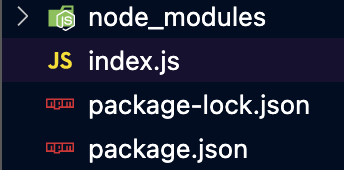
项目结构: 项目结构将如下所示:
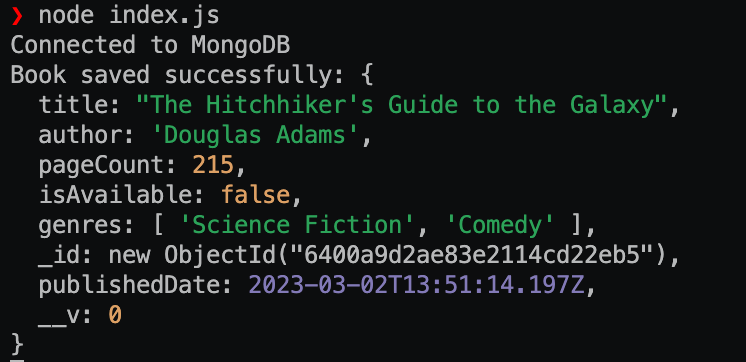
示例1: 在这个示例中,我们为一个名为”book”的文档定义了一个Mongoose模式,其中包含书籍的标题、作者、页数、出版日期、可用性和流派等字段。我们为每个字段设置了不同的参数,如required、min、default、enum等。
然后我们使用该模式创建一个Mongoose模型,并使用它创建一个新的文档对象book,并为每个字段赋值。然后,我们调用save()方法将文档保存到数据库中。
Index.js
const mongoose = require("mongoose");
mongoose.set("strictQuery", true);
mongoose
    .connect("mongodb://localhost:27017/geeksforgeeks", {
        useNewUrlParser: true,
        useUnifiedTopology: true,
    })
    .then(() => console.log("Connected to MongoDB"))
    .catch((err) =>
       console.error("Error connecting to MongoDB:", err));

// Define a Mongoose schema
const bookSchema = new mongoose.Schema({
    title: {
        type: String,
        required: true,
    },
    author: {
        type: String,
        required: true,
    },
    pageCount: {
        type: Number,
        min: 1,
        required: true,
    },
    publishedDate: {
        type: Date,
        default: Date.now,
    },
    isAvailable: {
        type: Boolean,
        default: true,
    },
    genres: {
        type: [String],
        enum: [
            "Fiction",
            "Non-Fiction",
            "Biography",
            "History",
            "Science Fiction",
            "Comedy",
        ],
    },
});

// Create a Mongoose model using the schema
const Book = mongoose.model("Book", bookSchema);

// Create a new document using the model
const book = new Book({
    title: "The Hitchhiker's Guide to the Galaxy",
    author: "Douglas Adams",
    pageCount: 215,
    isAvailable: false,
    genres: ["Science Fiction", "Comedy"],
});

// Save the document to the database
book.save(function (err, savedBook) {
    if (err) {
        console.log("Error saving book:", err);
    } else {
        console.log("Book saved successfully:", savedBook);
    }
});
使用以下命令运行index.js文件:
node index.js
输出:
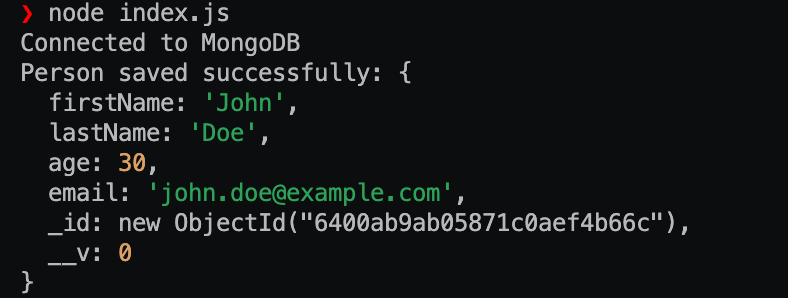
示例2: 在这个示例中,我们连接到一个MongoDB数据库并定义一个Mongoose模式来表示一个”person”文档。该模式包括名字、姓氏、年龄和电子邮件字段。
然后,我们使用该模式创建一个Mongoose模型,并根据每个字段的值创建一个新的文档对象person。最后,我们调用save()方法将文档保存到数据库中。
Index.js
const mongoose = require("mongoose");
mongoose.set("strictQuery", true);
mongoose
    .connect("mongodb://localhost:27017/geeksforgeeks", {
        useNewUrlParser: true,
        useUnifiedTopology: true,
    })
    .then(() => console.log("Connected to MongoDB"))
    .catch((err) =>
       console.error("Error connecting to MongoDB:", err));

// Define a Mongoose schema
const personSchema = new mongoose.Schema({
    firstName: String,
    lastName: String,
    age: Number,
    email: String,
});

// Create a Mongoose model using the schema
const Person = mongoose.model("Person", personSchema);

// Create a new document using the model
const person = new Person({
    firstName: "John",
    lastName: "Doe",
    age: 30,
    email: "john.doe@example.com",
});

// Save the document to the database
person.save(function (err, savedPerson) {
    if (err) {
        console.log("Error saving person:", err);
    } else {
        console.log("Person saved successfully:", savedPerson);
    }
});
使用以下命令运行 index.js 文件:
node index.js
输出:
参考: https://mongoosejs.com/docs/schematypes.html