 极客教程
极客教程Node.js 如何动态调用路由器函数
Node.js 通过 Express 框架提供了一个强大的路由系统。这个路由系统的一个特点是根据传入的请求动态调用路由器函数。
动态调用路由器函数意味着函数是在运行时根据请求参数选择的,而不是在代码中显式定义的。当您想处理大量相似的请求而不必为每个请求定义一个单独的函数时,这非常有用。
在Express中,您可以使用 app.METHOD() 函数动态调用路由器函数,其中METHOD是请求的HTTP方法(如GET、POST、PUT、DELETE等)。这使您能够在不显式创建路由器对象的情况下动态处理请求。
语法:
app.METHOD(path, [callback1], [callback2], ...)
其中 METHOD 是请求的HTTP方法,path 是路由的路径,callback 是将处理请求的函数。
安装: 您可以访问链接来安装express模块。您可以使用以下命令来安装这个包。
npm install express
安装完express模块后,可以使用命令提示符检查您的express版本。
npm version express
之后,您只需创建一个文件夹并添加一个文件,例如index.js。要运行此文件,您需要运行以下命令。
node index.js
项目结构:
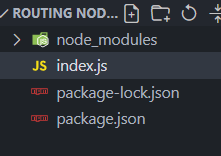
这是在Node.js中动态调用路由函数的示例:
示例 1: 文件名: index.js
在这个示例中,我们定义了一个包含不同路径和对应处理函数的routes对象。我们使用for…in循环遍历routes对象,并使用app.get()方法动态调用每个路径对应的函数。
const express = require('express');
const app = express();
const PORT = 3000;

// Define routes as key-value pairs
const routes = {
    '/users/:id': function (req, res) {
        const { id } = req.params;
        res.send(`User ID is {id}`);
    },
    '/products/:id': function (req, res) {
        const { id } = req.params;
        res.send(`Product ID is{id}`);
    }
};

// Loop through the routes and register
// them with Express
for (let route in routes) {
    app.get(route, routes[route]);
}

// Start the server
app.listen(PORT, function (err) {
    if (err) console.log(err);
    console.log(`Server listening on PORT ${PORT}`);
});
运行程序的步骤:
使用以下命令运行index.js文件:
node index.js
控制台输出:
Server listening on PORT 3000
浏览器输出: 现在,打开你的网络浏览器并导航到 **** http://localhost:3000/users/123 . 你应该会看到以下输出:
User ID is 123
如果你导航到 http://localhost:3000/products/456。 你应该看到以下输出:
Product ID is 456
示例2:文件名:index.js
假设我们有一个电子商务网站,并且我们想根据用户的请求动态路由到不同的产品类别和产品。
我们可以创建一个新的路由器对象,并为每个产品类别和产品定义路由。
const express = require("express");
const app = express();
const PORT = 3000;

// Define product category routes
app.get("/electronics", function (req, res) {
    res.send("This is the electronics category");
});

app.get("/books", function (req, res) {
    res.send("This is the books category");
});

app.get("/clothing", function (req, res) {
    res.send("This is the clothing category");
});

// Define product routes
app.get("/electronics/:productId", function (req, res) {
    const { productId } = req.params;
    res.send(`This is the product page
        for electronics product {productId}`);
});

app.get("/books/:productId", function (req, res) {
    const { productId } = req.params;
    res.send(`This is the product page for book{productId}`);
});

app.get("/clothing/:productId", function (req, res) {
    const { productId } = req.params;
    res.send(`This is the product page
        for clothing product {productId}`);
});

// Dynamically call router functions
app.use("/:category/:productId", function (req, res, next) {
    const { category, productId } = req.params;

    if (
        app._router.stack.some(
            (r) => r.route && r.route.path
                === `/{category}/:productId`
        )
    ) {
        app(req, res, next);
    } else {
        next();
    }
});

app.listen(PORT, function (err) {
    if (err) console.log(err);
    console.log(`Server listening on PORT ${PORT}`);
});
运行程序的步骤: 使用以下命令运行index.js文件:
node index.js
控制台输出:
Server listening on PORT 3000
浏览器输出:
现在打开你的 Web 浏览器,访问 http://localhost:3000/electronics/123 。你应该看到以下输出:
This is the product page for electronics product 123
同样地,你可以通过将URL更改为 http://localhost:3000/books/456 或者 http://localhost:3000/clothing/789 来测试其他路由。根据URL中指定的类别和产品ID,您应该能够看到相应的输出。