极客教程
极客教程Fabric.js Textbox 的 cornerStyle 属性
在本文中,我们将看到如何使用 Fabric.js 设置画布 Textbox 控制角的样式。Fabric.js 中的 Textbox 可以移动和根据需求进行拉伸。此外,当涉及到初始描边颜色、高度、宽度、填充颜色或描边宽度时,Textbox 可以进行自定义设置。
为了实现这一目标,我们将使用一个名为 Fabric.js 的 JavaScript 库。在导入库之后,我们将在 body 标签中创建一个包含 Textbox 的 canvas 块。在此之后,我们将初始化 Canvas 和 Textbox 的实例,使用 cornerStyle 属性设置控制角样式,然后将 Textbox 渲染到 Canvas 上,如下面的示例所示。
语法:
fabric.Textbox('text', {
    cornerStyle: string
});
参数: 此属性接受如上所述并以下述方式描述的单个参数:
- cornerStyle: 它指定控制角的样式。该参数只接受 rect、square 和 circle 三个值。
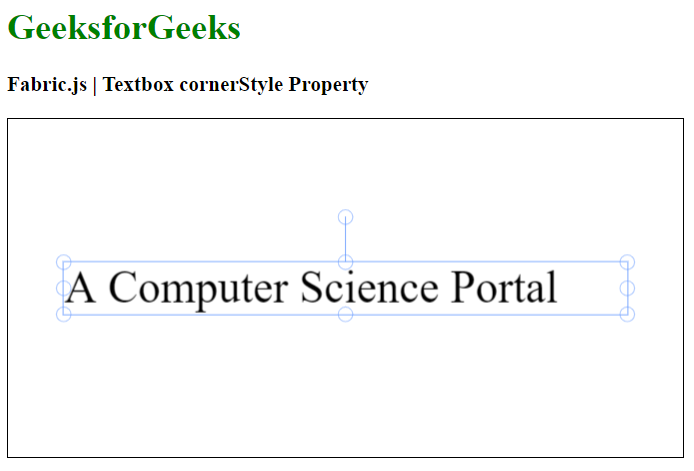
示例: 此示例使用 Fabric.js 设置 Textbox 的控制角样式如下。你需要点击对象来查看控制角的样式。
<html>
<head>
    <!-- Adding the FabricJS library -->
    <script src=
"https://cdnjs.cloudflare.com/ajax/libs/fabric.js/4.3.0/fabric.min.js">
    </script>
</head>
<body>
    <h1 style="color: green;">
        GeeksforGeeks
    </h1>
    <h3>
        Fabric.js | Textbox cornerStyle Property
    </h3>
    <canvas id="canvas" width="600" height="300"
        style="border:1px solid #000000">
    </canvas>
    <script>
        // Initiate a Canvas instance
        var canvas = new fabric.Canvas("canvas");

        // Create a new Textbox instance
        var text = new fabric.Textbox(
            'A Computer Science Portal', {
            width: 500,
            cornerStyle: 'circle'
        });

        // Render the Textbox in canvas
        canvas.add(text);
        canvas.centerObject(text);
    </script>
</body>
</html>
输出: