 极客教程
极客教程Java TreeMap
Java中的TreeMap与AbstractMap类一起用于实现Map接口和NavigableMap。地图根据其键的自然顺序进行排序,或者根据地图创建时提供的比较器进行排序,这取决于使用哪个构造函数。这被证明是对键值对进行排序和存储的一种有效方式。由treemap维护的存储顺序必须与等价物一致,就像其他任何排序的地图一样,与显式比较器无关。如果一个地图被多个线程同时访问,并且至少有一个线程在结构上修改了该地图,那么该treemap的实现是不同步的,必须在外部进行同步。
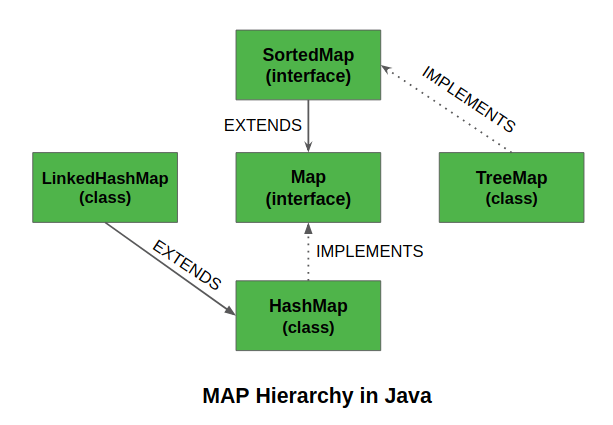
TreeMap的特征
TreeMap的一些重要特征如下。
- 该类是Java集合框架的一个成员。
- 该类实现了Map接口,包括NavigableMap、SortedMap,并扩展了AbstractMap类。
- Java中的TreeMap不允许空键(像Map),因此会抛出NullPointerException。然而,多个空值可以与不同的键相关联。
- 这个类及其视图中的方法所返回的条目对代表了它们产生时的映射快照。它们不支持Entry.setValue方法。
现在让我们继续前进,讨论同步的TreeMap。 TreeMap的实现是不同步的。这意味着,如果多个线程同时访问一个树集,并且至少有一个线程修改了该树集,那么它必须在外部进行同步。这通常是通过使用 Collections.synchronizedSortedMap 方法来实现的。这最好在创建时完成,以防止对集合的意外非同步访问。这可以通过以下方式实现。
SortedMap m = Collections.synchronizedSortedMap(new TreeMap(...));
极客们,现在你们一定想知道TreeMap的内部是如何工作的?
TreeMap中的方法在获取键集和值时,会返回一个迭代器,该迭代器在本质上是故障快速的。因此,任何并发的修改都会抛出ConcurrentModificationException。TreeMap是基于一个红黑树数据结构的。
树上的每个节点都有
- 3个变量 (K key=键, V value=值, boolean color=颜色)
- 3个引用 (Entry left = Left, Entry right = Right, Entry parent = Parent)
TreeMap中的构造函数
为了创建一个TreeMap,我们需要创建一个TreeMap类的对象。TreeMap类由各种构造函数组成,允许创建TreeMap的可能性。以下是该类中可用的构造函数。
- TreeMap()
- TreeMap(Comparator comp)
- TreeMap(Map M)
- TreeMap(SortedMap sm)
让我们在实现每个构造函数的同时单独讨论它们,如下所示。
构造函数1: TreeMap()
该构造函数用于建立一个空的TreeMap,该TreeMap将通过其键的自然顺序进行排序。
例子
// Java Program to Demonstrate TreeMap
// using the Default Constructor

// Importing required classes
import java.util.*;
import java.util.concurrent.*;

// Main class
// TreeMapImplementation
public class GFG {

    // Method 1
    // To show TreeMap constructor
    static void Example1stConstructor()
    {
        // Creating an empty TreeMap
        TreeMap<Integer, String> tree_map
            = new TreeMap<Integer, String>();

        // Mapping string values to int keys
        // using put() method
        tree_map.put(10, "Geeks");
        tree_map.put(15, "4");
        tree_map.put(20, "Geeks");
        tree_map.put(25, "Welcomes");
        tree_map.put(30, "You");

        // Printing the elements of TreeMap
        System.out.println("TreeMap: " + tree_map);
    }

    // Method 2
    // Main driver method
    public static void main(String[] args)
    {
        System.out.println("TreeMap using "
                           + "TreeMap() constructor:\n");

        // Calling constructor
        Example1stConstructor();
    }
}
输出
TreeMap using TreeMap() constructor:
TreeMap: {10=Geeks, 15=4, 20=Geeks, 25=Welcomes, 30=You}
构造函数2: TreeMap(Comparator comp)
这个构造函数用于建立一个空的TreeMap对象,其中的元素需要一个外部的排序顺序规范。
例子
// Java Program to Demonstrate TreeMap
// using Comparator Constructor

// Importing required classes
import java.util.*;
import java.util.concurrent.*;

// Class 1
// Helper class representing Student
class Student {

    // Attributes of a student
    int rollno;
    String name, address;

    // Constructor
    public Student(int rollno, String name, String address)
    {

        // This keyword refers to current object itself
        this.rollno = rollno;
        this.name = name;
        this.address = address;
    }

    // Method of this class
    // To print student details
    public String toString()
    {
        return this.rollno + " " + this.name + " "
            + this.address;
    }
}

// Class 2
// Helper class - Comparator implementation
class Sortbyroll implements Comparator<Student> {

    // Used for sorting in ascending order of
    // roll number
    public int compare(Student a, Student b)
    {
        return a.rollno - b.rollno;
    }
}

// Class 3
// Main class
public class GFG {

    // Calling constructor inside main()
    static void Example2ndConstructor()
    {
        // Creating an empty TreeMap
        TreeMap<Student, Integer> tree_map
            = new TreeMap<Student, Integer>(
                new Sortbyroll());

        // Mapping string values to int keys
        tree_map.put(new Student(111, "bbbb", "london"), 2);
        tree_map.put(new Student(131, "aaaa", "nyc"), 3);
        tree_map.put(new Student(121, "cccc", "jaipur"), 1);

        // Printing the elements of TreeMap
        System.out.println("TreeMap: " + tree_map);
    }

    // Main driver method
    public static void main(String[] args)
    {

        System.out.println("TreeMap using "
                           + "TreeMap(Comparator)"
                           + " constructor:\n");
        Example2ndConstructor();
    }
}
输出
TreeMap using TreeMap(Comparator) constructor:
TreeMap: {111 bbbb london=2, 121 cccc jaipur=1, 131 aaaa nyc=3}
构造函数3: TreeMap(Map M)
这个构造函数用来初始化一个TreeMap,其条目来自于给定的地图M,将按照键的自然顺序进行排序。
例子
// Java Program to Demonstrate TreeMap
// using the Default Constructor

// Importing required classes
import java.util.*;
import java.util.concurrent.*;

// Main class
public class TreeMapImplementation {

    // Method 1
    // To illustrate constructor<Map>
    static void Example3rdConstructor()
    {
        // Creating an empty HashMap
        Map<Integer, String> hash_map
            = new HashMap<Integer, String>();

        // Mapping string values to int keys
        // using put() method
        hash_map.put(10, "Geeks");
        hash_map.put(15, "4");
        hash_map.put(20, "Geeks");
        hash_map.put(25, "Welcomes");
        hash_map.put(30, "You");

        // Creating the TreeMap using the Map
        TreeMap<Integer, String> tree_map
            = new TreeMap<Integer, String>(hash_map);

        // Printing the elements of TreeMap
        System.out.println("TreeMap: " + tree_map);
    }

    // Method 2
    // Main driver method
    public static void main(String[] args)
    {

        System.out.println("TreeMap using "
                           + "TreeMap(Map)"
                           + " constructor:\n");

        Example3rdConstructor();
    }
}
输出
TreeMap using TreeMap(Map) constructor:
TreeMap: {10=Geeks, 15=4, 20=Geeks, 25=Welcomes, 30=You}
构造函数4: TreeMap(SortedMap sm)
这个构造函数用来初始化一个TreeMap,其中包含了来自给定排序地图的条目,这些条目将以与给定排序地图相同的顺序存储。
例子
// Java Program to Demonstrate TreeMap
// using the SortedMap Constructor

// Importing required classes
import java.util.*;
import java.util.concurrent.*;

// Main class
// TreeMapImplementation
public class GFG {

    // Method
    // To show TreeMap(SortedMap) constructor
    static void Example4thConstructor()
    {
        // Creating a SortedMap
        SortedMap<Integer, String> sorted_map
            = new ConcurrentSkipListMap<Integer, String>();

        // Mapping string values to int keys
        // using put() method
        sorted_map.put(10, "Geeks");
        sorted_map.put(15, "4");
        sorted_map.put(20, "Geeks");
        sorted_map.put(25, "Welcomes");
        sorted_map.put(30, "You");

        // Creating the TreeMap using the SortedMap
        TreeMap<Integer, String> tree_map
            = new TreeMap<Integer, String>(sorted_map);

        // Printing the elements of TreeMap
        System.out.println("TreeMap: " + tree_map);
    }

    // Method 2
    // Main driver method
    public static void main(String[] args)
    {

        System.out.println("TreeMap using "
                           + "TreeMap(SortedMap)"
                           + " constructor:\n");

        Example4thConstructor();
    }
}
输出
TreeMap using TreeMap(SortedMap) constructor:
TreeMap: {10=Geeks, 15=4, 20=Geeks, 25=Welcomes, 30=You}
TreeMap类中的方法
| 方法 | 执行的动作 |
|---|---|
| clear() | 该方法从该TreeMap中删除所有映射,并清除该地图。 |
| clone() | 该方法返回该TreeMap的一个浅层副本。 |
| containsKey(Object key) | 如果该地图包含指定键的映射,则返回true。 |
| containsValue(Object value) | 如果该地图将一个或多个键映射到指定的值,则返回true。 |
| entrySet() | 返回该地图中包含的映射的集合视图。 |
| firstKey() | 返回当前在这个排序的地图中的第一个(最低)键。 |
| get(Object key) | 返回该地图对指定键的映射值。 |
| headMap(Object key_value) | 该方法返回地图中严格小于参数key_value的部分的视图。 |
| keySet() | 该方法返回treemap中包含的键的Set视图。 |
| lastKey() | 返回当前在此排序的地图中的最后一个(最高)键。 |
| put(Object key, Object value) | 该方法用于向地图中插入一个映射。 |
| putAll(Map map) | 将指定地图中的所有映射复制到这个地图中。 |
| remove(Object key) | 如果存在的话,从这个TreeMap中删除这个键的映射。 |
| size() | 返回该地图中键值映射的数量。 |
| subMap((K startKey, K endKey) | 该方法返回此地图中键值范围从startKey(包括)到endKey(不包括)的部分。 |
| values() | 返回该地图中包含的值的集合视图。 |
实现: 下面的程序将更好地演示如何创建、插入和遍历TreeMap。
示例
// Java Program to Illustrate Operations in TreeMap
// Such as Creation, insertion
// searching, and traversal

// Importing required classes
import java.util.*;
import java.util.concurrent.*;

// Main class
// Implementation of TreeMap
public class GFG {

    // Declaring a TreeMap
    static TreeMap<Integer, String> tree_map;

    // Method 1
    // To create TreeMap
    static void create()
    {

        // Creating an empty TreeMap
        tree_map = new TreeMap<Integer, String>();

        // Display message only
        System.out.println("TreeMap successfully"
                           + " created");
    }

    // Method 2
    // To Insert values in the TreeMap
    static void insert()
    {

        // Mapping string values to int keys
        // using put() method
        tree_map.put(10, "Geeks");
        tree_map.put(15, "4");
        tree_map.put(20, "Geeks");
        tree_map.put(25, "Welcomes");
        tree_map.put(30, "You");

        // Display message only
        System.out.println("\nElements successfully"
                           + " inserted in the TreeMap");
    }

    // Method 3
    // To search a key in TreeMap
    static void search(int key)
    {

        // Checking for the key
        System.out.println("\nIs key \"" + key
                           + "\" present? "
                           + tree_map.containsKey(key));
    }

    // Method 4
    // To search a value in TreeMap
    static void search(String value)
    {

        // Checking for the value
        System.out.println("\nIs value \"" + value
                           + "\" present? "
                           + tree_map.containsValue(value));
    }

    // Method 5
    // To display the elements in TreeMap
    static void display()
    {

        // Displaying the TreeMap
        System.out.println("\nDisplaying the TreeMap:");

        System.out.println("TreeMap: " + tree_map);
    }

    // Method 6
    // To traverse TreeMap
    static void traverse()
    {

        // Display message only
        System.out.println("\nTraversing the TreeMap:");

        for (Map.Entry<Integer, String> e :
             tree_map.entrySet())
            System.out.println(e.getKey() + " "
                               + e.getValue());
    }

    // Method 6
    // Main driver method
    public static void main(String[] args)
    {

        // Calling above defined methods inside main()

        // Creating a TreeMap
        create();

        // Inserting the values in the TreeMap
        insert();

        // Search key "50" in the TreeMap
        search(50);

        // Search value "Geeks" in the TreeMap
        search("Geeks");

        // Display the elements in TreeMap
        display();

        // Traversing the TreeMap
        traverse();
    }
}
输出
TreeMap successfully created
Elements successfully inserted in the TreeMap
Is key "50" present? false
Is value "Geeks" present? true
Displaying the TreeMap:
TreeMap: {10=Geeks, 15=4, 20=Geeks, 25=Welcomes, 30=You}
Traversing the TreeMap:
10 Geeks
15 4
20 Geeks
25 Welcomes
30 You
对TreeMap进行各种操作
在Java 1.5中引入泛型后,可以限制可以存储在TreeMap中的对象的类型。现在,让我们看看如何在TreeMap上执行一些常用的操作。
操作1: 添加元素
为了向TreeMap添加一个元素,我们可以使用put()方法。但是,插入的顺序在TreeMap中并没有被保留。在内部,对于每个元素,键被比较并按升序排序。
例子
// Java Program to Illustrate Addition of Elements
// in TreeMap using put() Method

// Importing required classes
import java.util.*;

// Main class
class GFG {

    // Main driver method
    public static void main(String args[])
    {
        // Default Initialization of a TreeMap
        TreeMap tm1 = new TreeMap();

        // Inserting the elements in TreeMap
        // using put() method
        tm1.put(3, "Geeks");
        tm1.put(2, "For");
        tm1.put(1, "Geeks");

        // Initialization of a TreeMap using Generics
        TreeMap<Integer, String> tm2
            = new TreeMap<Integer, String>();

        // Inserting the elements in TreeMap
        // again using put() method
        tm2.put(new Integer(3), "Geeks");
        tm2.put(new Integer(2), "For");
        tm2.put(new Integer(1), "Geeks");

        // Printing the elements of both TreeMaps

        // Map 1
        System.out.println(tm1);
        // Map 2
        System.out.println(tm2);
    }
}
输出
{1=Geeks, 2=For, 3=Geeks}
{1=Geeks, 2=For, 3=Geeks}
操作2:改变元素
在添加完元素后,如果我们想改变元素,可以通过put()方法再次添加该元素。由于treemap中的元素是用键来索引的,所以可以通过简单地插入我们想改变的键的更新值来改变键的值。
例子
// Java program to Illustrate Updation of Elements
// in TreeMap using put() Method

// Importing required classes
import java.util.*;

// Main class
class GFG {

    // Main driver method
    public static void main(String args[])
    {
        // Initialization of a TreeMap
        // using Generics
        TreeMap<Integer, String> tm
            = new TreeMap<Integer, String>();

        // Inserting the elements in Map
        // using put() method
        tm.put(3, "Geeks");
        tm.put(2, "Geeks");
        tm.put(1, "Geeks");

        // Print all current elements in map
        System.out.println(tm);

        // Inserting the element at specified
        // corresponding to specified key
        tm.put(2, "For");

        // Printing the updated elements of Map
        System.out.println(tm);
    }
}
输出
{1=Geeks, 2=Geeks, 3=Geeks}
{1=Geeks, 2=For, 3=Geeks}
操作3: 删除元素
为了从TreeMap中移除一个元素,我们可以使用remove()方法。这个方法接收键值,如果该键存在于地图中,则从该地图中删除该键的映射。
例子
// Java program to Illustrate Removal of Elements
// in TreeMap using remove() Method

// Importing required classes
import java.util.*;

// Main class
class GFG {

    // Main driver method
    public static void main(String args[])
    {
        // Initialization of a TreeMap
        // using Generics
        TreeMap<Integer, String> tm
            = new TreeMap<Integer, String>();

        // Inserting the elements
        // using put() method
        tm.put(3, "Geeks");
        tm.put(2, "Geeks");
        tm.put(1, "Geeks");
        tm.put(4, "For");

        // Printing all elements of Map
        System.out.println(tm);

        // Removing the element corresponding to key
        tm.remove(4);

        //  Printing updated TreeMap
        System.out.println(tm);
    }
}
输出
{1=Geeks, 2=Geeks, 3=Geeks, 4=For}
{1=Geeks, 2=Geeks, 3=Geeks}
操作4: 在TreeMap中迭代
有多种方法来迭代地图。最著名的方法是使用for-each循环并获得键。通过使用 getValue()方法 可以找到键的值 。
例子
// Java Program to Illustrate Iterating over TreeMap
// using

// Importing required classes
import java.util.*;

// Main class
class GFG {

    // Main driver method
    public static void main(String args[])
    {
        // Initialization of a TreeMap
        // using Generics
        TreeMap<Integer, String> tm
            = new TreeMap<Integer, String>();

        // Inserting the elements
        // using put() method
        tm.put(3, "Geeks");
        tm.put(2, "For");
        tm.put(1, "Geeks");

        // For-each loop for traversal over Map
        // via entrySet() Method
        for (Map.Entry mapElement : tm.entrySet()) {

            int key = (int)mapElement.getKey();

            // Finding the value
            String value = (String)mapElement.getValue();

            // Printing the key and value
            System.out.println(key + " : " + value);
        }
    }
}
输出
1 : Geeks
2 : For
3 : Geeks