 极客教程
极客教程Java 向量类
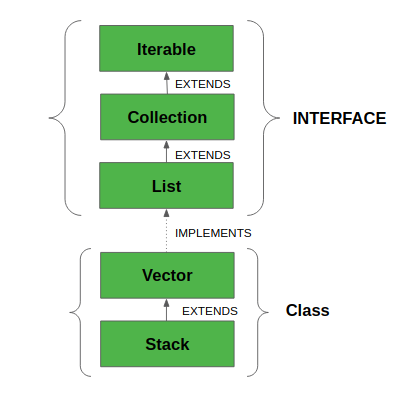
矢量类实现了一个可增长的对象阵列。矢量属于遗留类,但现在它已经与集合完全兼容。它在java.util包中找到,实现了List接口,所以我们可以使用List接口的所有方法,如下图所示。
- Vector实现了一个动态数组,这意味着它可以根据需要增长或缩小。像一个数组一样,它包含的组件可以使用一个整数索引来访问。
- 它们与ArrayList非常相似,但Vector是同步的,并且有一些集合框架不包含的遗留方法。
- 它也像ArrayList一样保持着一个插入顺序。尽管如此,由于它是 同步的 ,所以很少在非线程环境中使用,由于这个原因,它在添加、搜索、删除和更新其元素时性能很差。
- 矢量类所返回的迭代器是快速失败的。在并发修改的情况下,它会失败并抛出 ConcurrentModificationException。
语法
public class Vector<E> extends AbstractList<E> implements List<E>, RandomAccess, Cloneable, Serializable
这里, E 是元素的类型。
- 它扩展了AbstractList并实现了List接口。
- 它实现了Serializable, Cloneable, Iterable
, Collection , List , RandomAccess接口。 - 直接已知的子类是Stack。
关于向量容量的增量的重要观点 如下。
如果指定了增量,Vector将在每个分配周期中根据它来扩展。尽管如此,如果没有指定增量,那么向量的容量在每个分配周期内都会被加倍。Vector定义了三个受保护的数据成员。
- int capacityIncreament:包含增量值。
- int elementCount:当前存储在向量中的元素的数量。
- Object elementData[]:保存向量的数组,存储在其中。
向量声明中的常见错误如下: 。
- 如果定义的向量的InitialSize为负数,Vector会抛出一个 IllegalArgumentException 。
- 如果指定的集合是空的,它会抛出 **NullPointerException . **
构造函数
1.Vector(): 创建一个初始容量为10的默认向量。
Vector<E> v = new Vector<E>();
2.Vector(int size): 创建一个初始容量由size指定的向量。
Vector<E> v = new Vector<E>(int size);
3.Vector(int size, int incr): 创建一个向量,其初始容量由size指定,增量由incr指定。它指定了每次向上调整向量大小时要分配的元素数量。
Vector<E> v = new Vector<E>(int size, int incr);
4.Vector(Collection c): 创建一个包含集合c元素的向量。
vect
Vector<E> v = new Vector<E>(Collection c);
向量类中的方法
| 方法 | 描述 |
|---|---|
| add(E e) | 将指定的元素添加到这个Vector的末尾。 |
| add(int index, E element) | 在这个Vector中的指定位置插入指定的元素。 |
| addAll(Collection c) | 将指定Collection中的所有元素添加到此Vector的末尾,顺序是指定Collection的迭代器所返回的元素。 addAll(int index, Collection c) | 在指定的位置将指定集合中的所有元素插入到这个向量中。 addElement(E obj) | 将指定的组件添加到这个向量的末尾,使其大小增加一个。 capacity() | 返回这个向量的当前容量。 clear() | 移除这个向量中的所有元素。 clone() | 返回这个向量的一个克隆。 contains(Object o) | 如果这个向量包含指定的元素,返回true。 containsAll(Collection c) |
如果此Vector包含指定Collection中的所有元素,则返回true。 |
| copyInto(Object[] anArray) | 将此向量的元素复制到指定的数组中。 |
| elementAt(int index) | 返回指定索引处的组件。 |
| elements() | 返回这个向量的组件的枚举值。 |
| ensureCapacity(int minCapacity) | 如果需要的话,增加这个向量的容量,以确保它至少能容纳最小容量参数所指定的组件数量。 |
| equals(Object o) | 将指定的对象与这个向量进行比较,看是否相等。 |
| firstElement() | 返回这个向量的第一个组件(索引为0的项目)。 |
| forEach(Consumer action) | 对Iterable的每个元素执行给定的动作,直到所有元素都被处理完,或者该动作抛出一个异常。 get(int index) | 返回该向量中指定位置的元素。 hashCode() | 返回此Vector的哈希代码值。 indexOf(Object o) | 返回指定元素在此向量中第一次出现的索引,如果此向量不包含该元素,则返回-1。 indexOf(Object o, int index) | 返回指定元素在此向量中第一次出现的索引,从索引开始向前搜索,如果没有找到该元素则返回-1。 insertElementAt(E obj, int index) | 在这个向量中的指定索引处插入指定的对象作为一个组件。 isEmpty() | 测试这个向量是否没有组件。 iterator() | 以适当的顺序返回列表中元素的迭代器。 LastElement() | 返回向量的最后一个组件。 lastIndexOf(Object o) | 返回指定元素在这个向量中最后出现的索引,如果这个向量不包含该元素,则返回-1。 LastIndexOf(Object o, int index) | 返回指定元素在这个向量中最后出现的索引,从索引开始向后搜索,如果没有找到该元素,则返回-1。 listIterator() | 返回此列表中元素的列表迭代器(按照适当的顺序)。 listIterator(int index) | 返回一个列表中元素的迭代器(按适当的顺序),从列表中的指定位置开始。 remove(int index) | 移除这个Vector中指定位置的元素。 remove(Object o) | 移除此Vector中第一次出现的指定元素。如果Vector不包含该元素,那么它就不会被改变。 removeAll(Collection c) |
从这个Vector中移除它在指定Collection中包含的所有元素。 |
| removeAllElements() | 从这个向量中移除所有元素,并将其大小设置为零。 |
| removeElement(Object obj) | 从这个向量中移除参数的第一个(最低索引)出现。 |
| removeElementAt(int index) | 删除指定索引处的组件。 |
| removeIf(Predicate filter) | 删除这个集合中满足给定谓词的所有元素。 removeRange(int fromIndex, int toIndex) | 从这个列表中删除所有索引在fromIndex(包括)和toIndex(不包括)之间的元素。 replaceAll(UnaryOperator retainAll(Collection c) |
只保留这个向量中包含在指定Collection中的元素。 |
| set(int index, E element) | 用指定的元素替换这个Vector中指定位置的元素。 |
| setElementAt(E obj, int index) | 将此向量中指定索引处的元素设置为指定对象。 |
| setSize(int newSize) | 设置此向量的大小。 |
| size() | 返回此向量中的组件数。 |
| sort(Comparator<? super E> c) | 根据指定的比较器所引起的顺序对这个列表进行排序。 |
| spliterator() | 在这个列表中的元素上创建一个晚期绑定的、故障快速的Spliterator。 |
| subList(int fromIndex, int toIndex) | 返回列表中从Index(含)到toIndex(不含)之间部分的视图。 |
| toArray() | 返回一个包含向量中所有元素的数组,顺序正确。 |
| toArray(T[] a) | 返回一个数组,包含这个Vector中的所有元素,顺序正确;返回的数组的运行时类型是指定的数组的类型。 |
| toString() | 返回此Vector的字符串表示,包含每个元素的字符串表示。 |
| trimToSize() | 将此向量的容量修剪为向量的当前大小。 |
让我们首先讨论并实现如何创建和使用一个Vector,然后再讨论这个类的方法。
例子
// Java Program to Demonstrate Working of Vector
// Via Creating and Using It

// Importing required classes
import java.io.*;
import java.util.*;

// Main class
class GFG {

    // Main driver method
    public static void main(String[] args)
    {
        // Size of the Vector
        int n = 5;

        // Declaring the Vector with
        // initial size n
        Vector<Integer> v = new Vector<Integer>(n);

        // Appending new elements at
        // the end of the vector
        for (int i = 1; i <= n; i++)
            v.add(i);

        // Printing elements
        System.out.println(v);

        // Remove element at index 3
        v.remove(3);

        // Displaying the vector
        // after deletion
        System.out.println(v);

        // iterating over vector elements
        // using for loop
        for (int i = 0; i < v.size(); i++)

            // Printing elements one by one
            System.out.print(v.get(i) + " ");
    }
}
输出
[1, 2, 3, 4, 5]
[1, 2, 3, 5]
1 2 3 5
注意
- 如果没有指定向量的增量,那么它的容量将在每个增量周期内增加一倍。
- 矢量的容量不能低于大小,它可能等于大小。
Java 对向量类进行各种操作
让我们讨论一下对Vector类的各种操作,具体如下。
- 添加元素
- 更新元素
- 删除元素
- 遍历元素
操作1: 添加元素
为了添加元素到Vector,我们使用add()方法。这个方法是重载的,可以根据不同的参数执行多种操作。下面列出了这些操作。
- add(Object): 这个方法是用来在Vector的末尾添加一个元素。
- add(int index, Object): 这个方法是用来在Vector的特定索引处添加一个元素。
例子
// Java Program to Add Elements in Vector Class

// Importing required classes
import java.io.*;
import java.util.*;

// Main class
// AddElementsToVector
class GFG {

    // Main driver method
    public static void main(String[] arg)
    {

        // Case 1
        // Creating a default vector
        Vector v1 = new Vector();

        // Adding custom elements
        // using add() method
        v1.add(1);
        v1.add(2);
        v1.add("geeks");
        v1.add("forGeeks");
        v1.add(3);

        // Printing the vector elements to the console
        System.out.println("Vector v1 is " + v1);

        // Case 2
        // Creating generic vector
        Vector<Integer> v2 = new Vector<Integer>();

        // Adding custom elements
        // using add() method
        v2.add(1);
        v2.add(2);
        v2.add(3);

        // Printing the vector elements to the console
        System.out.println("Vector v2 is " + v2);
    }
}
输出
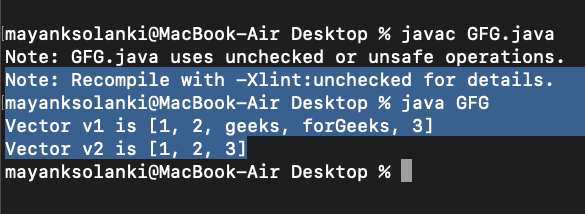
Vector v1 is [1, 2, geeks, forGeeks, 3]
Vector v2 is [1, 2, 3]
操作2: 更新元素
在添加元素后,如果我们想改变元素,可以用set()方法来完成。由于矢量是有索引的,我们希望改变的元素是由元素的索引来引用的。因此,这个方法需要一个索引和更新的元素被插入到该索引处。
例子
// Java code to change the
// elements in vector class

import java.util.*;

public class UpdatingVector {

    public static void main(String args[])
    {
        // Creating an empty Vector
        Vector<Integer> vec_tor = new Vector<Integer>();

        // Use add() method to add elements in the vector
        vec_tor.add(12);
        vec_tor.add(23);
        vec_tor.add(22);
        vec_tor.add(10);
        vec_tor.add(20);

        // Displaying the Vector
        System.out.println("Vector: " + vec_tor);

        // Using set() method to replace 12 with 21
        System.out.println("The Object that is replaced is: "
                        + vec_tor.set(0, 21));

        // Using set() method to replace 20 with 50
        System.out.println("The Object that is replaced is: "
                        + vec_tor.set(4, 50));

        // Displaying the modified vector
        System.out.println("The new Vector is:" + vec_tor);
    }
}
输出
Vector: [12, 23, 22, 10, 20]
The Object that is replaced is: 12
The Object that is replaced is: 20
The new Vector is:[21, 23, 22, 10, 50]
操作3: 删除元素
为了从一个Vector中删除一个元素,我们可以使用remove()方法。这个方法是重载的,可以根据不同的参数执行多种操作。它们是
- remove(Object): 这个方法被用来从Vector中删除一个对象。如果有多个这样的对象,那么第一个出现的对象将被删除。
- remove(int index): 因为Vector是有索引的,这个方法需要一个整数值,它可以简单地删除Vector中存在于该特定索引的元素。在删除元素后,所有的元素都被移到左边以填补空间,并且对象的索引被更新。
例子
// Java code illustrating the removal
// of elements from vector

import java.util.*;
import java.io.*;

class RemovingElementsFromVector {

    public static void main(String[] arg)
    {

        // create default vector of capacity 10
        Vector v = new Vector();

          // Add elements using add() method
        v.add(1);
        v.add(2);
        v.add("Geeks");
        v.add("forGeeks");
        v.add(4);

        // removing first occurrence element at 1
        v.remove(1);

        // checking vector
        System.out.println("after removal: " + v);
    }
}
输出
after removal: [1, Geeks, forGeeks, 4]
操作4:迭代向量
有多种方法可以在Vector中进行迭代。最著名的方法是通过使用基本的for循环与get()方法相结合来获得特定索引的元素,以及高级的for循环。
例子
// Java program to iterate the elements
// in a Vector

import java.util.*;

public class IteratingVector {

    public static void main(String args[])
    {
          // create an instance of vector
        Vector<String> v = new Vector<>();

          // Add elements using add() method
        v.add("Geeks");
        v.add("Geeks");
        v.add(1, "For");

        // Using the Get method and the
        // for loop
        for (int i = 0; i < v.size(); i++) {

            System.out.print(v.get(i) + " ");
        }

        System.out.println();

        // Using the for each loop
        for (String str : v)
            System.out.print(str + " ");
    }
}
输出
Geeks For Geeks
Geeks For Geeks