 极客教程
极客教程Java IdentityHashMap类
IdentityHashMap 使用Hashtable实现了Map接口,在比较键(和值)时,使用引用-平等来代替对象-平等。该类不是一个通用的Map实现。虽然该类实现了Map接口,但它故意违反了Map的一般契约,该契约规定在比较对象时必须使用equals()方法。当用户需要通过引用来比较对象时,就会用到这个类。它属于 java.util 包。
IdentityHashMap的特点
- 它遵循引用平等,而不是使用equals()方法,它使用==运算符。
- 它不是同步的,必须在外部进行同步。
- 迭代器是快速失败的,在试图在迭代时进行修改时抛出 ConcurrentModificationException 。
- 该类为基本操作(get和put)提供了恒定的时间性能,假设系统的身份哈希函数(System.identityHashCode(Object))在桶中正确地分散了元素。IdentityHashMap不使用hashCode()方法,而是使用System.identityHashCode()方法。这是一个重要的区别,因为现在你可以在Map中使用易变的对象作为键,当映射存储在IdentityHashMap中时,其哈希代码可能会改变。
声明
public class IdentityHashMap<K,V> extends AbstractMap<K,V> implements Map<K,V>, Serializable, Cloneable
这里, K 是密钥对象类型, V 是值对象类型。
IdentityHashMap的层次结构
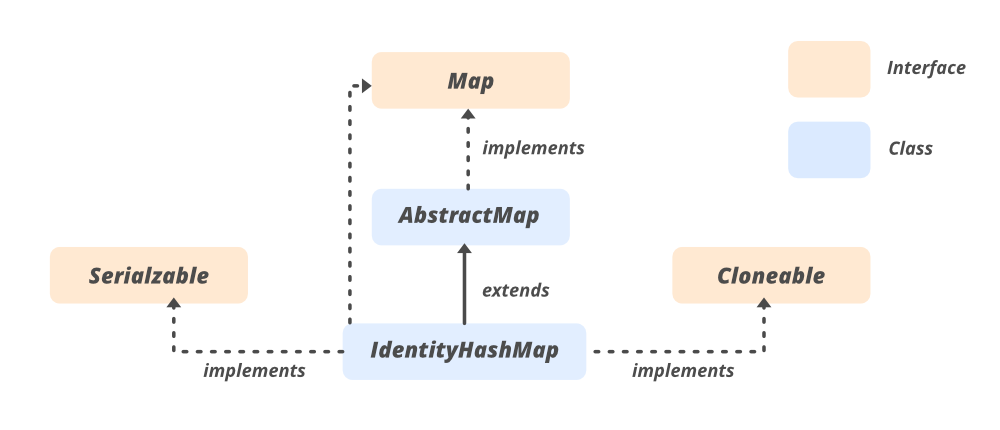
它实现了 Serializable , Cloneable , Map<K, V>接口,并扩展了 **AbstractMap <K, V> **类。
例子
// Java code to demonstrate IdentityHashMap

import java.util.Map;
import java.util.HashMap;
import java.util.IdentityHashMap;

public class IdentityHashMapExample
{
    public static void main(String[] args)
    {
        // creating an instance of IdentityHashMap
        Map<String, String> ihm = new IdentityHashMap<>();

        // Putting key and value pair
        // in a IdentityHashMap Object
        ihm.put("ihmkey","ihmvalue");
        ihm.put(new String("ihmkey"),"ihmvalue1");

        // ihm.size() will print 2 since it
        // compares the objects by reference
        System.out.println("Size of IdentityHashMap--"+ihm.size());

    }
}
输出
Size of IdentityHashMap--2
IdentityHashMap的构造函数
我们可以通过两种方式创建一个 IdentityHashMap 的实例。
IdentityHashMap<K, V> ihm = new IdentityHashMap<K, V>();
            (or)
Map<K, V> hm = new IdentityHashMap<K, V>();
1.IdentityHashMap(): 构造一个新的、空的IdentityHashMap,有一个默认的预期最大尺寸。
IdentityHashMap<K, V> ihm = new IdentityHashMap<K, V>()
2.IdentityHashMap(int expectedMaxSize): 构建一个新的、空的、具有指定最大预期大小的地图。
IdentityHashMap<K, V> ihm = new IdentityHashMap(int expectedMaxSize);
3.IdentityHashMap(Map m): 构建一个新的IdentityHashMap,包含指定地图中的键值映射。
IdentityHashMap<K, V> ihm = new IdentityHashMap(Map m);
IdentityHashMap的基本操作
1.添加元素
为了在IdentityHashMap中插入或添加映射,我们有put()和putAll()方法。put()可以插入一个特定的键和它所映射的值,到一个特定的映射中。如果传递了一个现有的键,那么之前的值就会被新的值所取代。 putAll()将所有的元素,即映射,从一个映射复制到另一个映射。
// Java code to illustrate
// adding elements to IdentityHashMap
import java.util.*;

public class AddingElementsToIdentityHashMap {

    public static void main(String[] args)
    {
        // Creating an empty IdentityHashMap
        Map<Integer, String> identity_hash
            = new IdentityHashMap<Integer, String>();

        // Mapping string values to int keys
        // using put() method
        identity_hash.put(10, "Geeks");
        identity_hash.put(15, "4");
        identity_hash.put(20, "Geeks");
        identity_hash.put(25, "Welcomes");
        identity_hash.put(30, "You");

        // Displaying the IdentityHashMap
        System.out.println("Initial Mappings are: "
                           + identity_hash);

        // Inserting existing key along with new value
          // previous value gets returned and stored in
          // returned_value
        String returned_value
            = (String)identity_hash.put(20, "All");

        // Verifying the returned value
        System.out.println("Returned value is: "
                           + returned_value);

        // Displaying the new map
        System.out.println("New map is: " + identity_hash);

        // Creating a new Identityhash map and copying
        Map<Integer, String> new_Identityhash_map
            = new IdentityHashMap<Integer, String>();
        new_Identityhash_map.putAll(identity_hash);

        // Displaying the final IdentityHashMap
        System.out.println("The new map: "
                           + new_Identityhash_map);
    }
}
输出
Initial Mappings are: {10=Geeks, 25=Welcomes, 30=You, 20=Geeks, 15=4}
Returned value is: Geeks
New map is: {10=Geeks, 25=Welcomes, 30=You, 20=All, 15=4}
The new map: {10=Geeks, 25=Welcomes, 30=You, 20=All, 15=4}
2.移除元素
为了移除映射,我们使用remove(),这是IdentityHashMap类的一个内置方法,用于从地图中移除任何特定键的映射。
// Java code to illustrate removing
// elements from IdentityHashMap

import java.util.*;

public class RemovingMappingsFromIdentityHashMap {
    public static void main(String[] args)
    {

        // Creating an empty IdentityHashMap
        Map<Integer, String> Identity_hash = new
                    IdentityHashMap<Integer, String>();

        // Mapping string values to int keys
        Identity_hash.put(10, "Geeks");
        Identity_hash.put(15, "4");
        Identity_hash.put(20, "Geeks");
        Identity_hash.put(25, "Welcomes");
        Identity_hash.put(30, "You");

        // Displaying the IdentityHashMap
        System.out.println("Initial Mappings are: " +
                                        Identity_hash);

        // Removing the existing key mapping
        String returned_value =
                        (String)Identity_hash.remove(20);

        // Verifying the returned value
        System.out.println("Returned value is: " +
                                    returned_value);

        // Displaying the new map
        System.out.println("New map is: " + Identity_hash);
    }
}
输出
Initial Mappings are: {10=Geeks, 25=Welcomes, 30=You, 20=Geeks, 15=4}
Returned value is: Geeks
New map is: {10=Geeks, 25=Welcomes, 30=You, 15=4}
3.访问元素
我们可以使用get()方法访问IdentityHashMap中的元素,下面给出了这个例子。
// Java code to illustrate the accessing
// elements from IdentityHashMap

import java.util.*;

public class AccessingElementsFromIdentityHashMap {

    public static void main(String[] args)
    {

        // Creating an empty IdentityHashMap
        Map<Integer, String> identity_hash
            = new IdentityHashMap<Integer, String>();

        // Mapping string values to int keys
        identity_hash.put(10, "Geeks");
        identity_hash.put(15, "4");
        identity_hash.put(20, "Geeks");
        identity_hash.put(25, "Welcomes");
        identity_hash.put(30, "You");

        // Displaying the IdentityHashMap
        System.out.println("Initial Mappings are: "
                           + identity_hash);

        // Getting the value of 25
        System.out.println("The Value is: "
                           + identity_hash.get(25));

        // Getting the value of 10
        System.out.println("The Value is: "
                           + identity_hash.get(10));

          // Using keySet() to get the set view of keys
        System.out.println("The set is: " + identity_hash.keySet());

          // Using entrySet() to get the set view
        System.out.println("The set is: " +
                                identity_hash.entrySet());
    }
}
输出
Initial Mappings are: {10=Geeks, 25=Welcomes, 30=You, 20=Geeks, 15=4}
The Value is: Welcomes
The Value is: Geeks
The set is: [10, 25, 30, 20, 15]
The set is: [10=Geeks, 25=Welcomes, 30=You, 20=Geeks, 15=4]
4.遍历
我们可以使用Iterator接口来遍历集合框架的任何结构。由于迭代器只处理一种类型的数据,我们使用Entry< ?, ? >来将两种不同的类型解析成一种兼容的格式。然后使用next()方法,我们打印IdentityHashMap的元素。
// Java code to illustrate the
// iterating over IdentityHashmap

import java.util.*;

public class IteratingIdentityHashMap {

    public static void main(String[] args)
    {

        // Creating an empty IdentityHashMap
        IdentityHashMap<Integer, String> identity_hash
            = new IdentityHashMap<Integer, String>();

        // Mapping string values to int keys
        identity_hash.put(10, "Geeks");
        identity_hash.put(15, "4");
        identity_hash.put(20, "Geeks");
        identity_hash.put(25, "Welcomes");
        identity_hash.put(30, "You");

        // Displaying the IdentityHashMap
        System.out.println("Initial Mappings are: "
                           + identity_hash);

        // Create an Iterator over the
        // IdentityHashMap
        Iterator<IdentityHashMap.Entry<Integer, String> >
            itr = identity_hash.entrySet().iterator();

        // The hasNext() method is used to check if there is
        // a next element The next() method is used to
        // retrieve the next element
        while (itr.hasNext()) {
            IdentityHashMap.Entry<Integer, String> entry
                = itr.next();
            System.out.println("Key = " + entry.getKey()
                               + ", Value = "
                               + entry.getValue());
        }
    }
}
输出
Initial Mappings are: {10=Geeks, 25=Welcomes, 30=You, 20=Geeks, 15=4}
Key = 10, Value = Geeks
Key = 25, Value = Welcomes
Key = 30, Value = You
Key = 20, Value = Geeks
Key = 15, Value = 4
同步的IdentityHashMap
如果多个线程同时访问一个IdentityHashMap,并且至少有一个线程对该图进行了结构性的修改,那么它必须在外部进行同步。(结构性修改是指增加或删除一个或多个映射的任何操作;仅仅改变与一个实例已经包含的键相关的值并不是结构性修改)。这通常是通过在一些自然封装了地图的对象上进行同步来实现的。如果没有这样的对象,应该使用 Collections.synchronizedMap 方法来 “包装 “该地图。这最好在创建时完成,以防止意外地对地图进行非同步访问。
Mapm = Collections.synchronizedMap(new IdentityHashMap(..))
IdentityHashMap的方法
- K – 地图中键的类型。
- V – 在地图中映射的值的类型。
| 方法 | 描述 |
|---|---|
| clear() | 移除该地图中的所有映射。 |
| clone() | 返回这个IdentityHashMap的一个浅层拷贝:键和值本身没有被克隆。 |
| containsKey(Object key) | 测试指定的对象引用是否是此IdentityHashMap中的一个键。 |
| containsValue(Object value) | 测试指定的对象引用是否是这个IdentityHashMap中的一个值。 |
| entrySet() | 返回该地图中包含的映射的Set视图。 |
| equals(Object o) | 将指定的对象与这个映射进行比较,看是否相等。 |
| get(Object key) | 返回指定的键被映射到的值,如果此地图不包含键的映射,则返回空值。 |
| hashCode() | 返回该地图的哈希代码值。 |
| isEmpty() | 如果这个IdentityHashMap不包含键值映射,则返回true。 |
| keySet() | 返回这个地图中包含的键的基于身份的集合视图。 |
| put(K key, V value) | 将指定的值与此IdentityHashMap中的指定键关联起来。 |
| putAll(Map<? extends K,? extends V> m) | 将指定地图中的所有映射复制到这个地图中。 |
| remove(Object key) | 如果存在的话,从这个地图中删除这个键的映射。 |
| size() | 返回这个身份哈希地图中的键值映射的数量。 |
| values() | 返回该地图中包含的值的集合视图。 |
java.util.AbstractMap类中声明的方法
| 方法 | 描述 |
|---|---|
| toString() | 返回该地图的一个字符串表示。 |
在接口 java.util.Map 中声明的方法
| 方法 | 描述 |
|---|---|
| compute(K key, BiFunction<? super K,? super V,? extends V> remappingFunction) | 试图为指定的键和其当前的映射值计算一个映射(如果没有当前的映射,则为空)。 |
| computeIfAbsent(K key, Function<? super K,? extends V> mappingFunction) | 如果指定的键还没有与一个值相关联(或者被映射为空),则尝试使用给定的映射函数计算其值,并将其输入此映射,除非为空。 |
| computeIfPresent(K key, BiFunction<? super K,? super V,? extends V> remappingFunction) | 如果指定的键的值是存在的,并且不是空的,则尝试给定键和其当前的映射值来计算一个新的映射。 |
| forEach(BiConsumer<? super K,? super V> action) | 对这个地图中的每个条目执行给定的动作,直到所有条目都被处理完,或者该动作抛出一个异常。 |
| getOrDefault(Object key, V defaultValue) | 返回指定的键被映射到的值,如果这个地图不包含键的映射,则返回defaultValue。 |
| merge(K key, V value, BiFunction<? super V,? super V,? extends V> remappingFunction) | 如果指定的键还没有与一个值关联,或者与空值关联,那么就将其与给定的非空值关联。 |
| putIfAbsent(K key, V value) | 如果指定的键还没有与一个值相关联(或被映射为null),则将其与给定的值相关联并返回null,否则返回当前值。 |
| remove(Object key, Object value) | 只有当指定的键当前被映射到指定的值时,才会删除该键的条目。 |
| replace(K key, V value) | 只有当指定的键当前被映射到某个值时,才会替换该键的条目。 |
| replace(K key, V oldValue, V newValue) | 只在当前映射到指定值的情况下替换指定键的条目。 |
| replaceAll(BiFunction<? super K,? super V,? extends V> function) | 用在该条目上调用给定函数的结果替换每个条目的值,直到所有条目都被处理或该函数抛出一个异常。 |
IdentityHashMap vs HashMap
- IdentityHashMap使用平等操作符”==”来比较键和值,而HashMap使用equals方法来比较Map内部的键和值。
- 由于IdentityHashMap不使用equals(),因此对于一个具有昂贵的equals()的对象来说,它比HashMap快。
- IdentityHashMap不要求键是不可变的,因为它不依赖于equals()。
下面的程序说明了IdentityHashMap和HashMap实现之间的区别。
// Java code to demonstrate IdentityHashMap and
// illustration of how it is different from HashMap

import java.util.Map;
import java.util.HashMap;
import java.util.IdentityHashMap;

public class IdentityHashMapExample
{
    public static void main(String[] args)
    {
        // Creating HashMap and IdentityHashMap objects
        Map<String, String> hm = new HashMap<>();
        Map<String, String> ihm = new IdentityHashMap<>();

        // Putting key and value in HashMap and IdentityHashMap Object
        hm.put("hmkey","hmvalue");
        hm.put(new String("hmkey"),"hmvalue1");
        ihm.put("ihmkey","ihmvalue");
        ihm.put(new String("ihmkey"),"ihmvalue1");

        // Print Size of HashMap and WeakHashMap Object
        // hm.size() will print 1 since it compares the objects logically
        // and both the keys are same
        System.out.println("Size of HashMap is : "+hm.size());

        // ihm.size() will print 2 since it compares the objects by reference
        System.out.println("Size of IdentityHashMap is : "+ihm.size());


    }
}
输出
Size of HashMap is : 1
Size of IdentityHashMap is : 2