 极客教程
极客教程Java中的DelayQueue类及其示例
DelayQueue 类是Java Collections Framework的成员之一。它属于 java.util.concurrent 包。DelayQueue实现了BlockingQueue接口。DelayQueue是一个专门针对延迟时间对元素进行排序的优先队列,意味着只有那些时间已过期的元素才可以从队列中取出。
DelayQueue头部包含最少时间已过期的元素。如果没有延迟已过期,则没有头部,并且poll将返回null。DelayQueue仅接受那些属于类型为 Delayed 或实现 java.util.concurrent.Delayed 接口的类的元素。DelayQueue内部会阻塞元素,直到某个延迟已过期。DelayQueue实现了getDelay(TimeUnit.NANOSECONDS)方法,以返回剩余的延迟时间。传递给getDelay()方法的TimeUnit实例是一个枚举类型,告诉应该以哪个时间单位返回延迟。TimeUnit枚举可以采用DAYS,HOURS,MINUTES,SECONDS,MILLISECONDS,MICROSECONDS,NANOSECONDS。该队列不允许出现null元素。这个类及其迭代器实现了所有 Collection 和 Iterator 接口的可选方法。在iterator()方法中提供的迭代器不能保证以任何特定顺序遍历DelayQueue的元素。
// Delayed接口声明

public interface Delayed extends Comparable<Delayed>

{

/**

* 以给定的时间单位返回与此对象关联的剩余延迟时间。

*

* @param unit 时间单位

*

* @return 剩余延迟时间;零或负值表示延迟已经过去

*/

long getDelay(TimeUnit unit);

}
DelayQueue的继承结构
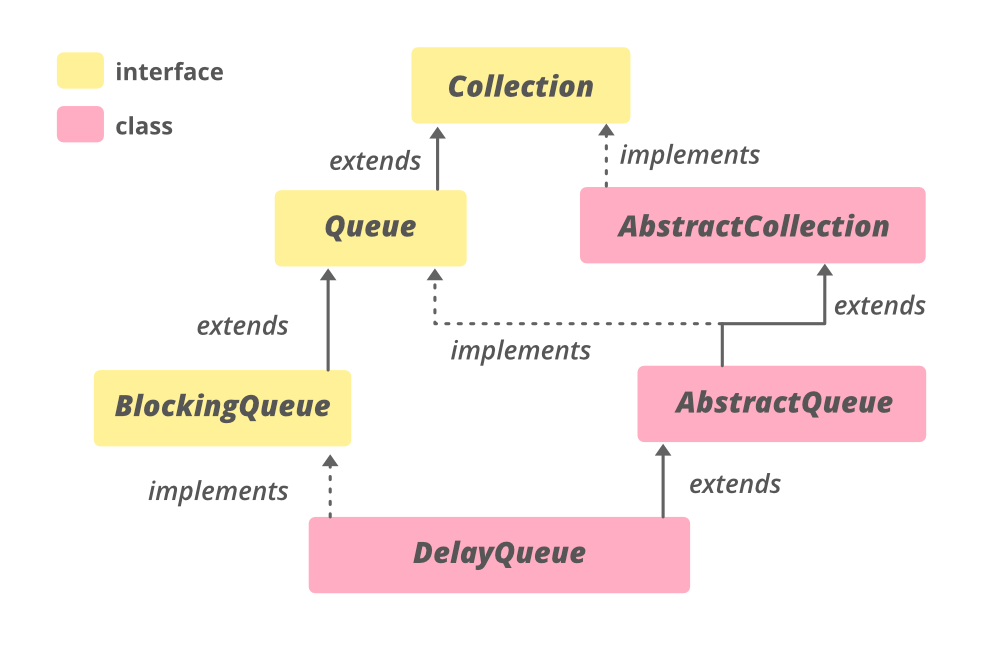
它实现了 Iterable <E>, Collection <E>, BlockingQueue<E>, Queue<E>接口。
类声明:
public class DelayQueue<E extends Delayed> extends AbstractQueue<E> implements BlockingQueue<E>
在这里, E 是这个集合维护的元素类型。
DelayQueue的构造函数
要构造一个DelayQueue,我们需要从 java.util.concurrent.DelayQueue 中导入它。
1. DelayQueue() :构造一个空的DelayQueue。
DelayQueue<E> dq = new DelayQueue<E>();
2. DelayQueue(Collection
DelayQueue<E> dq = new DelayQueue(Collection<E> c);
以下是一个演示Java中DelayQueue的示例程序:
// Java程序演示DelayQueue
  import java.util.concurrent.*;
  import java.util.*;
  // DelayQueue的DelayObject
  // 它必须实现Delayed接口
  // 以及其getDelay()和compareTo()方法
  class DelayObject实现了Delayed {

    private String name;
    private long time;

    // DelayObject的构造函数
    public DelayObject(String name, long delayTime)
    {
        this.name = name;
        this.time = System.currentTimeMillis()
                    + delayTime;
    }

    // 实现了Delayed的getDelay()方法
    @Override
    public long getDelay(TimeUnit unit)
    {
        long diff = time - System.currentTimeMillis();
        return unit.convert(diff, TimeUnit.MILLISECONDS);
    }

    // 实现了Delayed的compareTo()方法
    @Override
    public int compareTo(Delayed obj)
    {
        if (this.time < ((DelayObject)obj).time) {
            return -1;
        }
        if (this.time > ((DelayObject)obj).time) {
            return 1;
        }
        return 0;
    }

    // 实现了Delayed的toString()方法
    @Override
    public String toString()
    {
        return "\n{"
            + "name=" + name
            + ", time=" + time
            + "}";
    }
}

// 驱动程序类
public class GFG {
    public static void main(String[] args)
        throws InterruptedException
    {

        // 使用DelayQueue()构造函数创建DelayQueue对象
        BlockingQueue<DelayObject> DQ
            = new DelayQueue<DelayObject>();

        // 将数字添加到DelayQueue的末尾
        DQ.add(new DelayObject("A", 1));
        DQ.add(new DelayObject("B", 2));
        DQ.add(new DelayObject("C", 3));
        DQ.add(new DelayObject("D", 4));

        // 打印DelayQueue
        System.out.println("DelayQueue: " + DQ);

        // 使用DelayQueue(Collection c)构造函数创建DelayQueue对象
        BlockingQueue<DelayObject> DQ2
            = new DelayQueue<DelayObject>(DQ);

        // 打印DelayQueue
        System.out.println("DelayQueue: " + DQ2);
    }
}
输出:
DelayQueue: [
{name=A, time=1543472836003},
{name=B, time=1543472836004},
{name=C, time=1543472836005},
{name=D, time=1543472836006}]
DelayQueue: [
{name=A, time=1543472836003},
{name=B, time=1543472836004},
{name=C, time=1543472836005},
{name=D, time=1543472836006}]
下面是Java中演示DelayQueue方法的示例程序:
// Java程序演示DelayQueue方法

import java.util.concurrent.*;
import java.util.*;

// DelayQueue的DelayObject
// 必须实现Delayed和
// 其getDelay()和compareTo()方法
class DelayObject implements Delayed {

    private String name;
    private long time;

    // DelayObject的构造函数
    public DelayObject(String name, long delayTime)
    {
        this.name = name;
        this.time = System.currentTimeMillis()
                    + delayTime;
    }

    // 实现Delayed的getDelay()方法
    @Override
    public long getDelay(TimeUnit unit)
    {
        long diff = time - System.currentTimeMillis();
        return unit.convert(diff, TimeUnit.MILLISECONDS);
    }

    // 实现Delayed的compareTo()方法
    @Override
    public int compareTo(Delayed obj)
    {
        if (this.time < ((DelayObject)obj).time) {
            return -1;
        }
        if (this.time > ((DelayObject)obj).time) {
            return 1;
        }
        return 0;
    }

    // 实现Delayed的toString()方法
    @Override
    public String toString()
    {
        return "\n{"
            + "name=" + name
            + ", time=" + time
            + "}";
    }
}

// 驱动程序
public class GFG {
    public static void main(String[] args)
        throws InterruptedException
    {

        // 使用DelayQueue()构造函数创建DelayQueue对象
        BlockingQueue<DelayObject> DQ
            = new DelayQueue<DelayObject>();

        // 使用add()方法将数字添加到DelayQueue的末尾
        DQ.add(new DelayObject("A", 1));
        DQ.add(new DelayObject("B", 2));
        DQ.add(new DelayObject("C", 3));
        DQ.add(new DelayObject("D", 4));

        // 打印队列
        System.out.println("DelayQueue: "
                           + DQ);

        // 使用peek()方法打印队列头部
        System.out.println("Head of DelayQueue: "
                           + DQ.peek());

        // 使用size()方法打印队列大小
        System.out.println("Size of DelayQueue: "
                           + DQ.size());

        // 使用poll()方法删除队列头部
        System.out.println("Head of DelayQueue: "
                           + DQ.poll());

        // 使用size()方法打印队列大小
        System.out.println("Size of DelayQueue: "
                           + DQ.size());

        // 使用clear()方法清除DelayQueue
        DQ.clear();
        System.out.println("Size of DelayQueue"
                           + " after clear: "
                           + DQ.size());
    }
}
输出:
DelayQueue: [
{name=A, time=1543472845012},
{name=B, time=1543472845013},
{name=C, time=1543472845014},
{name=D, time=1543472845015}]

Head of DelayQueue:
{name=A, time=1543472845012}

Size of DelayQueue: 4

Head of DelayQueue:
{name=A, time=1543472845012}

Size of DelayQueue: 3

清除DelayQueue后的大小: 0
基本操作
1. 添加元素
Java DelayQueue类的add(E e)方法用于将给定元素插入延迟队列中,如果元素成功插入则返回true。
// Java程序演示向DelayQueue添加元素

import java.util.concurrent.DelayQueue;
import java.util.concurrent.Delayed;
import java.util.concurrent.TimeUnit;

public class AddingElementsExample {
    public static void main(String args[])
    {
        // 创建一个DelayQueue实例
        DelayQueue<Delayed> queue
            = new DelayQueue<Delayed>();

        // 创建一个Delayed实例
        Delayed obj = new Delayed() {
            public long getDelay(TimeUnit unit)
            {
                return 24; // 返回一些值
            }

            public int compareTo(Delayed o)
            {
                if (o.getDelay(TimeUnit.DAYS)
                    > this.getDelay(TimeUnit.DAYS))
                    return 1;
                else if (o.getDelay(TimeUnit.DAYS)
                         == this.getDelay(TimeUnit.DAYS))
                    return 0;
                return -1;
            }
        };

        // 使用add()方法将obj添加到空的DelayQueue实例中
        queue.add(obj);

        // 将队列的大小打印到控制台上
        System.out.println("队列的大小:" + queue.size());
    }
}
输出
队列的大小:1
2. 删除元素
Java DelayQueue类的remove()方法用于从该DelayQueue中删除给定对象obj的单个实例(如果存在)。如果成功删除给定的元素,则返回true,否则返回false. ****
// Java程序演示DelayQueue类的删除元素

import java.util.concurrent.DelayQueue;
import java.util.concurrent.Delayed;
import java.util.concurrent.TimeUnit;

public class RemovingElementsExample {
    public static void main(String args[])
    {
        // 创建一个DelayQueue实例
        DelayQueue<Delayed> queue = new DelayQueue<Delayed>();

        // 创建一个Delayed类型的对象
        Delayed ob = new Delayed() {
            public long getDelay(TimeUnit unit)
            {
                return 24; // 返回一些值
            }

            public int compareTo(Delayed o)
            {
                if (o.getDelay(TimeUnit.DAYS)
                    > this.getDelay(TimeUnit.DAYS))
                    return 1;
                else if (o.getDelay(TimeUnit.DAYS)
                         == this.getDelay(TimeUnit.DAYS))
                    return 0;
                return -1;
            }
        };

        // 将对象添加到DelayQueue中
        queue.add(ob);

        // 打印Queue的初始大小
        System.out.println("初始大小 : " + queue.size());

        // 从DelayQueue中删除对象ob
        queue.remove(ob);

        // 打印DelayQueue的最终大小
        System.out.println("删除后的大小 : " + queue.size());
    }
}
输出
初始大小 : 1
删除后的大小 : 0
3. 访问元素
DelayQueue的peek()方法用于检索DelayQueue的头,但不删除它,而在poll()方法中,头从DelayQueue中删除。
// Java程序演示访问
// DelayQueue的元素

import java.util.concurrent.*;
import java.util.*;

// DelayQueue的DelayObject
// 它必须实现Delayed以及
// 它的getDelay()和compareTo()方法
class DelayObject implements Delayed {

    private String name;
    private long time;

    // DelayObject的构造方法
    public DelayObject(String name, long delayTime)
    {
        this.name = name;
        this.time = System.currentTimeMillis() + delayTime;
    }

    // 实现Delayed的getDelay()方法
    @Override public long getDelay(TimeUnit unit)
    {
        long diff = time - System.currentTimeMillis();
        return unit.convert(diff, TimeUnit.MILLISECONDS);
    }

    // 实现Delayed的compareTo()方法
    @Override public int compareTo(Delayed obj)
    {
        if (this.time < ((DelayObject)obj).time) {
            return -1;
        }
        if (this.time > ((DelayObject)obj).time) {
            return 1;
        }
        return 0;
    }

    // 实现Delayed的toString()方法
    @Override public String toString()
    {
        return "\n{"
            + " " + name + ", time=" + time + "}";
    }
}

// 驱动程序类
public class AccessingElementsExample {
    public static void main(String[] args)
        throws InterruptedException
    {

        // 使用DelayQueue()构造函数创建DelayQueue对象
        BlockingQueue<DelayObject> DQ = new DelayQueue<DelayObject>();

        // 使用add()方法将数字添加到DelayQueue的末尾
        DQ.add(new DelayObject("A", 1));
        DQ.add(new DelayObject("B", 2));

        // 打印DelayQueue
        System.out.println("原始DelayQueue:" + DQ + "\n");

        // 将所有元素删除
        DQ.clear();

        // peek()方法用于返回DelayQueue的头部
        System.out.println("DelayQueue的头部:" + DQ.peek());
    }
}
输出
原始DelayQueue:[
{ A, time=1600770273132},
{ B, time=1600770273134}]

DelayQueue的头部:null
4.遍历
DelayQueue的iterator()方法用于返回遍历DelayQueue中所有元素的迭代器。
// Java程序演示遍历
// DelayQueue

import java.util.concurrent.*;
import java.util.*;

// DelayQueue的DelayObject
// 它必须实现Delayed、
// 它的getDelay()和compareTo()方法
class DelayObject implements Delayed {

    private String name;
    private long time;

    // DelayObject的构造函数
    public DelayObject(String name, long delayTime)
    {
        this.name = name;
        this.time = System.currentTimeMillis() + delayTime;
    }

    // 实现Delayed的getDelay()方法
    @Override public long getDelay(TimeUnit unit)
    {
        long diff = time - System.currentTimeMillis();
        return unit.convert(diff, TimeUnit.MILLISECONDS);
    }

    // 实现Delayed的compareTo()方法
    @Override public int compareTo(Delayed obj)
    {
        if (this.time < ((DelayObject)obj).time) {
            return -1;
        }
        if (this.time > ((DelayObject)obj).time) {
            return 1;
        }
        return 0;
    }

    // 实现Delayed的toString()方法
    @Override public String toString()
    {
        return "\n{"
            + " " + name + ", time=" + time + "}";
    }
}

// 驱动类
public class IteratingExample {
    public static void main(String[] args)
        throws InterruptedException
    {

        // 使用DelayQueue()构造函数创建DelayQueue对象
        BlockingQueue<DelayObject> DQ = new DelayQueue<DelayObject>();

        // 使用add()方法将数字添加到DelayQueue的末尾
        DQ.add(new DelayObject("A", 1));
        DQ.add(new DelayObject("B", 2));
        DQ.add(new DelayObject("C", 3));
        DQ.add(new DelayObject("D", 4));

        // 创建迭代器
        Iterator val = DQ.iterator();

        // 在遍历DelayQueue后打印值
        System.out.println("The iterator values are: ");
        while (val.hasNext()) {
            System.out.println(val.next());
        }
    }
}
输出
遍历的值为:

{ A, time=1600770415898}

{ B, time=1600770415900}

{ C, time=1600770415901}

{ D, time=1600770415902}
DelayQueue的方法
| 方法 | 描述 |
|---|---|
| add(E e) | 将指定元素插入到此延迟队列中。 |
| clear() | 原子地将此延迟队列中的所有元素都移除掉。 |
| drainTo(Collection c) | 从此队列中删除所有可用的元素,并将它们添加到给定的集合中。 drainTo(Collection c, int maxElements) | 尝试最多从此队列中删除给定数量的可用元素,并将它们添加到给定的集合中。 iterator() | 返回一个迭代器,遍历此队列中所有元素(包括已过期的和未过期的)。 offer(E e) | 将指定元素插入到此延迟队列中。 offer(E e, long timeout, TimeUnit unit) | 将指定元素插入到此延迟队列中。 peek() | 检索但不删除此队列的头部,如果此队列为空,则返回null。 poll() | 检索和删除此队列的头,如果此队列中没有已过期延迟的元素,则返回null。 poll(long timeout, TimeUnit unit) | 检索和删除此队列的头,如果必要,则等待直到此队列上有一个已过期延迟的元素可用,或者指定的等待时间过期为止。 put(E e) | 将指定元素插入到此延迟队列中。 remainingCapacity() | 因为一个延迟队列不受容量约束,所以始终返回Integer.MAX_VALUE。 remove(Object o) | 如果存在,从此队列中移除指定元素(无论是否已过期)。 take() | 检索和删除此队列的头,如果必要,则等待直到此队列上有一个已过期延迟的元素可用。 toArray() | 返回包含此队列中所有元素的数组。 toArray(T[] a) | 返回包含此队列中所有元素的数组,返回数组的运行时类型是指定数组的类型。 ### 在类java.util.AbstractQueue中声明的方法 方法 | 描述 ### 在类java.util.AbstractCollection中声明的方法 方法 | 描述 |
如果此集合包含指定集合中的所有元素,则返回 true。 |
| isEmpty() | 如果此集合不包含元素,则返回 true。 |
| removeAll(Collection c) | 移除此集合中也包含在指定集合中的所有元素(可选操作)。 retainAll(Collection c) |
仅保留此集合中包含在指定集合中的元素(可选操作)。 |
| toString() | 返回此集合的字符串表示形式。 |
java.util.concurrent.BlockingQueue接口中声明的方法
| 方法 | 描述 |
|---|---|
| contains(Object o) | 如果此队列包含指定元素,则返回 true。 |
java.util.Collection接口中声明的方法
| 方法 | 描述 |
|---|---|
| addAll(Collection c) | 将指定集合中的所有元素添加到此集合中(可选操作)。 containsAll(Collection c) |
如果此集合包含指定集合中的所有元素,则返回 true。 |
| equals(Object o) | 将指定对象与此集合进行比较。 |
| hashCode() | 返回此集合的散列码值。 |
| isEmpty() | 如果此集合不包含元素,则返回 true。 |
| parallelStream() | 返回一个可能并行的流,其源为此集合。 |
| removeAll(Collection c) | 移除此集合中也包含在指定集合中的所有元素(可选操作)。 removeIf(Predicate filter) | 移除满足给定谓词的这个集合中的所有元素。 retainAll(Collection c) |
仅保留此集合中包含在指定集合中的元素(可选操作)。 |
| size() | 返回此集合中的元素数。 |
| spliterator() | 在此集合中的元素上创建一个Spliterator。 |
| stream() | 返回一个顺序流,其源为此集合。 |
| toArray(IntFunction<T[]> generator) | 使用提供的生成器函数分配返回数组,其中包含此集合中的所有元素。 |
java.lang.Iterable接口中声明的方法
| 方法 | 描述 |
|---|---|
| forEach(Consumer<? super T> action) | 对可迭代对象的每个元素执行给定的操作,直到所有元素都已处理或操作引发异常。 |
java.util.Queue 接口声明的方法
| 方法 | 描述 |
|---|---|
| element() | 检索但不移除此队列的头。 |
| remove() | 检索并移除此队列的头。 |
参考: https://docs.oracle.com/en/java/javase/11/docs/api/java.base/java/util/concurrent/DelayQueue.html