 极客教程
极客教程Java中的ConcurrentNavigableMap接口
ConcurrentNavigableMap 接口是Java Collection Framework 的成员。 它扩展自NavigableMap接口和ConcurrentMap接口。 ConcurrentNavigableMap不仅提供线程安全的元素访问,还提供方便的导航方法。 它属于 java.util.concurrent 包。
声明:
public interface ConcurrentNavigableMap<K,V> extends ConcurrentMap<K,V>, NavigableMap<K,V>
在这里, K 是键对象类型, V 是值对象类型。
ConcurrentNavigableMap的层次结构
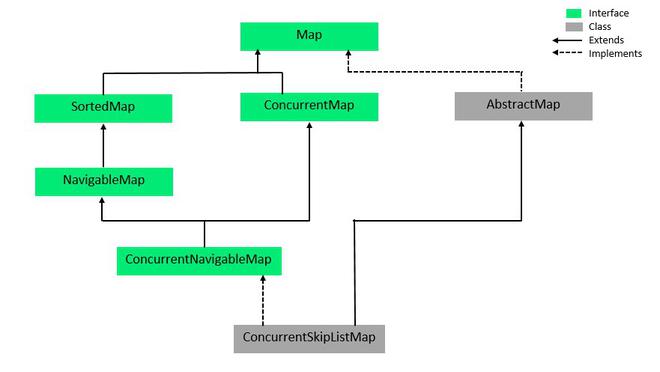
它实现了ConcurrentMap<K, V>,Map<K,V>,NavigableMap<K,V>,SortedMap<K,V>接口。 ConcurrentSkipListMap 实现了ConcurrentNavigableMap。
示例:
//Java程序演示
//ConcurrentNavigableMap接口

import java.util.concurrent.ConcurrentNavigableMap;
import java.util.concurrent.ConcurrentSkipListMap;

public class GFG {

    public static void main(String[] args)
    {

        //实例化一个对象
        //由于ConcurrentNavigableMap是一个接口,所以我们使用ConcurrentSkipListMap
        ConcurrentNavigableMap<Integer, String> cnmap
            = new ConcurrentSkipListMap<Integer, String>();

        //使用put()方法添加元素
        cnmap.put(1, "First");
        cnmap.put(2, "Second");
        cnmap.put(3, "Third");
        cnmap.put(4, "Fourth");

        //将内容打印在控制台上
        System.out.println(
            "Mappings of ConcurrentNavigableMap : "
            + cnmap);

        System.out.println("HeadMap(3): "
                                   + cnmap.headMap(3));
        System.out.println("TailMap(3): "
                                   + cnmap.tailMap(3));
        System.out.println("SubMap(1, 3): "
                                   + cnmap.subMap(1, 3));
    }
}
输出:
Mappings of ConcurrentNavigableMap: {1=First, 2=Second, 3=Third, 4=Fourth}
HeadMap(3): {1=First, 2=Second}
TailMap(3): {3=Third, 4=Fourth}
SubMap(1, 3): {1=First, 2=Second}
实现类
ConcurrentNavigableMap有一个实现类,即ConcurrentSkipListMap类。 ConcurrentSkipListMap是ConcurrentNavigableMap接口的可扩展实现。 ConcurrentSkipListMap中的键按照自然顺序或在构建对象时使用比较器进行排序。ConcurrentSkipListMap的预计时间成本为 log(n) ,用于插入,删除和搜索操作。 它是一个线程安全的类,因此,所有基本操作都可以同时完成。
语法:
ConcurrentSkipListMap< ? , ? > objectName = new ConcurrentSkipListMap<?, ?>();
例如: 在下面给出的代码中,我们只是实例化了一个名为cslmap的ConcurrentSkipListMap类的对象。 使用put()方法添加元素,使用remove()删除元素。 对于remove()方法,语法是 objectname.remove(Object key) 。 keySet()显示地图中的所有键(在上面的方法表中描述)。
// Java程序演示ConcurrentSkipListMap的用法
import java.util.concurrent.*;

public class ConcurrentSkipListMapExample {

    public static void main(String[] args)
    {

        // 实例化ConcurrentSkipListMap对象cslmap
        ConcurrentSkipListMap<Integer, String> cslmap
            = new ConcurrentSkipListMap<Integer, String>();

        //使用put()方法添加元素
        cslmap.put(1, "Geeks");
        cslmap.put(2, "For");
        cslmap.put(3, "Geeks");

        // 在控制台上打印元素
        System.out.println(
            "The ConcurrentSkipListMap contains: "
            + cslmap);

        //使用keySet()方法打印元素的键
        System.out.println(
            "\nThe ConcurrentSkipListMap key set: "
            + cslmap.keySet());

        //使用remove()方法移除一个元素
        cslmap.remove(3);

        // 打印修改后的元素
        System.out.println(
            "\nThe ConcurrentSkipListMap contains: "
            + cslmap);
    }
}
输出:
The ConcurrentSkipListMap contains: {1=Geeks, 2=For, 3=Geeks}

The ConcurrentSkipListMap key set: [1, 2, 3]

The ConcurrentSkipListMap contains: {1=Geeks, 2=For}
ConcurrentNavigableMap的基本操作
1. 添加元素
要将元素添加到ConcurrentNavigableMap中,我们可以使用Map接口中的任何方法。下面的代码演示了如何使用它们。在代码中可以看出,在构造时没有提供比较器时,会按照自然顺序排序。
// Java程序演示向ConcurrentNavigableMap中添加元素
import java.util.concurrent.*;

public class AddingElementsExample {

    public static void main(String[] args)
    {

        // 实例化ConcurrentNavigableMap对象cnmap,由于ConcurrentNavigableMap 是一个接口
        // 因此我们使用ConcurrentSkipListMap
        ConcurrentNavigableMap<Integer, String> cnmap
            = new ConcurrentSkipListMap<Integer, String>();

        //使用put()方法添加元素
        cnmap.put(8, "Third");
        cnmap.put(6, "Second");
        cnmap.put(3, "First");

        // 打印元素内容
        System.out.println(
            "Mappings of ConcurrentNavigableMap : "
            + cnmap);
    }
}
输出:
Mappings of ConcurrentNavigableMap : {3=First, 6=Second, 8=Third}
2. 移除元素
要移除元素,我们同样使用Map接口中的方法,因为ConcurrentNavigableMap是Map的子类。
// Java Program for deleting
// elements from ConcurrentNavigableMap

import java.util.concurrent.*;

public class RemovingElementsExample {

    public static void main(String[] args)
    {

        // Instantiate an object
        // Since ConcurrentNavigableMap
        // is an interface
        // We use ConcurrentSkipListMap
        ConcurrentNavigableMap<Integer, String> cnmap
            = new ConcurrentSkipListMap<Integer, String>();

        // Add elements using put()
        cnmap.put(8, "Third");
        cnmap.put(6, "Second");
        cnmap.put(3, "First");
        cnmap.put(11, "Fourth");

        // Print the contents on the console
        System.out.println(
            "Mappings of ConcurrentNavigableMap : "
            + cnmap);

        // Remove elements using remove()
        cnmap.remove(6);
        cnmap.remove(8);

        // Print the contents on the console
        System.out.println(
            "\nConcurrentNavigableMap, after remove operation : "
            + cnmap);

        // Clear the entire map using clear()
        cnmap.clear();
        System.out.println(
            "\nConcurrentNavigableMap, after clear operation : "
            + cnmap);
    }
}
输出:
Mappings of ConcurrentNavigableMap : {3=First, 6=Second, 8=Third, 11=Fourth}

ConcurrentNavigableMap, after remove operation : {3=First, 11=Fourth}

ConcurrentNavigableMap, after clear operation : {}
3. 访问元素
我们可以使用get()方法来访问ConcurrentNavigableMap的元素,下面给出一个示例。
// Java Program for accessing
// elements in a ConcurrentNavigableMap

import java.util.concurrent.*;

public class AccessingElementsExample {

    public static void main(String[] args)
    {
        // Instantiate an object
        // Since ConcurrentNavigableMap is an interface
        // We use ConcurrentSkipListMap
        ConcurrentNavigableMap<Integer, String> cnmap
            = new ConcurrentSkipListMap<Integer, String>();

        // Add elements using put()
        cnmap.put(8, "Third");
        cnmap.put(6, "Second");
        cnmap.put(3, "First");
        cnmap.put(11, "Fourth");

        // Accessing the elements using get()
        // with key as a parameter
        System.out.println(cnmap.get(3));
        System.out.println(cnmap.get(6));
        System.out.println(cnmap.get(8));
        System.out.println(cnmap.get(11));

        // Display the set of keys using keySet()
        System.out.println(
            "\nThe ConcurrentNavigableMap key set: "
            + cnmap.keySet());
    }
}
输出:
First
Second
Third
Fourth

The ConcurrentNavigableMap key set: [3, 6, 8, 11]
4. 遍历
我们可以使用Iterator接口遍历Collection Framework中的任何结构。由于Iterators只能处理一种类型的数据,因此我们使用.Entry< ? , ? >将两个不同类型的数据解析为兼容的格式。然后使用next()方法打印ConcurrentNavigableMap的元素。
// Java程序用于遍历ConcurrentNavigableMap

import java.util.concurrent.*;
import java.util.*;

public class TraversalExample {

    public static void main(String[] args)
    {

        // 实例化一个对象
        // 因为ConcurrentNavigableMap是接口
        // 我们使用ConcurrentSkipListMap
        ConcurrentNavigableMap<Integer, String> cnmap
            = new ConcurrentSkipListMap<Integer, String>();

        // 使用put()添加元素
        cnmap.put(8, "第三");
        cnmap.put(6, "第二");
        cnmap.put(3, "第一");
        cnmap.put(11, "第四");

        // 在ConcurrentNavigableMap上创建一个迭代器
        Iterator<ConcurrentNavigableMap
                     .Entry<Integer, String> > itr
            = cnmap.entrySet().iterator();

        // hasNext()方法用于检查是否有下一个元素
        // next()方法用于检索下一个元素
        while (itr.hasNext()) {
            ConcurrentNavigableMap
                .Entry<Integer, String> entry
                = itr.next();
            System.out.println("键= " + entry.getKey()
                               + ", 值= " + entry.getValue());
        }
    }
}
输出:
键= 3, 值= 第一
键= 6, 值= 第二
键= 8, 值= 第三
键= 11, 值= 第四
注意: 每次我们说“ConcurrentNavigableMap的元素”时,必须注意这些元素实际上存储在ConcurrentNavigableMap的实现类对象中,即在此例中的ConcurrentSkipListMap中。
ConcurrentNavigableMap的方法
ConcurrentNavigableMap继承了Map接口、SortedMap接口、ConcurrentMap接口、NavigableMap接口的方法。添加元素、删除元素和遍历的基本方法由父接口给出。ConcurrentNavigableMap的方法如下表所示。其中,
- K – 映射在Map中的键的类型。
- V – 映射在Map中的值的类型。
| 方法 | 描述 |
|---|---|
| descendingKeySet() | 返回一个包含映射中的键的倒序 NavigableSet 视图。 |
| descendingMap() | 返回一个倒序视图,包含映射中的映射。 |
| headMap(K toKey) | 返回包含键小于 toKey 的部分的视图。 |
| headMap(K toKey, boolean inclusive) | 返回包含键小于 toKey 的部分的视图,并且如果 inclusive 为 true,则包含 toKey。 |
| keySet() | 返回此映射所包含的键的 NavigableSet 视图。 |
| navigableKeySet() | 返回此映射所包含的键的 NavigableSet 视图。 |
| subMap(K fromKey, boolean fromInclusive, K toKey, boolean toInclusive) | 返回键范围从 fromKey 到 toKey 的部分视图。 |
| subMap(K fromKey, K toKey) | 返回键范围从 fromKey(包括)到 toKey(不包括)的部分视图。 |
| tailMap(K fromKey) | 返回一个包含键大于 fromKey 的视图。 |
| tailMap(K fromKey, boolean inclusive) | 返回一个包含键大于 fromKey 的视图,并且如果 inclusive 为 true,则包含 fromKey。 |
在接口 java.util.concurrent.ConcurrentMap 中声明的方法
| 方法名称 | 描述 |
|---|---|
| compute(K key, BiFunction<? super K, ? super V,? extends V> remappingFunction) | 尝试计算指定键的映射及其当前映射值(如果没有则为 null)。 |
| computeIfAbsent(K key, Function<? super K, ? extends V> mappingFunction) | 如果指定键尚未与值关联(或映射到 null),则使用指定的映射函数计算其值,并将该值插入到该映射中,除非为 null。 |
| computeIfPresent(K key, BiFunction<? super K,? super V,? extends V> remappingFunction) | 如果指定键的值存在且非空,则尝试计算给定键和其当前映射值的新映射。 |
| forEach(BiConsumer<? super K,? super V> action) | 对此映射中的每个条目执行给定的操作,直到处理完所有条目或操作引发异常为止。 |
| getOrDefault(Object key, V defaultValue) | 如果该Map包含该键的映射,则返回该键映射的值,否则返回defaultValue。 |
| merge(K key, V value, BiFunction<? super V ,? super V,? extends V> remappingFunction) | 如果指定键尚未与值关联或与 null 关联,则将其与给定的非 null 值关联。 |
| putIfAbsent(K key, V value) | 如果指定键尚未与值关联,则将其与给定值关联。 |
| remove(Object key, Object value) | 仅在为键映射到给定值时才删除键的条目。 |
| replace(K key, V value) | 仅当某个键目前映射到某个值时,才替换该键的条目。 |
| replace(K key, V oldValue, V newValue) | 仅在为键映射到给定值时才替换键的条目。 |
| replaceAll(BiFunction<? super K,? super V ,? extends V> function) | 将每个条目的值替换为在该条目上调用给定功能的结果,直到处理完所有条目或函数引发异常为止。 |
interface java.util.Map 声明的方法
| 方法 | 描述 |
|---|---|
| clear() | 从此映射中删除所有映射(可选操作)。 |
| containsKey(Object key) | 如果此映射包含指定键的映射,则返回 true。 |
| containsValue(Object value) | 如果此映射将一个或多个键映射到指定值,则返回 true。 |
| equals(Object o) | 将指定的对象与此映射进行比较以实现相等。 |
| get(Object key) | 返回指定键所映射的值,如果此映射不包含该键的映射,则返回 null。 |
| hashCode() | 返回此映射的哈希码值。 |
| isEmpty() | 如果此映射未包含键-值映射,则返回 true。 |
| put(K key, V value) | 在此映射中关联指定值与指定键(可选操作)。 |
| putAll(Map<? extends K,? extends V> m) | 将指定映射中的所有映射复制到此映射中(可选操作)。 |
| remove(Object key) | 如果存在(可选操作),则从此映射中删除键的映射。 |
| size() | 返回此映射中的键-值映射数。 |
声明在接口 java.util.NavigableMap 中的方法
| 方法 | 描述 |
|---|---|
| ceilingEntry(K key) | 返回与大于等于给定键的最小键相关联的键值映射;如果没有这样的键,则返回null。 |
| ceilingKey(K key) | 返回大于等于给定键的最小键;如果没有这样的键,则返回null。 |
| firstEntry() | 返回此映射中最小键相关联的键值映射;如果映射为空,则返回null。 |
| floorEntry(K key) | 返回与小于等于给定键的最大键相关联的键值映射,如果没有这样的键,则返回null。 |
| floorKey(K key) | 返回小于等于给定键的最大键;如果没有这样的键,则返回null。 |
| higherEntry(K key) | 返回与严格大于给定键的最小键相关联的键值映射;如果没有这样的键,则返回null。 |
| higherKey(K key) | 返回严格大于给定键的最小键;如果没有这样的键,则返回null。 |
| lastEntry() | 返回此映射中最大键相关联的键值映射;如果映射为空,则返回null。 |
| lowerEntry(K key) | 返回与严格小于给定键的最大键相关联的键值映射;如果没有这样的键,则返回null。 |
| lowerKey(K key) | 返回严格小于给定键的最大键;如果没有这样的键,则返回null。 |
| pollFirstEntry() | 从此映射中删除并返回最小键相关联的键值映射;如果映射为空,则返回null。 |
| pollLastEntry() | 从此映射中删除并返回最大键相关联的键值映射;如果映射为空,则返回null。 |
在java.util.SortedMap接口中声明的方法
| 方法 | 描述 |
|---|---|
| comparator() | 返回用于对此映射中的键进行排序的比较器;如果此映射使用其键的自然顺序,则返回null。 |
| entrySet() | 返回此映射中包含的映射的Set视图。 |
| firstKey() | 返回此映射中当前最小的键。 |
| lastKey() | 返回此映射中当前最大的键。 |
| values() | 返回此映射中包含的值的Collection视图。 |